Image Sources
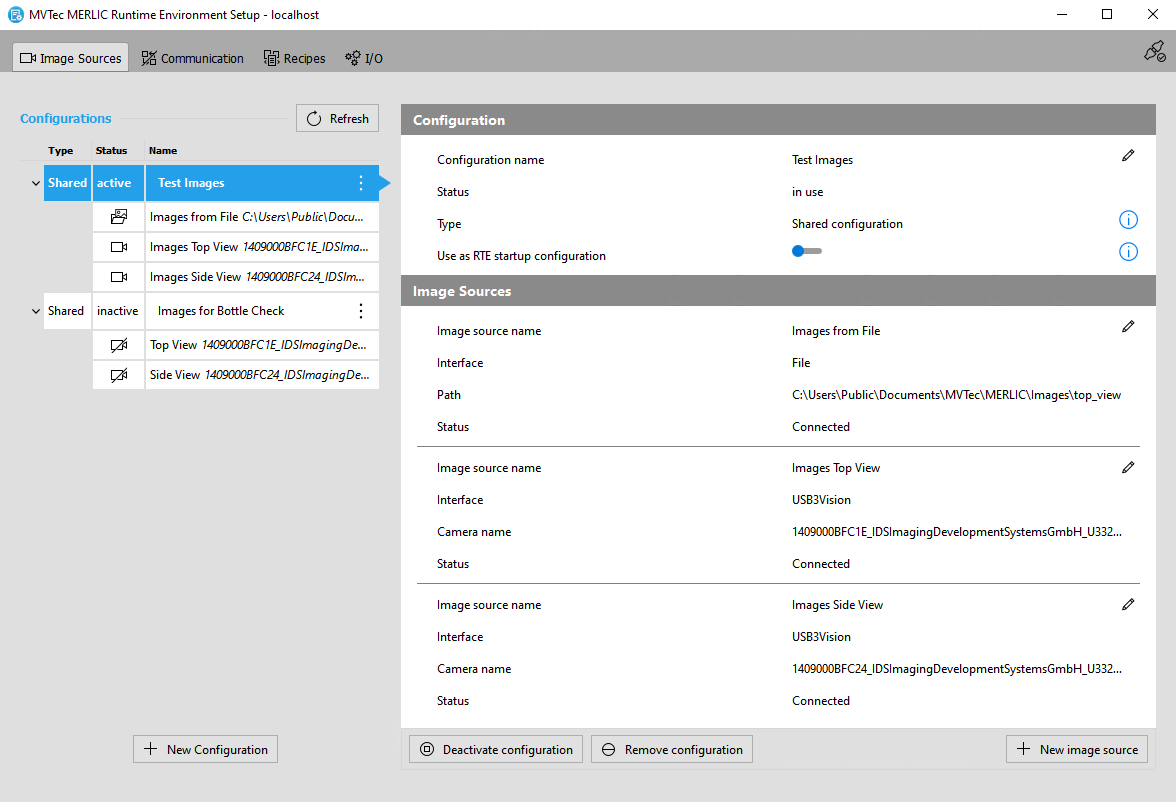
The " Image Sources" tab of the MERLIC RTE Setup represents the graphical user interface for the configuration of image sources for the image acquisition via the Image Source Manager. It allows you to configure image sources independently from a MERLIC Vision App. You can set up different types of image sources such as camera devices, image directories, or peripheral devices, for example, lighting controllers. When using the Image Source Manager for the image acquisition, you have to assign each image source to a specific image source configuration An image source configuration represents a set of image sources of the Image Source Manager. Each image source must be assigned to a specific configuration. It is not possible to add an image source without a configuration. Therefore, you first have to add a configuration for a new image source in the "Image Sources" tab of the MERLIC RTE Setup or you have to add the image source to an existing configuration.
There are different types of configurations: shared configurations and MVApp-specific configurations. The state of a configuration determines if the respective image sources can be adjusted and used in an MVApp., that is, to a set of image sources.
Image Sources" tab of the MERLIC RTE Setup represents the graphical user interface for the configuration of image sources for the image acquisition via the Image Source Manager. It allows you to configure image sources independently from a MERLIC Vision App. You can set up different types of image sources such as camera devices, image directories, or peripheral devices, for example, lighting controllers. When using the Image Source Manager for the image acquisition, you have to assign each image source to a specific image source configuration An image source configuration represents a set of image sources of the Image Source Manager. Each image source must be assigned to a specific configuration. It is not possible to add an image source without a configuration. Therefore, you first have to add a configuration for a new image source in the "Image Sources" tab of the MERLIC RTE Setup or you have to add the image source to an existing configuration.
There are different types of configurations: shared configurations and MVApp-specific configurations. The state of a configuration determines if the respective image sources can be adjusted and used in an MVApp., that is, to a set of image sources.
In the " Image Sources" tab, you can get an overview of the available image source configurations, get information about the type and status of the configuration to which the image sources are assigned to, and you can check the status and the settings of the individual image sources. It also provides an image preview with a live mode that enables you to immediately check the effects of your changes.
You can also connect to the "Image Sources" tab on a remote system to configure image sources on the remote system. This facilitates the deployment of an MVApp from the development system to the final system for productive use.
Requirements
The configuration options in the "Image Sources" tab are only available if one of the following conditions is met. Otherwise, no image source can be configured because no service for the image source configuration is available.
- MERLIC Creator is currently running on the system that is connected.
- MERLIC RTE is currently running on the system that is connected and MERLIC is in one of the following states: "Preoperational", "Initialized", or "Error" (in certain circumstances).
For example, if you want to configure image source on your local system, either MERLIC Creator or MERLIC RTE must be running on your local system. However, in case MERLIC RTE is running, you also have to make sure that MERLIC is in a state that allows the configuration. For more information, see the topic Configuring Image Sources During Process Integration.
Get More Information
For more detailed information on the Image Source Manager and how to add and configure image source, refer to the following topics in the chapter Image Acquisition in MERLIC.
Adding New Configurations and Image Sources
Get information about the different types of configurations. Also learn how to get an overview of the image sources, and how to add new configurations and image sources for the image acquisition via the Image Source Manager.
Learn how to activate an image source configuration, how to check the status of the image source, and how to configure an image source in the "Image Sources" tab.