Checking the MERLIC State (Digital I/O)
While working with the process integration MERLIC can be used in machine vision systems that are integrated in a manufacturing machine. The machine controller, e.g., a programmable logic controller (PLC), must be able to control an integrated vision system, to monitor the execution, and to query the results. Therefore, MERLIC provides a process integration mode to enable the communication with a machine controller. The process integration mode can be started with the application "MERLIC RTE" that is provided with the MERLIC installation. mode of MERLIC, you might want to check the current state of MERLIC to trigger the signals at the correct time, e.g., to start a new iteration after MERLIC finished a single execution.
Available MERLIC States
If you are using a digital I/O device or a camera device with GenICam compliant digital I/O channels for the process integration, only a limited set of MERLIC states and commands can be transmitted and used, respectively.
The graphic below shows the overview of all internal states of MERLIC and its transitions when using MERLIC process integration with digital I/O devices. All MERLIC states that are available are highlighted in blue. Currently, only the states "Ready" and "Error" can be transmitted. All other MERLIC states that are not available for digital I/O devices are grayed out. The same applies for transitions. All transitions and commands that are not available are grayed out in the graphic. Transitions that are displayed in orange represent transitions that are triggered automatically by MERLIC due to internal conditions.

The information if a state is active can be obtained from the respective signals that are transmitted via the digital output channels.
|
MERLIC Signal |
MERLIC State |
Description |
|---|---|---|
|
Ready |
Ready |
The corresponding digital output channel indicates if MERLIC is ready for the execution. In case of a digital I/O device, it also indicates if MERLIC is ready for a recipe change. |
|
Error |
Error |
The corresponding digital output channel indicates if MERLIC is in the state Error. |
Checking the Configuration for the Signals of the States
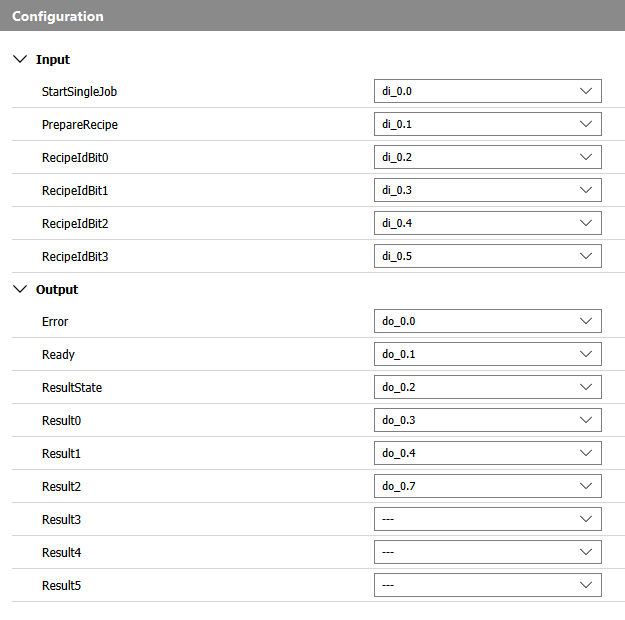
To check the current MERLIC state, you need to know how your device is configured in the "I/O" tab of the MERLIC RTE Setup. To be precise, you have to look up in the device configuration tab which output channel is selected for the respective signal of the MERLIC state. With this knowledge, you can recognize, if a signal for a specific state is activated.
- Open the MERLIC RTE Setup.
- Go to the list of digital outputs in the device configuration tab.
- Check the selected value for the key "Ready". This value represents the output channel for the "Ready" state of MERLIC.
- Check the selected value for the key "Error". This value represents the output channel for the "Error" state of MERLIC.
Checking the Current MERLIC State
If you know which output channels represent the signals for the MERLIC states, you can check if one of these digital outputs is currently active at your device, e.g., if the respective pins are connected to LEDs or lamps, you can easily monitor if the light is switched on. If you are not sure, which digital output channels represent the MERLIC states, you can look up the configuration in the "I/O" tab of the MERLIC RTE Setup as described in the section above.
|
Signal |
Description |
|---|---|
|
Ready |
If this signal is "true", MERLIC is in the state "Ready". The mapped digital output is set accordingly. |
|
Error |
If this signal is "true", MERLIC is in the state "Error". The mapped digital output is set accordingly. |