How to Activate a MERLIC License
All MERLIC packages except the trial version of MERLIC require a license dongle with an activated MERLIC license. If you have ordered a license for a MERLIC package, you will receive the dongle and an activation ticket for the license activation from your local distributor. If you have not received an activation ticket, please contact your local distributor in any case.
MERLIC licenses are always issued for a major version, e.g., for MERLIC 5. They are not bound to any computer hardware. Thus you can use the dongle on any computer with an installed MERLIC. It is not possible to use any dongle as license dongle for MERLIC. Only those supplied by MVTec via your local distributor can be used. Currently, MERLIC supports USB dongles.
A license dongle for MERLIC can contain only one license. However, you may run two MERLIC instances with one license, and there is no license required to use the MERLIC RTE Setup. If you want to use MERLIC on multiple computers simultaneously, you need a license dongle for each of them. However, you have to activate your license to use MERLIC as described below.
The activation of the license requires that MERLIC is already installed on your computer. Please make sure that MERLIC is already installed before proceeding with the license activation as described below. If you encounter any problems with the license activation, see the topic Troubleshooting for License Activation for more information.
Activating a License for a MERLIC Package
The MERLIC license can be activated with only a few clicks:
- Plug in the license dongle to your computer and open the MVTec License WebDepot in an internet browser.

- Enter your activation ticket and click "Next" to see the license which is connected to your ticket. If more than one license is connected to your ticket, a list of these licenses and their number is displayed. Click on "Activate Licenses" to continue.
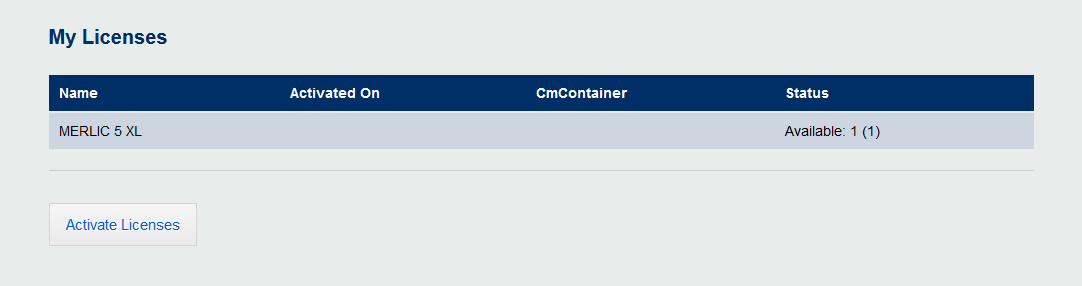
- Select your license you want to activate.

- Please make sure the correct dongle is selected. Usually, the automatic selection is correct.
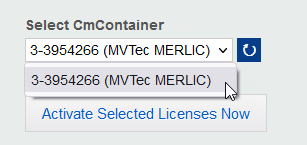
If your activation was successful, the license of your MERLIC installation will be activated and you can immediately start using MERLIC with the functionality of the respective MERLIC package.
Make sure that your anti virus protection does not interfere with your license.
Activating a MERLIC Add-On
If you purchased an additional add-on for your MERLIC package, you also have to activate the license for the add-on. Your local distributor will send you an activation ticket for the license after the purchase.
The activation of the license is the same as the activation of a MERLIC package with the difference that you have to select the add-on instead of the MERLIC package.