Adding a Plug-in Instance
The " Communication" tab of the MERLIC RTE Setup enables you to check which Communicator plug-ins are currently available on the connected system. You can add new instances of the plug-ins to the MERLIC RTE Setup, check the current configuration of the plug-in instance, and adjust the configuration for the process integration MERLIC can be used in machine vision systems that are integrated in a manufacturing machine. The machine controller, e.g., a programmable logic controller (PLC), must be able to control an integrated vision system, to monitor the execution, and to query the results. Therefore, MERLIC provides a process integration mode to enable the communication with a machine controller.
The process integration mode can be started with the application "MERLIC RTE" that is provided with the MERLIC installation.. If you are finished with your configuration, you can save the changes and start the plug-in directly in the MERLIC RTE Setup. For more information about how to change the configuration and how to start the plug-in, see the topics Configuring Communicator Plug-ins and Starting and Stopping Communicator Plug-ins
Communication" tab of the MERLIC RTE Setup enables you to check which Communicator plug-ins are currently available on the connected system. You can add new instances of the plug-ins to the MERLIC RTE Setup, check the current configuration of the plug-in instance, and adjust the configuration for the process integration MERLIC can be used in machine vision systems that are integrated in a manufacturing machine. The machine controller, e.g., a programmable logic controller (PLC), must be able to control an integrated vision system, to monitor the execution, and to query the results. Therefore, MERLIC provides a process integration mode to enable the communication with a machine controller.
The process integration mode can be started with the application "MERLIC RTE" that is provided with the MERLIC installation.. If you are finished with your configuration, you can save the changes and start the plug-in directly in the MERLIC RTE Setup. For more information about how to change the configuration and how to start the plug-in, see the topics Configuring Communicator Plug-ins and Starting and Stopping Communicator Plug-ins
Adding a New Instance of a Communicator Plug-in
- Open the "Communication" tab in the MERLIC RTE Setup.
- Click on the button "Add plug-in instance" to get the list of all Communicator plug-ins that are currently available for the process integration.
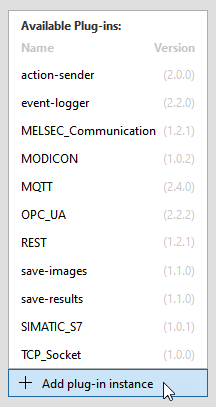
- Select the desired plug-in to add a new instance of the plug-in for the configuration. The plug-in instance is now shown in the list on the top left side.

- The current configuration of the respective plug-in instance is shown on the right side of the "Communication" tab. The parameters of the respective plug-in will be loaded with its default values. For more information about the configuration of a plug-in instance, see the topic Configuring Communicator Plug-ins.

List of Plug-in Instances
Each plug-in instance is shown with its execution status, ID, and name. The name represents the name of the Communicator plug-in. If you add multiple instance of a plug-in, all instances of this plug-in will show the same name. However, the IDs of the plug-in instances are unique.
The status of a plug-in instance is indicated by an icon:
|
Icon |
Description |
|---|---|
|
|
This icon indicates that the instance of the Communicator plug-in is currently running. |
|
|
This icon indicates that the instance of the Communicator plug-in is currently not running. |


Removing a Plug-in Instance
If you want to remove a plug-in instance, you first have to stop the execution of the plug-in. Afterward, you can remove the plug-in instance in two different ways:
- Click on the menu icon
 of the respective plug-in instance on the left and select "
 Remove".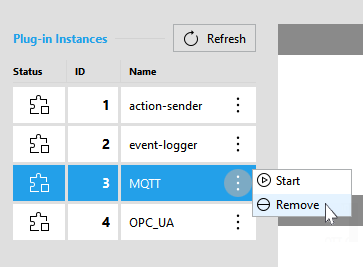
- Select the respective plug-in instance on the left and click on the button " Remove plug-in" on the bottom of the MERLIC RTE Setup.
All changes to the parameters of the plug-in instance will be lost if it is removed from the MERLIC RTE Setup. If a new instance of the plug-in is added, the configuration is loaded with the default values of the parameters.