Procedures for the Visualization
The following sections describe the provided interface procedures for the visualization in MERLIC as well as the available color settings.
Procedures
Visualization of Regions of Interest (ROIs)
The visualization of ROIs can be set with the interface procedures Me_set_active_roi_color and Me_set_inactive_roi_color. For more information, see the description of these procedures in the topic Procedures for Regions of Interest (ROIs).
Visualization of Graphical Objects
 Me_set_drawing
This procedure can be used to select whether a graphic object should be visualized. It may be useful to disable the visualization of an object to save processing time or to avoid the visualization of unimportant information.
Me_set_drawing ( : : ToolHandle, Parameter, Show : )Parameters
The procedure contains the following input parameters:
|
Input parameter |
Description |
|---|---|
|
ToolHandle |
The ID of the tool. |
|
Parameter |
The name of the iconic parameter whose visibility is to be set. |
|
Show |
The binary value that indicates whether the object is shown. If it is set to 1, the object is visualized, otherwise not. |
Example Use Cases
In some cases it might be useful to prevent the visualization of iconic content:
- Saving processing time
As a default MERLIC visualizes the iconic result in the graphics window. However, the iconic input, i.e., the input image, is also visualized even though only the manipulated result is visible for the user. Therefore, processing time can be saved if the iconic input parameter, e.g., the image, is set to "0" .
- Avoiding the visualization of unimportant or confusing information
In some cases the visualization of iconic data may be either unimportant or confusing for the user. An example would be that only a part of the image that was selected with an ROI, is used for the processing. The rest of the image is not important. Therefore it may be confusing to see the whole image in the background of the selected image part since it is not considered for the processing. Setting the visualization of this parameter to "0", allows you to just display the result without visualizing the input image.
Me_set_drawing_color
This procedure can be used to set the color for drawing a graphic object, for example, a contour. The color can be defined as a MERLIC color name, HALCON color name, or in hexadecimal values.
Me_set_drawing_color ( : : ToolHandle, Parameter, Color : )Parameters
The procedure contains the following input parameters:
|
Input parameter |
Description |
|---|---|
|
ToolHandle |
The ID of the tool. |
|
Parameter |
The name of the iconic parameter whose drawing color is to be set. |
|
Color |
The color to be set. |
Read the section MERLIC Default Colors below to get more information about the available color setting in the MERLIC preferences.
Visualization of Text
Me_set_tposition
This procedure can be used to set the position of a displayed text in the graphic window of a tool. It must be called before the interface procedure Me_write_string to define the position at which the text is drawn.
Me_set_tposition ( : : ToolHandle, Row, Col : )Parameters
The procedure contains the following input parameters:
|
Input parameter |
Description |
|---|---|
|
ToolHandle |
The ID of the tool. |
|
Row |
The row coordinate of the text position. |
|
Col |
The column coordinate of the text position. |
Me_write_string
This procedure can be used to write text into the graphic window of a tool. The position of the text must be defined previously with the interface procedure Me_set_tposition.
Me_write_string ( : : ToolHandle, Text : )Parameters
The procedure contains the following input parameters:
|
Input parameter |
Description |
|---|---|
|
ToolHandle |
The ID of the tool. |
|
Text |
The text to be written in the graphic window at the predefined position. |
Visualization of Tool Parameters
Me_set_parameter_disabled
This procedure can be used to disable a parameter of a tool in the Tool Board. The parameter will be grayed out and the user will not be able to adjust the value directly at the respective connector. However, it will still be possible to connect the parameter to the result of a previous tool and thus to transmit a value to the parameter via the connection.
Me_set_parameter_disabled ( : : ToolHandle, Parameter, GrayOut : )Parameters
The procedure contains the following input parameters:
|
Input parameter |
Description |
|---|---|
|
ToolHandle |
The ID of the tool. |
|
Parameter |
The name of the parameter to be grayed out. |
|
GrayOut |
The Boolean value that indicates whether the parameter should be grayed out. |
Color Settings
MERLIC Default Colors
MERLIC allows you to set default colors for various objects and text in the MERLIC Preferences dialog of the MERLIC Creator under "Edit → Preferences". The tab "Colors" allows you to change various default colors for the visualization in the graphics window.
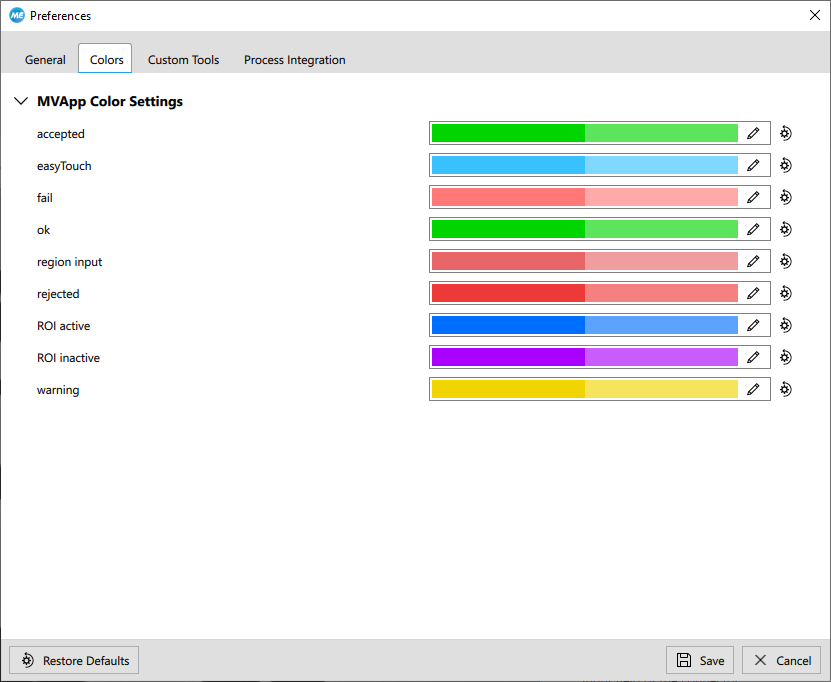
The following table gives more information about the objects and texts that can be set. It also describes the respective names in the MERLIC preferences as well as the corresponding parameter name that can be used when setting the color using the interface procedure Me_set_drawing_color.
|
Name in MERLIC preferences |
Parameter name |
Description |
|---|---|---|
|
accepted |
accepted |
Color of the accepted result regions and contours, e.g., "Accepted Regions" of the tool "Evaluate Regions". |
|
easyTouch |
easy_touch |
Color of the easyTouch preview. |
|
fail |
fail |
Color of code candidates in a code reading tool for which the decoding failed. |
|
ok |
ok |
Color of codes whose candidate has been found and successfully decoded with a code reading tool. |
|
region input |
region_input |
Color of input regions and the border of input regions. |
|
rejected |
rejected |
Color of the rejected result regions or contours, e.g., "Rejected Regions" of the tool "Evaluate Regions". |
|
ROI active |
roi_active |
Color of active ROIs within the graphic window of the tool. |
|
ROI inactive |
roi_inactive |
Color of inactive ROIs within the graphic window of the tool. |
|
warning |
warning |
Color of the texts that are returned within the image in case of a warning, e.g., the feature that is selected with easyTouch+ has a different property than the previously selected features. |
Direct Color Encoding with HALCON
When creating a MERLIC tool, you can optionally use the direct color encoding of HALCON. This may be interesting if you need colors that are not available as default colors in the MERLIC preferences.
Example:
- #003075
- #e53019
- #ffb529

Examples
Handling the Display Color in HDevelop
The following example shows how the display color can be handled in MERLIC and HDevelop.
The first image shows how the colors can set using the interface procedure Me_set_drawing_color . The colors are specified only for the object that is contained in the parameter "FinalRegion". By using the values "rejected" and "accepted", the colors are set to the predefined colors that are set in the MERLIC preference.
The colors are defined as "rejected" and "accepted" which refer to the default MERLIC colors that are set in the MERLIC preferences dialog. Thus, if the condition in the if clause is true, the object in "FinalRegion" will be displayed in the color that is set in the MERLIC preferences for rejected objects, otherwise the predefined MERLIC color for accepted objects will be used. This way, the colors are visualized according to the preferences of the user.
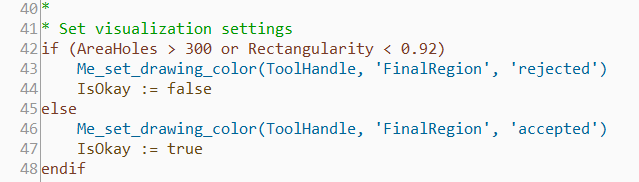
If you want to define a specific color independent of any predefined MERLIC colors, you can also define the color by its name or the respective hexadecimal value, e.g., Me_set_drawing_color(ToolHandle, 'FinalRegion', 'green') or Me_set_drawing_color(ToolHandle, 'FinalRegion', '#00FF00').
The image below shows how to set the color via the HALCON operator dev_set_color. In contrast to the interface procedure of MERLIC, the specified color is applied to all objects and not to a specific object.