MERLIC 5.7 comes with a lot of new and improved functionality. Here, you can find a quick overview of some of the most interesting changes. To see the list of all updates in this MERLIC version, please refer to the release notes.

Improvements for MERLIC Runtime Environment
This MERLIC version comes with an improved process integration mode to enhance usability and simplify managing communication plug-ins for MERLIC Runtime Environment (MERLIC RTE).
Configuration Services of MERLIC RTE
In contrast to previous MERLIC versions, it is no longer required to launch a dedicated "MERLIC Communicator" application to configure and execute communication plug-ins for MERLIC RTE. The respective services are now provided by the MERLIC RTE application which means that you just have to start MERLIC RTE to set up and control the execution of communication plug-ins via the "Communication" tab of the MERLIC RTE Setup. When the MERLIC RTE Setup is connected to a system on which MERLIC RTE is running (local or remote), both the "Image Sources" tab and the "Communication" tab will be available for configuration.
Simplified Configuration Setup and Logging
With the improved process integration mode, all configuration settings for MERLIC RTE and communication plug-ins can now be set in the same INI configuration file for MERLIC, for example, in the default "MERLIC5.ini". There is no need for a dedicated "Communicator.ini" file anymore.
In addition, the logging mechanism has been simplified. There are no separate log files for MERLIC RTE and communication plug-ins anymore. Instead, you can now find all log messages with respect to the process integration mode in the same log file.

Simplified Usage of Multiple MERLIC RTE Instances
With MERLIC 5.7, you can start two instances of MERLIC RTE at the same time without any manual configuration effort. MERLIC RTE will automatically choose free ports for the exchange of "commands" and "events" with communication plug-ins. It is no longer required to set fixed ports for each MERLIC RTE instance via INI configuration files or via command line options. However, you still have the possibility to define fixed ports if desired. MERLIC RTE will then try to use the defined ports.

Updated Documentation for MERLIC RTE
The MERLIC documentation has been adjusted to reflect the changes to the process integration mode. With MERLIC 5.7, the MERLIC Communicator manual that was provided in previous MERLIC versions is no longer necessary. The relevant information has been integrated into the MERLIC manual. In addition, the documentation of MERLIC RTE in general and other types of plug-ins for MERLIC RTE, such as for Hilscher cards, has been revised. The information on the process integration mode is therefore no longer spread over two manuals but can now be found in one manual.

MERLIC Frontend for Linux
With MERLIC 5.7, we now offer another component of MERLIC for Linux systems to enable more options for integrating your application to your desired system. In addition to MERLIC RTE, which was already available for Linux in previous versions, the MERLIC Frontend is now also available for Linux. This enables you to install and use the MERLIC Frontend directly on your Linux system. You can download the respective package from MVTec's download area: https://www.mvtec.com/downloads.
Example Dockerfiles for Enhanced Container Support
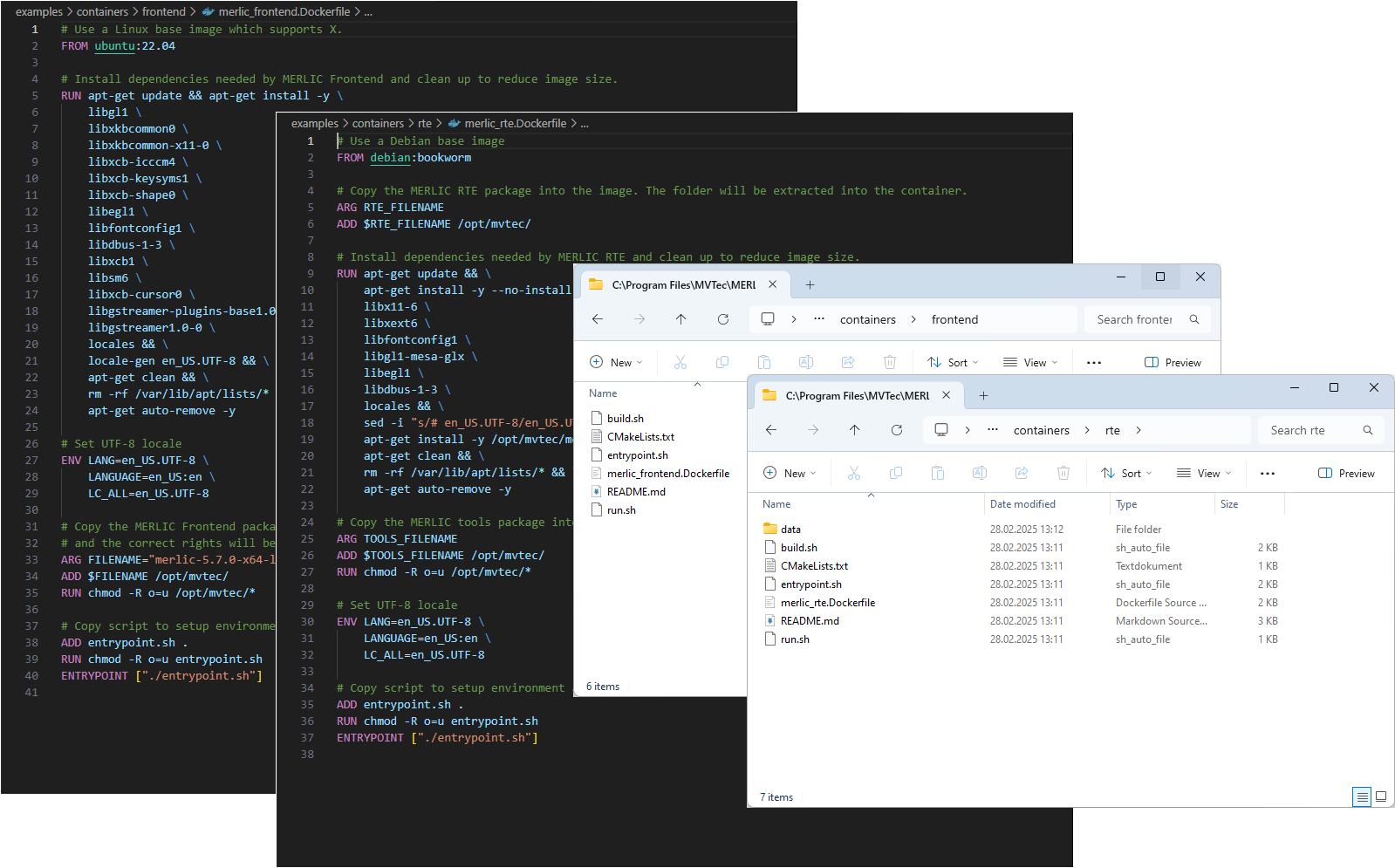
To facilitate setting up MERLIC for usage in a containerized environment, MERLIC now provides example Dockerfiles and scripts for building containers. You can use these Dockerfiles and the corresponding scripts as starting point to easily build and run containers tailored for the MERLIC Frontend and MERLIC RTE.
This offers more flexibility in how you deploy and manage MERLIC. By leveraging Dockerfiles, you can streamline the setup process and integrate the MERLIC Frontend and MERLIC RTE into your existing containerized workflows.
You can find the example Dockerfiles after the installation of MERLIC in the sub-directory "examples\containers" within the installation directory. It also contains a "Readme" file with a short description on how to use the Dockerfiles.

Adding Notes to MERLIC Tools
MERLIC Creator has been improved to support adding notes for MERLIC tools and tool groups within the MERLIC Vision App (MVApp). You can now add a description to any tool or tool group at the respective tool board. When saving the MVApp, the respective notes will also be saved. This allows you to add custom notes, for example, explaining the current parameter configuration of the tool. Existing tool notes can be visualized directly in the tool board or in the Tool Flow panel.
Classify Image - Support of Out-of-Distribution Detection
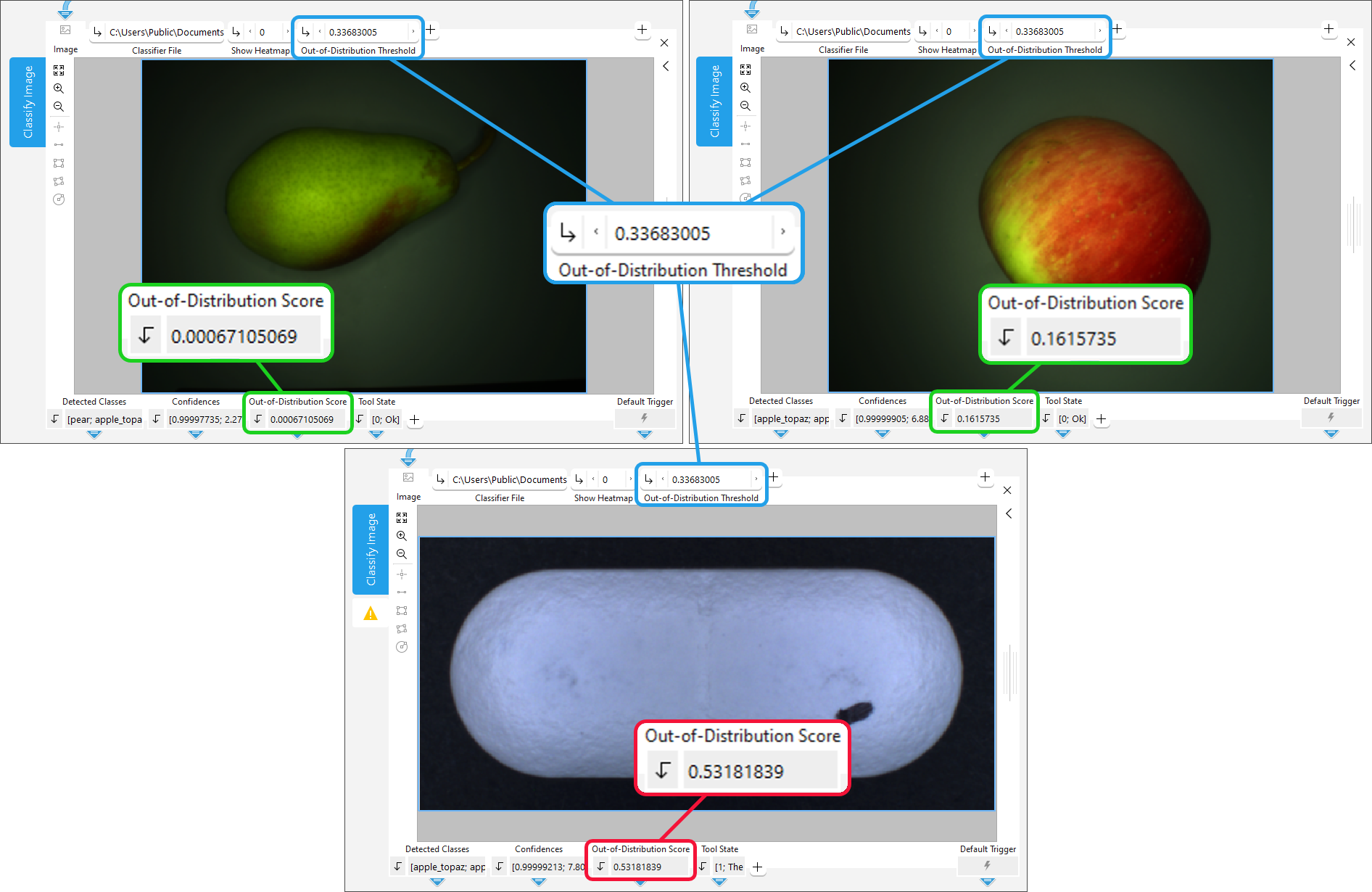
The MERLIC tool "Classify Image" now supports deep learning models for classification that have been extended for "Out-of-Distribution Detection" (OOD). This allows recognizing incorrect classification of objects or samples that differ significantly from the training data, for example, an object made of metal if the system was only trained on glass bottles.
For this, the "Classify Image" tool has been extended by the new tool parameter "Out-of-Distribution Threshold" and the new tool result "Out-of-Distribution Score". Both are provided as additional parameter and result, respectively, which are only available if the used classifier was extended for OOD. "Out-of-Distribution Score" indicates the degree of deviation from the trained class and "Out-of-Distribution Threshold" allows adjusting the threshold for identifying Out-of-Distribution samples.