Renaming Tools and Connectors
You can rename a MERLIC tool and the connectors Connectors are interactive elements, shaped like tabs, that let you adjust the name, value, and semantic type of tool parameters, training parameters, tool results and triggers. Connectors are located on the top left (tool parameters), on the top right (training parameters and / or input triggers), on the bottom left (tool results and / or branch trigger), and on the bottom right (output trigger) of the Tool Board. Connectors that are displayed by default are called "Basic Parameters" and "Basic Results". Connectors that can be added manually via the plus button are called "Additional Parameters" and "Additional Results". of its parameters and results in the respective tool board. Therefore, you first have to select the tool in the Tool Flow so that its tool board is shown in the Tool Workspace.
You can use almost all common types of characters for the names as long as it complies with the naming conventions.
Renaming Tools
- In the tool board, click on the tool name.
- Enter the new tool name into the respective text field. If you only enter a number, it will be appended to the end of the default name instead.
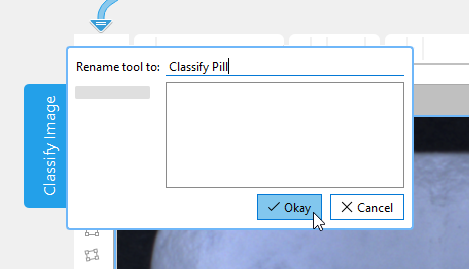
- Confirm your changes.
To ensure that the tool can be easily identified after the renaming, the default name will still be displayed in addition to the new name. Both names will be visible at the tool board and in the Tool Flow panel.
Renaming Connectors
- In the tool board, double-click on the name of the tool parameter or tool result.
- Enter the new name into the text field. If you only enter a number, it will be appended to the end of the default name instead.
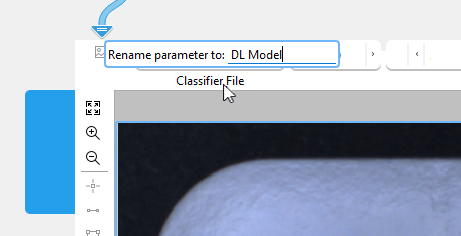
- Confirm your changes with Enter or by clicking outside the dialog.
After renaming, only the new name will be displayed at the tool board. However, when connecting the parameter or result in the MERLIC Creator or in the MERLIC Designer, the default name will also be displayed.
Alternatively, you can also check the tooltip of the respective tool parameter or result for detailed information on its name. Hover the mouse pointer over the name of the respective connector to display the tooltip. It will show the respective default name and the user given name.
Restoring the Default Name
To restore the default name of a tool, a tool parameter, or tool result, proceed as follows:
- In the tool board, click on the respective name.
- Remove the user given name in the text field.
- Confirm your changes.
Naming Conventions
In general, you can specify an arbitrary name for a tool and the respective connectors.
However, for the tools Branch on Condition and Evaluate Expression, some restrictions apply when renaming the connectors:
- The following characters are not allowed in the names of tool parameters and results:
Copy
][ ! " # $ % & ' ( ) * + , . / \ : ; < > = ? @ ^ ` { } | ~ -
- The names of the tool parameters and results may not start with the following characters:
- Double underscore, for example, "__Parameter"
- Digit, for example, "1_Parameter"
- Names that represent reserved identifiers, for example, operations in the expression, are not allowed as names for the tool parameters and results.
 List of reserved identifiers
abs acos and asin assign assign_at atan atan2 band bnot bor break bxor case catch ceil chr chrt comment continue cos cosh cumul default deg deviation else elseif endfor endif endswitch endtry endwhile environment exit exp export_def fabs false find floor fmod for gen_tuple_const global HNULL H_MSG_FAIL H_MSG_FALSE H_MSG_TRUE H_MSG_VOID H_TYPE_ANY H_TYPE_HANDLE H_TYPE_INT H_TYPE_MIXED H_TYPE_REAL H_TYPE_STRING if ifelse insert int inverse is_handle is_handle_elem is_int is_int_elem is_mixed is_number is_real is_real_elem is_string is_string_elem is_valid_handle ldexp log log10 lsh max max2 mean median min min2 not or ord ords par_join par_start pow rad rand real regexp_match regexp_replace regexp_select regexp_test remove repeat replace return round rsh select_mask select_rank sem_type sem_type_elem sgn sin sinh sort sort_index split sqrt stop strchr strlen strrchr strrstr strstr subset sum switch tan tanh throw true try type type_elem uniq until while xor