Setting the Default Language for the Frontend
MERLIC enables you to define a language in which the Frontend is opened by default. This language is called the default language of the Frontend. It applies to all Frontends, even if they are opened via a remote connection. The setting for the default language is independent from the current MERLIC Vision App, i.e., it is stored in the MERLIC settings.
How to Set the Default Language
- Click on the Designer menu entry "Localization" and select "Default Language" to display the list of available languages for the Frontend. The list contains all languages that have been selected for the Frontend via the menu entry "Localization → Select Languages...".
- Select the language you want to set as the default language for the Frontend.
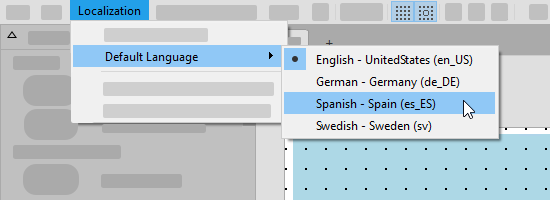
The Frontend will be opened with the selected default language. However, you still have the possibility to change the language directly in the Frontend. Please refer to the topic Changing the Language of the MERLIC Frontend to get more information about how to change the language in the Frontend.
MERLIC only provides some default translations for the standard MERLIC languages. Therefore, in most cases you still have to add the translations of the Frontend texts in a separate translation process. Please refer to the topic Translating the Frontend Texts for more detailed information.