Procedures for Regions of Interest (ROIs)
The following interface procedures can be used to define the support of ROIs as well as further functionality regarding ROIs.
An ROI parameter is organized as a tuple with type identifiers and values, containing multiple ROIs per tuple. These values can be considered as magic numbers that must not be accessed directly.
Procedures
ROI Support
 Me_add_roi_support_all
This procedure can be used to allow the use of all types of ROIs (circle, paraxial rectangle, rectangle, point, and segment) in a tool. All ROI buttons are activated at the tool board.
Me_add_roi_support_all ( : : SupportedRois : SupportedRois_Out )Parameters
The procedure contains the following input parameters:
|
Input parameter |
Description |
|---|---|
|
SupportedRois |
List of all ROI types to be supported in the tool. |
The procedure contains the following output parameter:
|
Output parameter |
Description |
|---|---|
|
SupportedRois_Out |
List of all ROI types that are supported in the tool. |
Me_add_roi_support_circle
This procedure can be used to allow the use of circular ROIs in a tool. It activates the button for the circular ROI at the tool board.
Me_add_roi_support_circle ( : : SupportedRois : SupportedRois_Out )Parameters
The procedure contains the following input parameters:
|
Input parameter |
Description |
|---|---|
|
SupportedRois |
List of currently supported ROI types. |
The procedure contains the following output parameter:
|
Output parameter |
Description |
|---|---|
|
SupportedRois_Out |
Extended list of supported ROI types containing the new type "circle". |
Me_add_roi_support_paraxial_rect
This procedure can be used to allow the use of paraxial rectangle ROIs in a tool. It activates the button for the paraxial rectangle ROI at the tool board.
Me_add_roi_support_paraxial_rect ( : : SupportedRois : SupportedRois_Out )Parameters
The procedure contains the following input parameters:
|
Input parameter |
Description |
|---|---|
|
SupportedRois |
List of currently supported ROI types. |
The procedure contains the following output parameter:
|
Output parameter |
Description |
|---|---|
|
SupportedRois_Out |
Extended list of supported ROI types containing the new type "paraxial_rect". |
Me_add_roi_support_point
This procedure can be used to allow the use of point ROIs in a tool. It activates the button for the point ROI at the tool board.
Me_add_roi_support_point ( : : SupportedRois : SupportedRois_Out )Parameters
The procedure contains the following input parameters:
|
Input parameter |
Description |
|---|---|
|
SupportedRois |
List of currently supported ROI types. |
The procedure contains the following output parameter:
|
Output parameter |
Description |
|---|---|
|
SupportedRois_Out |
Extended list of supported ROI types containing the new type "point". |
Me_add_roi_support_rectangle
This procedure can be used to allow the use of rectangular ROIs in a tool. It activates the button for the rectangle ROI at the tool board.
Me_add_roi_support_rectangle ( : : SupportedRois : SupportedRois_Out )Parameters
The procedure contains the following input parameters:
|
Input parameter |
Description |
|---|---|
|
SupportedRois |
List of currently supported ROI types. |
The procedure contains the following output parameter:
|
Output parameter |
Description |
|---|---|
|
SupportedRois_Out |
Extended list of supported ROI types containing the new type "rectangle". |
Me_add_roi_support_segment
This procedure can be used to allow the use of segment ROIs in a tool. It activates the button for the segment ROI at the tool board.
Me_add_roi_support_segment ( : : SupportedRois : SupportedRois_Out )Parameters
The procedure contains the following input parameters:
|
Input parameter |
Description |
|---|---|
|
SupportedRois |
List of currently supported ROI types. |
The procedure contains the following output parameter:
|
Output parameter |
Description |
|---|---|
|
SupportedRois_Out |
Extended list of supported ROI types containing the new type "segment". |
Creation
Me_gen_empty_roi_tuple
This procedure can be used to generate an empty tuple for ROIs.
Me_gen_empty_roi_tuple ( : : ToolHandle, RoiTuple : )Parameters
The procedure contains the following input parameter:
|
Input parameter |
Description |
|---|---|
|
ToolHandle |
The ID of the tool. |
The procedure contains no input parameter but only the following output parameter:
|
Output parameter |
Description |
|---|---|
|
RoiTuple |
Empty tuple container for the ROIs. |
Me_insert_circle
This procedure can be used to insert a circle ROI to the tuple list of ROIs at a given index position. The values are expected to be in image coordinates.
Me_insert_circle ( : : ToolHandle, RoiTuple, Index, Row, Column, Radius, Phi : RoiTuple_Out )Parameters
The procedure contains the following input parameters:
|
Input parameter |
Description |
|---|---|
|
ToolHandle |
The ID of the tool. |
|
RoiTuple |
The tuple with the list of ROIs. |
|
Index |
The index number at which the ROI is inserted. Keep in mind that the tuple of ROIs starts with index 0. |
|
Row |
The row coordinate of the circle's center. |
|
Column |
The column coordinate of the circle's center. |
|
Radius |
The radius of the circle ROI. |
|
Phi |
The orientation of the circle. |
The procedure contains the following output parameter:
|
Output parameter |
Description |
|---|---|
|
RoiTuple_Out |
The tuple with the new list of ROIs after the insertion. |
Me_insert_empty_roi
This procedure can be used to insert an empty ROI to the tuple list of ROIs at a given index position. It can be used during the initialization. By using an empty tuple, the index number of the ROIs can be kept even if the number of ROIs changes.
Me_insert_empty_roi ( : : ToolHandle, RoiTuple, Index : RoiTuple_Out )Parameters
The procedure contains the following input parameters:
|
Input parameter |
Description |
|---|---|
|
ToolHandle |
The ID of the tool. |
|
RoiTuple |
The tuple with the list of ROIs. |
|
Index |
The index number at which the ROI is inserted. Keep in mind that the tuple of ROIs starts with index 0. |
The procedure contains the following output parameter:
|
Output parameter |
Description |
|---|---|
|
RoiTuple_Out |
The tuple with the new list of ROIs after the insertion. |
Me_insert_line
This procedure can be used to insert a segment ROI to the tuple list of ROIs at a given index position. The values are expected to be in image coordinates.
Me_insert_line ( : : ToolHandle, RoiTuple, Index, Row1, Column1, Row2, Column2 : RoiTuple_Out )Parameters
The procedure contains the following input parameters:
|
Input parameter |
Description |
|---|---|
|
ToolHandle |
The ID of the tool. |
|
RoiTuple |
The tuple with the list of ROIs. |
|
Index |
The index number at which the ROI is inserted. Keep in mind that the tuple of ROIs starts with index 0. |
|
Row1 |
The row coordinate of the segment's start point. |
|
Column1 |
The column coordinate of the segment's start point. |
|
Row2 |
The row coordinate of the segment's end point. |
|
Column2 |
The column coordinate of the segment's end point. |
The procedure contains the following output parameter:
|
Output parameter |
Description |
|---|---|
|
RoiTuple_Out |
The tuple with the new list of ROIs after the insertion. |
Me_insert_paraxial_rect
This procedure can be used to insert a paraxial rectangle ROI to the tuple list of ROIs at a given index position. The values are expected to be in image coordinates.
Me_insert_paraxial_rect ( : : ToolHandle, RoiTuple, Index, Row, Column, Length1, Length2 : RoiTuple_Out )Parameters
The procedure contains the following input parameters:
|
Input parameter |
Description |
|---|---|
|
ToolHandle |
The ID of the tool. |
|
RoiTuple |
The tuple with the list of ROIs. |
|
Index |
The index number at which the ROI is inserted. Keep in mind that the tuple of ROIs starts with index 0. |
|
Row |
The row coordinate of the center of the paraxial rectangle. |
|
Column |
The column coordinate of the center of the paraxial rectangle. |
|
Length1 |
The first half length of the paraxial rectangle. |
|
Length2 |
The second half length of the paraxial rectangle. |
The procedure contains the following output parameter:
|
Output parameter |
Description |
|---|---|
|
RoiTuple_Out |
The tuple with the new list of ROIs after the insertion. |
Me_insert_point
This procedure can be used to insert a point ROI to the tuple list of ROIs at a given index position. The values are expected to be in image coordinates.
Me_insert_point ( : : ToolHandle, RoiTuple, Index, Row, Column : RoiTuple_Out )Parameters
The procedure contains the following input parameters:
|
Input parameter |
Description |
|---|---|
|
ToolHandle |
The ID of the tool. |
|
RoiTuple |
The tuple with the list of ROIs. |
|
Index |
The index number at which the ROI is inserted. Keep in mind that the tuple of ROIs starts with index 0. |
|
Row |
The row coordinate of the point. |
|
Column |
The column coordinate of the point. |
The procedure contains the following output parameter:
|
Output parameter |
Description |
|---|---|
|
RoiTuple_Out |
The tuple with the new list of ROIs after the insertion. |
Me_insert_rect
This procedure can be used to insert a rectangle ROI to the tuple list of ROIs at a given index position. The values are expected to be in image coordinates.
Me_insert_rect ( : : ToolHandle, RoiTuple, Index, Row, Column, Phi, Length1, Length2: RoiTuple_Out )Parameters
The procedure contains the following input parameters:
|
Input parameter |
Description |
|---|---|
|
ToolHandle |
The ID of the tool. |
|
RoiTuple |
The tuple with the list of ROIs. |
|
Index |
The index number at which the ROI is inserted. Keep in mind that the tuple of ROIs starts with index 0. |
|
Row |
The row coordinate of the center of the rectangle. |
|
Column |
The column coordinate of the center of the rectangle. |
|
Phi |
The orientation of the rectangle. |
|
Length1 |
The first half length of the rectangle. |
|
Length2 |
The second half length of the rectangle. |
The procedure contains the following output parameter:
|
Output parameter |
Description |
|---|---|
|
RoiTuple_Out |
The tuple with the new list of ROIs after the insertion. |
Access
Me_get_circle
This procedure can be used to get a circle ROI at a given index from a tuple of ROIs.
Me_get_circle ( : : ToolHandle, RoiTuple, Index, ReturnedCalibrated : Row, Column, Radius, Phi )Parameters
The procedure contains the following input parameters:
|
Input parameter |
Description |
|---|---|
|
ToolHandle |
The ID of the tool. |
|
RoiTuple |
The tuple with the list of ROIs. |
|
Index |
The index number of the ROI to be queried. |
|
ReturnedCalibrated |
The binary value that indicates whether the ROI values are returned in pixel coordinates or as calibrated values. If the parameter is set to 0, the pixel coordinates will be returned. If it is set to 1, the calibrated values will be returned. If no calibrated values are available, empty tuples will be returned. |
The procedure contains the following output parameters:
|
Output parameter |
Description |
|---|---|
|
Row |
The row coordinate of the circle's center. |
|
Column |
The column coordinate of the circle's center. |
|
Radius |
The radius of the circle ROI. |
|
Phi |
The orientation of the circle. |
Me_get_line
This procedure can be used to get a segment ROI at a given index from a tuple of ROIs.
Me_get_line ( : : ToolHandle, RoiTuple, Index, ReturnedCalibrated : Row1, Column1, Row2, Column2 )Parameters
The procedure contains the following input parameters:
|
Input parameter |
Description |
|---|---|
|
ToolHandle |
The ID of the tool. |
|
RoiTuple |
The tuple with the list of ROIs. |
|
Index |
The index number of the ROI to be queried. |
|
ReturnedCalibrated |
The binary value that indicates whether the ROI values are returned in pixel coordinates or as calibrated values. If the parameter is set to 0, the pixel coordinates will be returned. If it is set to 1, the calibrated values will be returned. If no calibrated values are available, empty tuples will be returned. |
The procedure contains the following output parameters:
|
Output parameter |
Description |
|---|---|
|
Row1 |
The row coordinate of the segment's start point. |
|
Column1 |
The column coordinate of the segment's start point. |
|
Row2 |
The row coordinate of the segment's end point. |
|
Column2 |
The column coordinate of the segment's end point. |
Me_get_num_roi
This procedure can be used to get the number of the current ROIs from the list of ROIs.
Me_get_num_roi ( : : ToolHandle, RoiTuple : NumRois )Parameters
The procedure contains the following input parameters:
|
Input parameter |
Description |
|---|---|
|
ToolHandle |
The ID of the tool. |
|
RoiTuple |
The tuple with the list of ROIs. |
The procedure contains the following output parameter:
|
Output parameter |
Description |
|---|---|
|
NumberRois |
The number of ROIs in the tuple list. |
Me_get_paraxial_rect
This procedure can be used to get a paraxial rectangle ROI at a given index from a tuple of ROIs.
Me_get_paraxial_rect ( : : ToolHandle, RoiTuple, Index, ReturnedCalibrated : Row, Column, Phi, Length1, Length2 )Parameters
The procedure contains the following input parameters:
|
Input parameter |
Description |
|---|---|
|
ToolHandle |
The ID of the tool. |
|
RoiTuple |
The tuple with the list of ROIs. |
|
Index |
The index number of the ROI to be queried. |
|
ReturnedCalibrated |
The binary value that indicates whether the ROI values are returned in pixel coordinates or as calibrated values. If the parameter is set to 0, the pixel coordinates will be returned. If it is set to 1, the calibrated values will be returned. If no calibrated values are available, empty tuples will be returned. |
The procedure contains the following output parameters:
|
Output parameter |
Description |
|---|---|
|
Row |
The row coordinate of the center of the paraxial rectangle. |
|
Column |
The column coordinate of the center of the paraxial rectangle. |
|
Phi |
The orientation of the main axis of the paraxial rectangle. |
|
Length1 |
The first half length of the paraxial rectangle. |
|
Length2 |
The second half length of the paraxial rectangle. |
Me_get_point
This procedure can be used to get a point ROI at a given index from a tuple of ROIs.
Me_get_point ( : : ToolHandle, RoiTuple, Index, ReturnedCalibrated : Row, Column )Parameters
The procedure contains the following input parameters:
|
Input parameter |
Description |
|---|---|
|
ToolHandle |
The ID of the tool. |
|
RoiTuple |
The tuple with the list of ROIs. |
|
Index |
The index number n of the ROI to be queried. |
|
ReturnedCalibrated |
The binary value that indicates whether the ROI values are returned in pixel coordinates or as calibrated values. If the parameter is set to 0, the pixel coordinates will be returned. If it is set to 1, the calibrated values will be returned. If no calibrated values are available, empty tuples will be returned. |
The procedure contains the following output parameters:
|
Output parameter |
Description |
|---|---|
|
Row |
The row coordinate of the point. |
|
Column |
The column coordinate of the point. |
Me_get_rect
This procedure can be used to get a rectangle ROI at a given index from a tuple of ROIs.
Me_get_rect ( : : ToolHandle, RoiTuple, Index, ReturnedCalibrated : Row, Column, Phi, Length1, Length2 )Parameters
The procedure contains the following input parameters:
|
Input parameter |
Description |
|---|---|
|
ToolHandle |
The ID of the tool. |
|
RoiTuple |
The tuple with the list of ROIs. |
|
Index |
The index number of the ROI to be queried. |
|
ReturnedCalibrated |
The binary value that indicates whether the ROI values are returned in pixel coordinates or as calibrated values. If the parameter is set to 0, the pixel coordinates will be returned. If it is set to 1, the calibrated values will be returned. If no calibrated values are available, empty tuples will be returned. |
The procedure contains the following output parameters:
|
Output parameter |
Description |
|---|---|
|
Row |
The row coordinate of the center of the rectangle. |
|
Column |
The column coordinate of the center of the rectangle. |
|
Phi |
The orientation of the rectangle. |
|
Length1 |
The first half length of the rectangle. |
|
Length2 |
The second half length of the rectangle. |
Me_get_roi_regions
This procedure converts ROIs of predefined ROI types to a region. The list of ROI types that should be converted must be specified in the input parameter "SupportedRois". The procedures Me_add_roi_support_* can be used to create an appropriate tuple.
All ROIs of the specified type in the ROI tuple list will be converted to a region. The resulting regions are then concatenated and returned in the output parameter "RoiRegions".
Me_get_roi_regions ( : RoiRegions : ToolHandle, RoiTuple, SupportedRois : HasUnsupportedRois )Parameters
The procedure contains the following input parameters:
|
Input parameter |
Description |
|---|---|
|
ToolHandle |
The ID of the tool. |
|
RoiTuple |
The tuple with the list of ROIs. |
|
SupportedRois |
The list of ROI types that should be converted. |
The procedure contains the following output parameter:
|
Output parameter |
Description |
|---|---|
|
RoiRegions |
The resulting region of the ROIs. |
|
HasUnsupportedRois |
The binary value that indicates whether the input parameter "RoiTuple" contains at least one non-empty ROI with an unsupported type that is not defined the input parameter "SupportedRois". |
Me_get_roi_type
This procedure can be used to return the type of an ROI at a given index position.
Me_get_roi_type ( : : ToolHandle, RoiTuple, Index : RoiType )Parameters
The procedure contains the following input parameters:
|
Input parameter |
Description |
|---|---|
|
ToolHandle |
The ID of the tool. |
|
RoiTuple |
The tuple with the list of ROIs. |
|
Index |
The index number of the ROI to be queried. |
The procedure contains the following output parameter:
|
Output parameter |
Description |
|---|---|
|
RoiType |
The type of the ROI. |
Modification
Me_delete_roi
This procedure can be used to delete an ROI at a given index.
Me_delete_roi ( : : ToolHandle, RoiTuple, Index : RoiTuple_Out )Parameters
The procedure contains the following input parameters:
|
Input parameter |
Description |
|---|---|
|
ToolHandle |
The ID of the tool. |
|
RoiTuple |
The tuple with the list of ROIs. |
|
Index |
The index number of the ROI to be deleted. |
The procedure contains the following output parameter:
|
Output parameter |
Description |
|---|---|
|
RoiTuple_Out |
The tuple with the new list of ROIs after the modification. |
Me_modify_circle
This procedure can be used to modify a circle ROI at a given index position in the list of ROIs.
Me_modify_circle ( : : ToolHandle, RoiTuple, Index, Row, Column, Radius, Phi, SetCalibrated : RoiTuple_Out )Parameters
The procedure contains the following input parameters:
|
Input parameter |
Description |
|---|---|
|
ToolHandle |
The ID of the tool. |
|
RoiTuple |
The tuple with the list of ROIs. |
|
Index |
The index number of the ROI to be modified. |
|
Row |
The row coordinate of the circle's center. |
|
Column |
The column coordinate of the circle's center. |
|
Radius |
The radius of the circle ROI. |
|
Phi |
The angle between the major axis and the column axis. |
|
SetCalibrated |
The binary value that indicates whether the values must be given in pixel coordinates or as calibrated values. If the parameter is set to 0, the values must be given in pixel coordinates. If it is set to 1, the calibrated values must be given. |
The procedure contains the following output parameter:
|
Output parameter |
Description |
|---|---|
|
RoiTuple_Out |
The tuple with the new list of ROIs after the modification. |
Me_modify_line
This procedure can be used to modify a segment ROI at a given index position in the list of ROIs.
Me_modify_line ( : : ToolHandle, RoiTuple, Index, Row1, Column1, Row2, Column2, SetCalibrated : RoiTuple_Out )Parameters
The procedure contains the following input parameters:
|
Input parameter |
Description |
|---|---|
|
ToolHandle |
The ID of the tool. |
|
RoiTuple |
The tuple with the list of ROIs. |
|
Index |
The index number of the ROI to be modified. |
|
Row1 |
The row coordinate of the segment's start point. |
|
Column1 |
The column coordinate of the segment's start point. |
|
Row2 |
The row coordinate of the segment's end point. |
|
Column2 |
The column coordinate of the segment's end point. |
|
SetCalibrated |
The binary value that indicates whether the values must be given in pixel coordinates or as calibrated values. If the parameter is set to 0, the values must be given in pixel coordinates. If it is set to 1, the calibrated values must be given. |
The procedure contains the following output parameter:
|
Output parameter |
Description |
|---|---|
|
RoiTuple_Out |
The tuple with the new list of ROIs after the modification. |
Me_modify_point
This procedure can be used to modify a point ROI at a given index position in the list of ROIs.
Me_modify_point ( : : ToolHandle, RoiTuple, Index, Row, Column, SetCalibrated : RoiTuple_Out )Parameters
The procedure contains the following input parameters:
|
Input parameter |
Description |
|---|---|
|
ToolHandle |
The ID of the tool. |
|
RoiTuple |
The tuple with the list of ROIs. |
|
Index |
The index number of the ROI to be modified. |
|
Row |
The row coordinate of the point. |
|
Column |
The column coordinate of the point. |
|
SetCalibrated |
The binary value that indicates whether the values must be given in pixel coordinates or as calibrated values. If the parameter is set to 0, the values must be given in pixel coordinates. If it is set to 1, the calibrated values must be given. |
The procedure contains the following output parameter:
|
Output parameter |
Description |
|---|---|
|
RoiTuple_Out |
The tuple with the new list of ROIs after the modification. |
Me_modify_rect
This procedure can be used to modify a rectangle ROI at a given index position in the list of ROIs.
Me_modify_rect ( : : ToolHandle, RoiTuple, Index, Row, Column, Phi, Length1, Length2, SetCalibrated : RoiTuple_Out )Parameters
The procedure contains the following input parameters:
|
Input parameter |
Description |
|---|---|
|
ToolHandle |
The ID of the tool. |
|
RoiTuple |
The tuple with the list of ROIs. |
|
Index |
The index number of the ROI to be modified. |
|
Row |
The row coordinate of the center of the rectangle. |
|
Column |
The column coordinate of the center of the rectangle. |
|
Phi |
The orientation of the rectangle. |
|
Length1 |
The first half length of the rectangle. |
|
Length2 |
The second half length of the rectangle. |
|
SetCalibrated |
The binary value that indicates whether the values must be given in pixel coordinates or as calibrated values. If the parameter is set to 0, the values must be given in pixel coordinates. If it is set to 1, the calibrated values must be given. |
The procedure contains the following output parameter:
|
Output parameter |
Description |
|---|---|
|
RoiTuple_Out |
The tuple with the new list of ROIs after the modification. |
Visualization
Me_set_active_roi_color
This procedure can be used to set the color for an ROI that is currently modified.
Me_set_active_roi_color ( : : ToolHandle, Parameter, Color : )Parameters
The procedure contains the following input parameters:
|
Input parameter |
Description |
|---|---|
|
ToolHandle |
The ID of the tool. |
|
Parameter |
The name of the ROI parameter to be modified. |
|
Color |
The color to be set. |
Read the section MERLIC Default Colors in the topic Procedures for the Visualization to get more information about the available color setting in the MERLIC preferences.
Me_set_inactive_roi_color
This procedure can be used to set the color for all ROIs except the last one that was modified.
Me_set_inactive_roi_color ( : : ToolHandle, Parameter, Color : )Parameters
The procedure contains the following input parameters:
|
Input parameter |
Description |
|---|---|
|
ToolHandle |
The ID of the tool. |
|
Parameter |
The name of the ROI parameter to be modified. |
|
Color |
The color to be set. |
Read the section MERLIC Default Colors in the topic Procedures for the Visualization to get more information about the available color setting in the MERLIC preferences.
Examples
Accessing ROIs
The following code example shows how ROIs of different types can be accessed to create a respective region.
First, the number of available ROIs is queried using Me_get_num_roi and an empty region is created which will be used later for the determination of the final region. Then, the type of each ROI is checked in the for loop using the procedure Me_get_roi_type.
If the ROI is a circle ROI, rectangle ROI, or a paraxial rectangle ROI, the respective code lines will be processed in which the ROI and its properties is accessed using the procedures Me_get_circle, Me_get_rect, and Me_get_paraxial_rect, followed by the creation of a region with the same properties. In the last step, the union of all regions is determined.
* Convert ROIs to combined region
Me_get_num_roi (ToolHandle, ROI, NumberRois)
gen_empty_region(RoiRegion)
*
* Check every ROI individually.
for Index := 0 to NumberRois-1 by 1
    *
    * Access ROIs of type 'circle', 'rectangle', and 'paraxial_rect'
    * and create the respective region
    Me_get_roi_type (ToolHandle, ROI, Index, RoiType)
    if (RoiType == 'circle')
        Me_get_circle(ToolHandle, ROI, Index, 0, Row, Column, Radius, Phi)
        gen_circle (ClassifRegion, Row, Column, Radius)
    elseif (RoiType == 'rectangle')
        Me_get_rect (ToolHandle, ROI, Index, 0, Row, Column, Phi, Length1, Length2)
        gen_rectangle2 (ClassifRegion, Row, Column, Phi, Length1*0.5, Length2*0.5)
    elseif (RoiType == 'paraxial_rect')
        Me_get_paraxial_rect (ToolHandle, ROI, Index, 0, Row, Column, Phi, Length1, Length2)
        gen_rectangle2 (ClassifRegion, Row, Column, Phi, Length1*0.5, Length2*0.5)
    endif
    *
    * Create the union of all regions
    union2(ClassifRegion, RoiRegion, RoiRegion)
endforThe following example shows how an circle ROI can be created.
Me_gen_empty_roi_tuple (ToolHandle, Circle)
Me_get_num_roi (ROI, NumRois)
ROIIndex := 0
for Index := 0 to NumRois -1 by 1
    * Do some measurement to determine Row, Column, and Radius
    if (IsOkay)
        Me_insert_circle (Circle, ROIIndex, CircleRow, CircleColumn, CircleRadius, 0.0, Circle)
        if (|Calibration_Data| != 0)
            Me_modify_circle (Circle, ROIIndex, CircleRowCalib, CircleColumnCalib, CircleRadiusCalib, 0.0, 1, Circle)
        endif
    ROIIndex := ROIIndex +1
    endif
endforROIs can also be converted into HALCON regions, if necessary. The following image shows an example how the interface procedure Me_get_roi_regions can be used to convert ROIs into regions.
In the example, first the number of available ROIs is queried with Me_get_num_roi. If there is at least one ROI available, the code within the if block is processed and the procedure Me_get_roi_regions is applied on each ROI that is available.
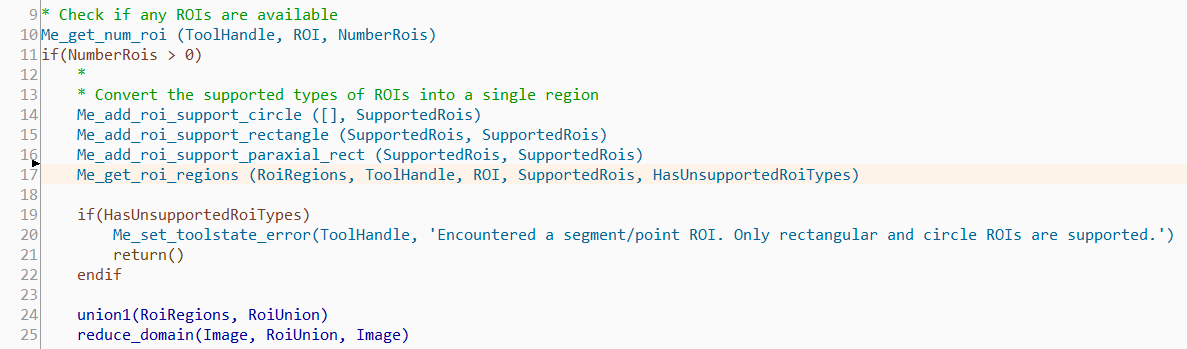
The signature of the procedure is the following: Me_get_num_roi ( : RoiRegions : RoiTuple, SupportedRois : HasUnsupportedRois ).
The ROI is provided by the "ROI" parameter. The tuple defined for the fourth parameter represents the list of supported ROIs that should be converted, i.e., only paraxial rectangle ROIs, rectangle ROIs, and circle ROIs should be converted. Other ROI types will not be converted into regions.
The converted region is returned in the output parameter "RoiRegions". The output parameter "HasUnsupportedRois" returns a Boolean value that indicates whether ROIs of an unsupported type are available. If there are any ROIs available that are not supported, i.e., point ROIs and segment ROIs, an error is returned using Me_set_toolstate_error.
After converting the ROIs, the union of the ROI regions is determined and the image domain is reduced to the determined region of the ROIs.
Flexible Use of ROIs
For certain measurements, only the center of an ROI should be used like a point ROI. This example shows how ROIs can be used in a flexible manner, i.e., if the center of an ROI should be used like a point ROI. This may be useful in measurement tasks in which the center of an ROI should be used as one measure point. A program like this would check the type of the ROI and then return the center point.
for Index := 0 to NumRois -1 by 1
    Me_get_roi_type (Points, Index, RoiType)
    if (RoiType == 'rectangle')
        Me_get_rect (Points, Index, 0, R, C, ...)
    elseif (RoiType == 'paraxial_rect')
        Me_get_paraxial_rect (Points, Index, 0, R, C, ...)
    elsif (RoiType == 'line')
        Me_get_line (Points, Index, 0, R1, C1, R2, C2)
        R := (R1 + R2) / 2.0
        C := (C1 + C2) / 2.0
    elseif (RoiType = 'circle')
        Me_get_circle (Points, Index, 0, R, C, ...)
    elseif (RoiType = 'point')
        Me_get_point (Points, Index, 0, R, C)
    endif
endfor