Procedures for Tool States
The interface procedures described below can be used to set the tool state of a custom tool. The tool states can be used to return information about the current status of a tool and thus can be used for error handling. Most of the procedures set the tool state with a tool state code and a text message.
The current tool state will be shown in the MERLIC Creator at the tool board of the custom tool in form of a tool result called "Tool State". The "Tool State" result is provided automatically for each MERLIC tool. It returns the tool state as a tuple containing the respective tool state code and text message. For information about the semantics of the tool state codes that can be set, see the section Available Tool States.
The tool state contains only information for the current state of the tool, i.e., it overwrites the last value of the tool state. Thus, it provides no information about previous executions of the application. In case the tool state is set to the level for errors or warnings, MERLIC shows an icon at the respective tool in the Tool Flow panel and in the Tool Workspace indicating the respective tool state. With a click on this icon at the tool board, the respective text message is shown.
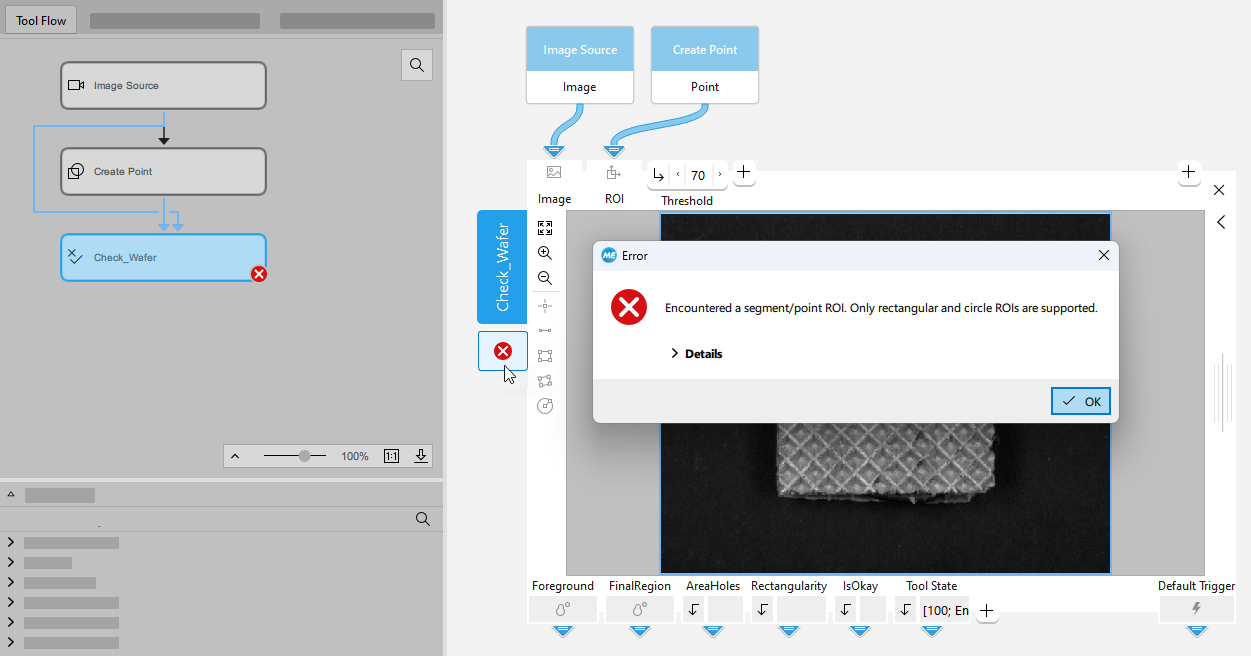
The text message defined in the procedures for the tool states will be shown at the tool board and written to the log file if the tool state is not okay. If you only want to write messages to the log file, you can use the interface procedures Me_console_* as described in the topic Procedures for Log Messages.
For more information about the available logging settings for MERLIC, see the topic Logging in the MERLIC manual.
Procedures
 Me_set_toolstate
This procedure can be used to set the tool state consisting of a tool state code and a message for a tool. In contrast to the other interface procedures for setting the tool state, this procedure can be used for all types of tool states.
Me_set_toolstate ( : : ToolHandle, Toolstate, Text : )Parameters
The procedure contains the following input parameters:
|
Input parameter |
Description |
|---|---|
|
ToolHandle |
The ID of the tool. |
|
Toolstate |
The tool state to be set. The tool state must be defined with the respective tool state code. For more information on the available tool state codes, see the section Available Tool States below. |
|
Text |
The text message to be set. |
Me_set_toolstate_error
This procedure can be used to set the tool state of a tool to "error", i.e., to the tool state code 100. It can be used to return information about an error with a text message. In MERLIC, this type of tool state is marked at the tool board and in the Tool Flow panel with the icon  . Additionally, this text is logged as error to the log file of the MERLIC application.
The procedure is equivalent to Me_set_toolstate (ToolHandle, 100, Message).
Me_set_toolstate_error ( : : ToolHandle, Message : )Parameters
The procedure contains the following input parameters:
|
Input parameter |
Description |
|---|---|
|
ToolHandle |
The ID of the tool. |
|
Message |
The error message to be set. |
Me_set_toolstate_info
This procedure can be used to set the tool state of a tool to "info", i.e., to the tool state code 99. Additionally, this text is logged as info to the log file of the MERLIC application.
The procedure is equivalent to Me_set_toolstate (ToolHandle, 99, Message).
Me_set_toolstate_info ( : : ToolHandle, Message : )Parameters
The procedure contains the following input parameter:
|
Input parameter |
Description |
|---|---|
|
ToolHandle |
The ID of the tool. |
|
Message |
The info message to be set. |
Me_set_toolstate_ok
This procedure can be used to set the tool state of a tool to "ok", i.e., to the tool state code 0.
The procedure is equivalent to Me_set_toolstate (ToolHandle, 0, "Ok").
Me_set_toolstate_ok ( : : ToolHandle : )Parameters
The procedure contains the following input parameter:
|
Input parameter |
Description |
|---|---|
|
ToolHandle |
The ID of the tool. |
Me_set_toolstate_warning
This procedure can be used to set the tool state of a tool to "warning", i.e., to the tool state code 1. It can be used to return information about warnings with a text message. In MERLIC, this type of tool state is marked at the tool board and in the Tool Flow panel with the icon  . Additionally, this text is logged as warning to the log file of the MERLIC application.
The procedure is equivalent to Me_set_toolstate (ToolHandle, 1, Message).
Me_set_toolstate_warning ( : : ToolHandle, Message : )Parameters
The procedure contains the following input parameters:
|
Input parameter |
Description |
|---|---|
|
ToolHandle |
The ID of the tool. |
|
Message |
The warning message to be set. |
Available Tool States
The following table shows the tool states that can be returned for the MERLIC tools that are provided with the MERLIC installation. The numbers represent the tool state codes that are specified in the respective interface procedures for the "Tool State" parameter and the strings in the "Message" column represent the corresponding text that is defined in the "Message" parameter.
If you want to set tool states for your custom tool, you can either use the same tool state codes and texts as provided for standard MERLIC tools or you can define any other numbers and texts instead. However, keep in mind that all tool state codes except 0, 1, and 99 will be interpreted as an error. Therefore, an error icon will be displayed at the tool if a tool state result with a tool state code other than 0,1, or 99 is returned.
|
Code |
Message |
Description |
|---|---|---|
|
0 |
okay |
The state of the tool is okay. |
|
1 |
warning |
The tool returns a warning. If this tool state is returned, a warning icon |
|
2 - 5 |
<error message> |
An error of a specific type occurred while the tool was executed. If this tool state is returned, an error icon |
|
99 |
info |
The tool returns an information. If this tool state is returned, an info icon |
|
100 |
error |
An error occurred while the tool was executed. If this tool state is returned, an error icon |
 will be displayed at the tool.