Changing the MERLIC Recipe (Hilscher)
MERLIC RTE also allows the PLC to load a different recipe file A MERLIC recipe represents a file with file ending ".mrcp", which references a specific MERLIC Vision App (MVApp) with a specific MVApp configuration. In MERLIC RTE, the process integration mode of MERLIC, recipes are used to load the referenced MVApp with the configuration as specified in the recipe. MERLIC recipes are only required if you want to set up mulitple pre-defined MVApp parameterizations for the same MVApp, or if you want to aktivate and use a specific acquisition sequence when loading an MVApp in MERLIC RTE for further processing. The recipe change can be triggered with the command "PrepareRecipe", that is, with the respective command code 4.
In case no recipe is prepared, the Frontend will show a respective text message.
Prerequisites
The "PrepareRecipe" command can only be called if MERLIC is in the state "Initialized" or "Ready". Therefore, you have to make sure that MERLIC is in one of these states before changing the recipe. In addition, the recipe that shall be loaded must be defined in the member Selector in the protocol FromPLCProtocol.
Changing the Recipe
Set the following members in the protocol FromPLCProtocol to load a recipe.
|
Member |
Value |
Description |
|---|---|---|
|
CommandCode |
4 |
Define the code value 4 for the command "PrepareRecipe". |
|
Selector |
ID |
Define the ID of the recipe that shall be loaded. The ID represents the ID that is assigned for the recipe in the "Recipes" of the MERLIC RTE Setup, for example, to load the recipe with ID 1, you have to set the value of "Selector" to 1. In case no recipe with this ID exists, MERLIC changes to the "Error" state. |
The protocol FromPLCProtocol that is sent from the PLC to MERLIC could be defined as shown in the following example:
TYPE
FromPLCProtocol :
STRUCT
    Preamble : 17;
    CommandCode : 4;
    Selector : 5;
END_STRUCT
END_TYPE
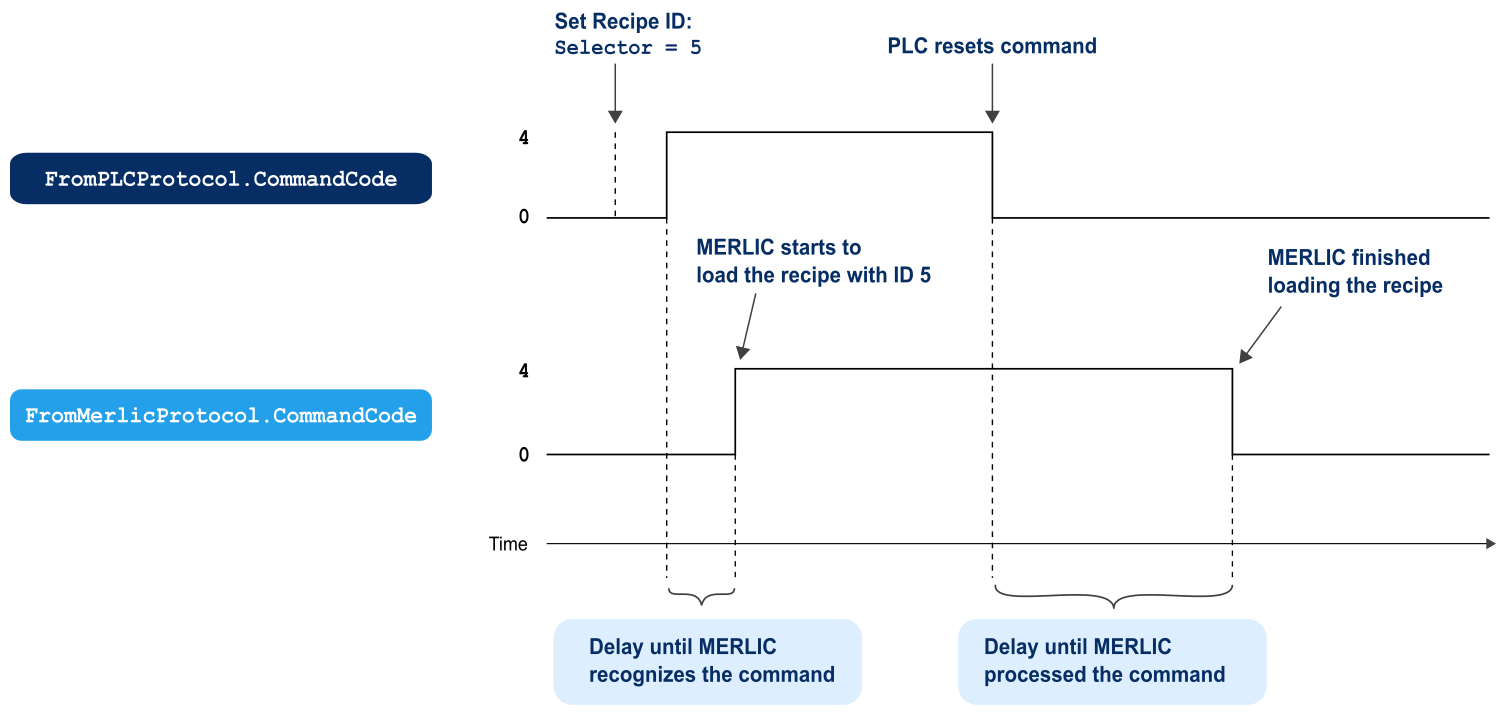
In the example above, the value of the member CommandCode is set to 4. Therefore, MERLIC recognizes the command "PrepareRecipe". The recipe file that shall be loaded is defined in the member Selector. In our example, the recipe with ID 5 shall be prepared and loaded in MERLIC.
Synchronization
The following graphic shows the handshaking process for the command "PrepareRecipe". The PLC triggers the recipe change by setting CommandCode in the protocol FromPLCProtocol to 4. Make sure to set the ID of the recipe to be loaded for the member Selector before triggering the command for the recipe change.
When MERLIC recognized the command, the member CommandCode in the protocol FromMerlicProtocol is also set to 4 as confirmation for the PLC and MERLIC starts to load the recipe file with the specified recipe ID and thus also the MVApp that is referenced in the recipe. As soon as the PLC receives the confirmation from MERLIC that the command was recognized, the member CommandCode in FromPLCProtocol is set to 0 to finalize the handshaking process. After the recipe has been loaded, MERLIC checks which CommandCode is sent from the PLC and proceeds accordingly.