Communication
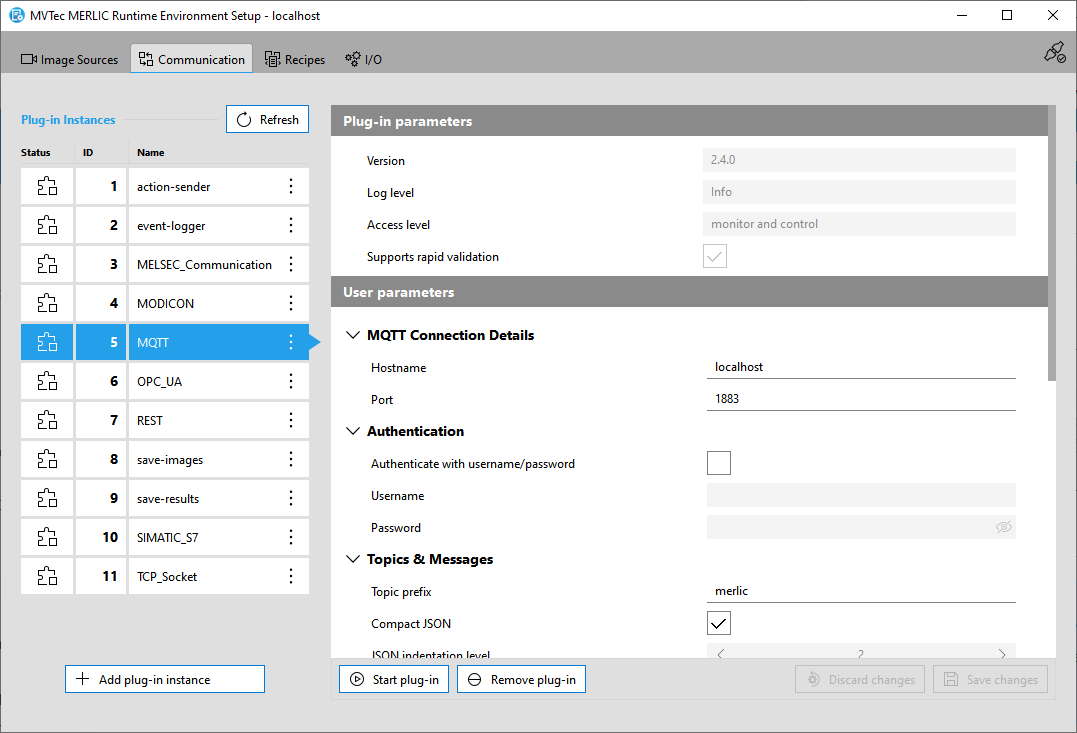
The " Communication" tab of the MERLIC RTE Setup enables you to configure all types of Communicator plug-ins, i.e., plug-ins that need to be started via the MERLIC Communicator for the process integration. Communicator plug-ins can be instantiated multiple times, i.e., you can use multiple instances of a plug-in with an individual configuration. In the MERLIC RTE Setup, you can therefore work with instances of the respective plug-in. If you add a new plug-in instance, you can check the current configuration for this instance and adjust the available user parameters that have been defined in the implementation of the respective plug-in. In addition, you can also start and stop the selected instances of the Communicator plug-ins in the MERLIC RTE Setup.
MERLIC already provides the following standard Communicator plug-ins that can be used immediately after the installation:
- MELSEC Communication
- MODICON®*
- MQTT
- OPC UA server
- REST
- save-results
- SIMATIC S7
The configuration and execution of custom plug-ins is possible in the "Communication" tab. The set of parameters and value ranges that are available in the configuration area is determined by the implementation of the respective Communicator plug-in, i.e., the parameters must be defined and exposed during the implementation of the plug-in. For more information about the required plug-in API functions and the implementation, see the topic Getting Started with Plug-in Development in the MERLIC Communicator manual.
The "Communication" tab is only available if a configuration service of the MERLIC Communicator could be found on the selected system, i.e., if the MERLIC Communicator has already been started on the system. Therefore, you have to make sure to first start the MERLIC Communicator.
Configuration on Remote Systems
It is possible to configure Communicator plug-ins on a remote system. For this, you have to ensure that the prerequisite regarding the configuration service is met on the respective system. In addition, you have to connect the MERLIC RTE Setup to the respective remote system, either during the start up of the MERLIC RTE Setup or via the "Select system" dialog that can be accessed via the icon  on the top right of the MERLIC RTE Setup. For more information, see the topic Opening the MERLIC RTE Setup.
On the left of the "Communication" tab, you can check which plug-ins are currently available for use and add new instances of the plug-ins for the configuration. The main area on the right shows the parameters of the plug-in instance which is currently selected. If you select a plug-in instance that has been configured before, the latest configuration is loaded. Otherwise, the default configuration is shown. If you are finished with your configuration, you can save the changes and start with the execution of the plug-in.
Get More Information
Learn how to add a new instance of a Communicator plug-in for the configuration to the MERLIC RTE Setup.
Configuring Communicator Plug-ins
Learn how to enable the configuration of a plug-in instance and which parameters can be configured.
Starting and Stopping Communicator Plug-ins
Learn the different methods how to start and stop a plug-in instance.
* Modicon® is a registered trademark of Schneider Electric USA, Inc.