_Info
This procedure can be used to define the following additional information for a custom tool:
- Supported regions of interest (ROIs) for the tool.
- Additional tool parameters and tool results, i.e., parameters and results that are not visible by default but can be accessed via the + button on the tool board.
The use of the "_Info" procedure is optional. If you want to implement a custom tool without any ROI support and without any additional tool parameters and results, you don't have to use this procedure. However, if you want to use ROIs, additional tool parameters, or additional tool results in the custom tool, you have to specify the respective information in the "_Info" procedure.
Name
The complete name of the procedure is a composition of the tool name, i.e., the name of the respective execute procedure and the suffix "_Info", i.e., <name of the custom tool> + "_Info". You also have to ensure to save the "_Info" procedure in the HDevelop procedure library of the respective custom tool.
Example
If you want to implement the "_Info" procedure for a tool named "Check_Wafer", the complete name of the procedure must be defined as: "Check_Wafer_Info" and the procedure must be saved in the procedure library "Check_Wafer.hdpl".
Check_Wafer_Info ( : : : Configuration)Parameters
The procedure provides the predefined output control parameter "Configuration" which can be used to define the additional information about supported ROIs and additional tool parameters and results.
Configuration
This parameter enables you to define the information about the supported ROIs and additional tool parameters and tool results. It must be given in a tuple with a predefined structure. You first have to specify the name of the information as a string followed by the actual value you want to defined for the information. All values that are specified behind the previously defined name are assigned to the respective information as along as the next name of an information is specified as a string.
In the following example, the values are provided by variables containing the actual information.
SupportedRois := []
Me_add_roi_support_rectangle (SupportedRois, SupportedRois_Out)
AdditionalParams := ['ROI','Alignment_Data','Processing_Region']
Configuration := ['SupportedRois', SupportedRois_Out, 'AdditionalParams', AdditionalParams]
You have to define the following information for the "Configuration" parameter:
|
Information |
Description |
|---|---|
|
SupportedRois |
List of supported ROIs that should be available in the custom tool. It defines which types of ROIs can be drawn manually into the graphics window of the custom tool, i.e., which of the ROI buttons are available for use. We recommend to define the list in a separate procedure using the private interface procedures Me_add_roi_support_*, e.g., Me_add_roi_support_rectangle. This ensures that list of supported ROIs can be queried constantly within any other tool procedure. See the topic Procedures for Regions of Interest (ROIs) for more information. If you want to support any of the ROIs, you also have to make sure to add an ROI parameter as tool parameter for your custom tool, i.e., by adding a new control input parameter "ROI" to the execute procedure of your custom tool. For more information on how to add parameter to the execute procedure, see the topic Defining the Procedure Settings. If you do not want to support any ROI, you can set the value to an empty tuple, i.e., SupportedRois := []. |
|
AdditionalParams |
List of tool parameters and results that should not visible on the tool board by default but can be added by the user via the + button next to the tool parameters or results, respectively. Keep in mind that all tool parameters and tool results must be defined in the execute procedure of the custom tool as described in the topic Defining the Procedure Settings. Thus, you can define only tool parameters or result as additional if they have already been defined in the procedure settings of the custom tool. If you do not want to define any of the tool parameters and result as additional tool parameters or additional tool results, you can set the value to an empty tuple, i.e., AdditionalParams := []. |
Creating the "_Info" Procedure
The following description describes how to create the "_Info" procedure in HDevelop for a MERLIC custom tool.
- In the HDevelop menu, click on the menu entry "Procedures" and select "Create New Procedure". This opens the procedure interface dialog.
- Define the general settings of the procedure:
- Enter the name of the "_Info" procedure. Keep in mind that the name must be composed of the tool name and the suffix "_Info" as described in the section Name. For our example custom tool "Check_Wafer", the procedure name would be "Check_Wafer_Info".
- Open the drop down menu for the "Type" of the procedure and select "Library Procedure (.hdpl)".
- Select the procedure library of your custom tool for the "Library" entry either via the drop down menu or via the button
 next to the "Library" entry. This ensures that the procedure is saved in the correct procedure library.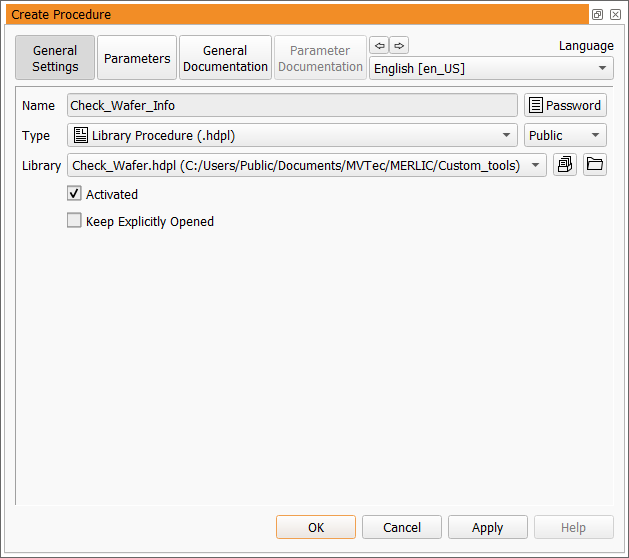
- Go to the "Parameters" tab and add the output control parameter "Configuration".
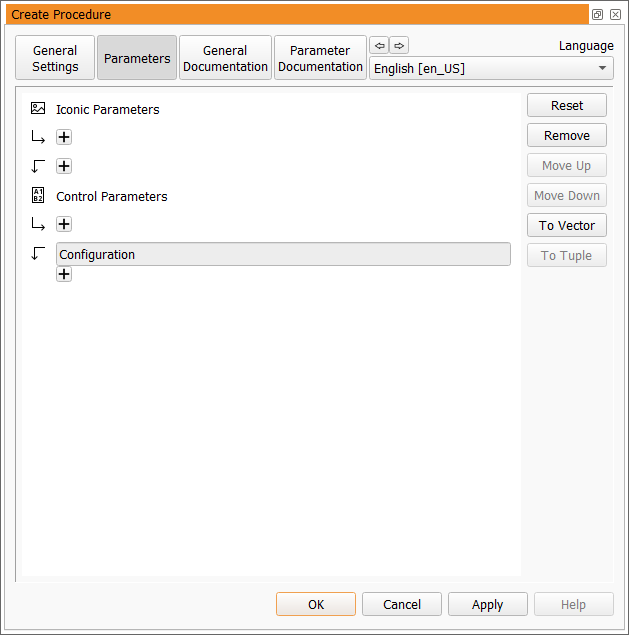
- Go to the "Parameter Documentation" tab and define the settings for the "Configuration" parameter as shown in the example image below:

- Click on the "OK" button to confirm your settings. The procedure is now opened in the "Program Window" of HDevelop.
- Now, you can define the desired ROIs and additional parameters and provide them in the "Configuration" parameter. The "_Info" procedure of your example custom tool "Check_Wafer" looks like this:
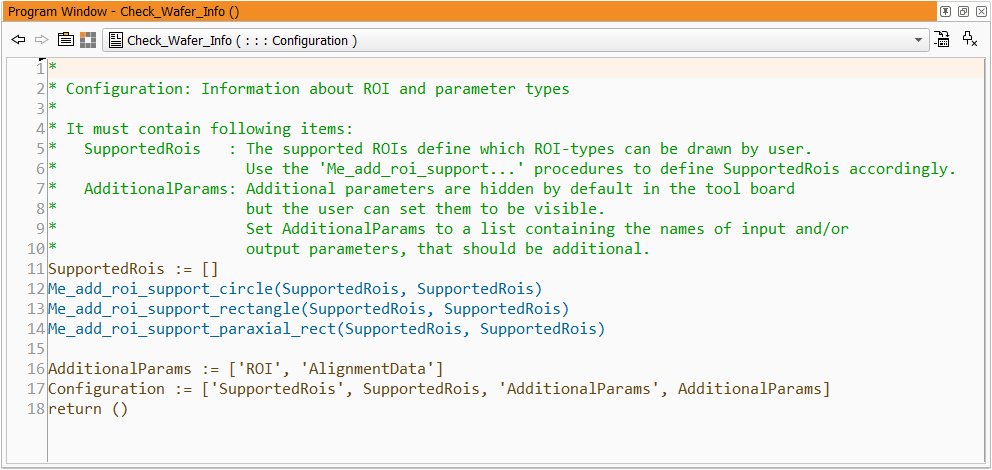
First, the supported ROIs and additional tool parameters are defined. The list of supported ROIs is defined by the interface procedures Me_add_roi_support_circle, Me_add_roi_support_rectangle, and Me_add_roi_support_paraxial_rect. Then, the parameters that should be provided as additional parameters are specified. In our example, the parameters "ROI" and "AlignmentData" are set as additional parameters. The output parameter of the ROI procedure and the variable with the additional parameters are then used as input values in the "Configuration" tuple.
-
Make sure to save the procedure when you are finished.
If an "_Info" procedure exists for a custom tool, it is automatically called when the tool is parsed. Thus, it is not necessary to add a call of the "_Info" procedure to the execute procedure of the custom tool.