MERLIC 5.8 comes with a lot of new and improved functionality. Here, you can find a quick overview of some of the most interesting changes. To see the list of all updates in this MERLIC version, please refer to the release notes.
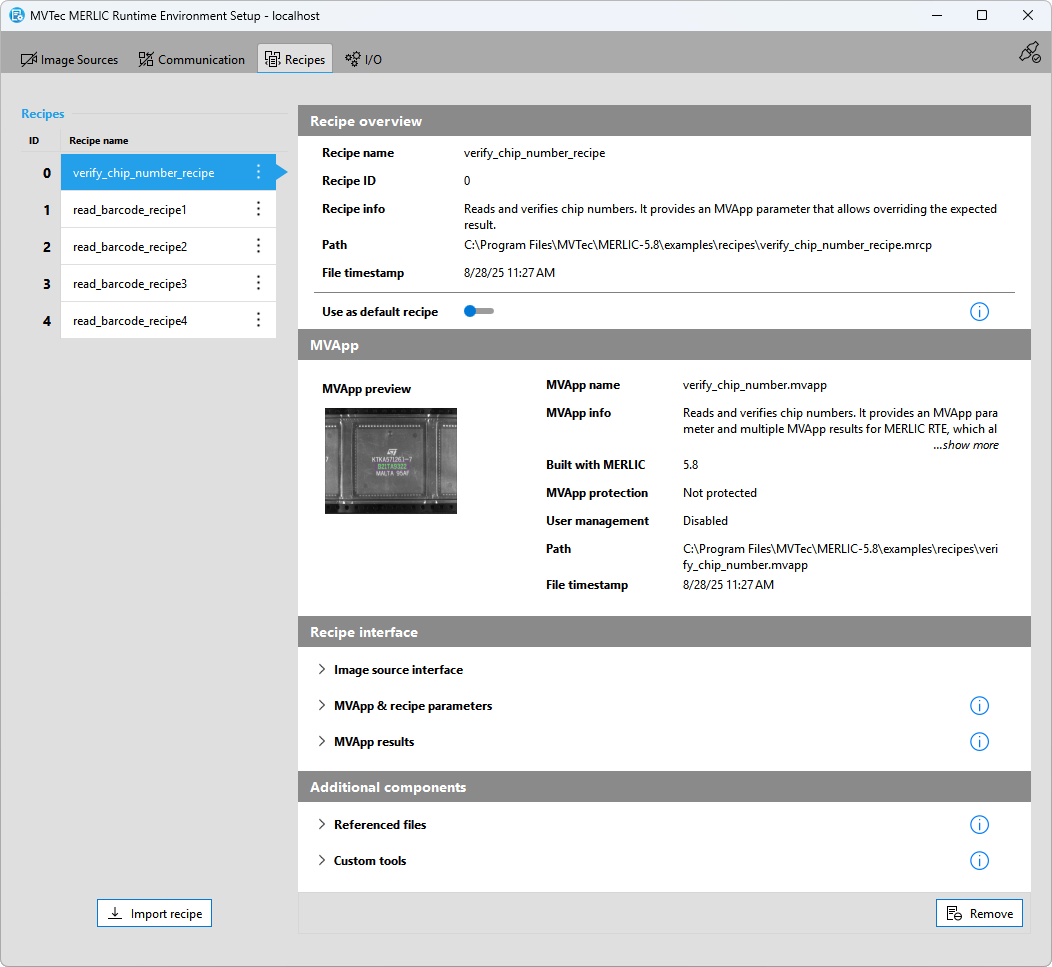
Improved User Interface for Recipe Management
This MERLIC version comes with many improvements in the graphical user interface for the recipe management. The "Recipes" tab in the MERLIC Runtime Environment Setup (MERLIC RTE Setup) has been revised and extended to help users setting up the application for the process integration more easily.
Detailed recipe information
The "Recipes" tab in the MERLIC RTE Setup now provides much more information on the respective recipe and the referenced MERLIC Vision App (MVApp). It can now be used to quickly look up all information that might be relevant for setting up your application for MERLIC RTE or to deploy your application on a different system. You can find general information on the recipe and the MVApp as well as detailed information on the specified image sources, MVApp parameters, and MVApp results. You can even look up whether additional components such as referenced files or custom tools are used by the MVApp that is referenced in the recipe.
New editing options
MERLIC now provides additional options to select the default recipe and to remove recipes in the "Recipes" tab. These modifications are now also available in a new menu that is provided for each recipe in the recipe list on the left. This way, you have multiple options on how to set or unset a default recipe and how to remove a recipe.
Preserved window geometry of MERLIC RTE Setup
MERLIC RTE Setup has been extended to preserve the window geometry across sessions. Any changes to the position and dimensions of the MERLIC RTE Setup window are now kept when closing and re-opening it. A new setting in the INI configuration file of MERLIC also allows to define a specific dimension in advance.

Improved Error Handling and Recipe Management
The new "Recipes" tab of the MERLIC RTE Setup also comes with an improved error handling. It has been extended to validate and show more error cases such as missing files referenced in the MVApp. In addition, errors are now displayed directly at the affected component and they provide more detailed information on possible solutions. Detecting and handling errors is therefore much easier than in previous MERLIC versions.
In addition, a wide range of internal improvements have been implemented to ensure a stable basis for future improvements of the recipe management with respect to deployment. One effect of these improvements is the loading time of MERLIC recipes. They are now loaded and imported much faster in the "Recipes" tab of the MERLIC RTE Setup.

Improved Error Handling for Image Acquisition
The error handling of the Image Source Manager (ISM) has been improved for this MERLIC version. It now monitors for missed trigger signals and detects when images are dropped. Depending on the used trigger mode and processing mode, MERLIC will now handle these events accordingly.
Detection and handling of missed triggers
The Image Source Manager now monitors for events (FrameTriggerMissed) from cameras that indicate that the camera received a trigger signal it could not process, for example, because it was still exposing an image from a previous trigger signal. In case a missed trigger has been detected, the Image Source Manager logs a warning.
If a missed trigger is detected in MERLIC RTE while the system is in the "Ready" state or in either of the execution states, an "error" event is emitted.
Handling of dropped images
The Image Source Manager (ISM) now detects when images from a camera get dropped from the frame buffer before they are processed by MERLIC. For this, the "Image Source" tool has been extended by a new parameter, "Frame ID", which represents a sequential number that is incremented with each frame that is acquired. A gap in the frame ID indicates that a frame was dropped and MERLIC will now react accordingly depending on the used trigger method.
Handling lost connections to image acquisition devices
In this MERLIC version, MERLIC RTE will now immediately switch to the "Error" state when the connection to a used image acquisition device has been lost while the system is in the "Ready" state. Previously, this transition only occurred after an attempt to acquire an image from the device failed due to starting a job.

New Communication Plug-in "Siemens IE Databus"
MERLIC now provides a new communication plug-in "Siemens IE Databus". It enables connecting MERLIC to the Siemens Industrial Edge (IE) platform. It can directly communicate with programmable logic controllers (PLCs) or other hardware using the Industrial Edge Connector apps, for example, "SIMATIC S7 Connector". For the communication between the plug-in and the Industrial Edge platform, the Industrial Edge app "Databus" is used. The Siemens IE Databus plug-in is designed to work with all Industrial Edge Connector apps that use the "Industrial Edge Common Databus Payload Format" API.

Simplified Remote Connection of MERLIC Frontend
In this MERLIC version, connecting a MERLIC Frontend to a remote MERLIC server is much easier than in previous versions. Until now, the Frontend could only be connected to a remote server via the command line. Now, the connection can be established via the graphical user interface of the MERLIC Frontend. You can open a connection dialog directly in the Frontend menu and select the desired MERLIC server. MERLIC detects available servers on the network and remembers recently used hosts so connecting to a MERLIC server can be done with only a few mouse clicks.

Tool Improvements
To profit from the improvements of the new HALCON version, the HALCON libraries used by MERLIC have been upgraded to the HALCON 25.05 Progress. Some MERLIC tools have been extended to use functionality of the new underlying HALCON version and to integrate further improvements due to user feedback.
Improvements for Deep OCR
The tool "Read Text and Numbers with Deep Learning" has been extended with a new tool parameter "Recognition Alignment". It improves the recognition accuracy for inaccurately cropped words. In addition, the tool has been extended by a new tool result "Character Confidences", which returns the confidence values of each single character that was read.
Improvements for reading data code
The tool "Read Data Matrix ECC 200" has been extended with the new tool parameter "Alternating Pattern Tolerance". It can be used to define the tolerance for the search with respect to the variation of the module widths along the two sides of the alternating pattern. This allows reading codes that could previously not be decoded because of high variations of the modules in the alternating pattern of the finder pattern. The tool has also been extended with a corresponding new training result "Alternating Pattern Tolerance Out", which returns the tolerance value that has been used for the parameter "Alternating Pattern Tolerance".
The tool "Read QR Code" also profits from the new underlying HALCON version. It now supports defining the search tolerance for reading deformed QR codes. The tolerance can be defined in the new parameter "Deformation Tolerance".
Support of Intel® NPU as Artificial Intelligence Acceleration (AI²) hardware
MERLIC now supports using Intel® Neural Processing Units (NPUs) as AI accelerator hardware in MERLIC tools with deep learning functionality. By expanding the range of supported Intel devices, customers now have even more flexibility in their choice of hardware.

New MVApp Example
MERLIC has been extended by the new MVApp example "demonstrate_evaluate_expression.mvapp". It demonstrates the use of the arithmetic and logical possibilities of the tool "Evaluate Expression". It also provides multiple tool notes with additional information in order to better understand the defined expressions.

New Concept Tool "Add Overlay to Image"
MERLIC has been extended by the new concept tool "Add Overlay to Image". It enables you to add graphical overlays and text overlays to an image. You can use this tool to customize the visualization and documentation of images, for example, by saving images that show important or individual results.
To demonstrate the new concept tool, MERLIC also comes with a new example MVApp "". It shows how text and contour overlays can be added to an image.
Concept tools are preliminary MERLIC tools with new functionality in an early stage of development. You can test and evaluate the concept tools and contribute to future development by providing us feedback on the preliminary version. This helps us improving upcoming MERLIC tools and to decide further development steps for future MERLIC versions.

Improved Documentation for Acquisition Sequences
In this MERLIC version, you can now find all information on using acquisition sequences in the MERLIC manual. This includes information on basic and managed sequences as well as detailed information on custom acquisition sequences and their configuration, which was previously only available in a separate PDF document. Contacting our customer support to receive the documentation for custom acquisition sequences is therefore not required anymore.