Logging
MERLIC provides a logging mechanism that automatically writes log messages to the respective log files in the default directory "%LOCALAPPDATA%\MVTec\MERLIC\". To access the log files from the MERLIC Creator, you can use the menu entry "Help → Open Log File Directory".
The log files are generated with the following naming convention: <merlic_executable><YYYY-MM-DD>_<hh-mm-ss>_<ProcessID>_<Counter>.log
|
Placeholder |
Description |
|---|---|
|
merlic‑executable |
The name of the executable that created the log file. The following components of MERLIC create their own log files:
Not all MERLIC components create their own log files, i.e., the MERLIC Designer. For more information, see the section Special Cases in Logging. |
|
YYYY |
Year |
|
MM |
Month |
|
DD |
Day |
|
hh |
Hour |
|
mm |
Minute |
|
ss |
Second |
|
ProcessID |
Windows process ID of the respective MERLIC instance |
|
Counter |
Counter of the log file. It is increased whenever MERLIC starts logging to a new log file, i.e., if the log file exceeds the maximum size, that has been set in "LogFileSizeInBytes". For each start up of a MERLIC instance, the counter is reset to 0. |
Special Cases in Logging
There are some special cases concerning MERLIC components that do not create their own log files:
- User actions and messages in the MERLIC Designer are recorded in the log file "merlic_creator_*.log".
- Depending on the executable, which was used to start the MERLIC Frontend, user actions and messages are recorded either in the log file "merlic_rte_*.log" or "merlic_creator_*.log".
- Currently, only basic information is being logged for the MERLIC Runtime Environment Setup (MERLIC RTE Setup), i.e., version, license, and program start up. This information can be found in the log file "merlic_rte_setup_*.log". However, the different components of the MERLIC RTE Setup follow their own logging principles:
- Depending on the executable, which was used to start the Image Source Manager, actions are recorded either in the log file "merlic_rte_*.log" or "merlic_creator_*.log".
- User actions and messages in the MERLIC RTE Setup component "Communication" are logged into the log file "merlic_rte_*.log".
- The MERLIC RTE Setup components "Recipe" and "I/O" are currently not being logged.
Configuring the Logging
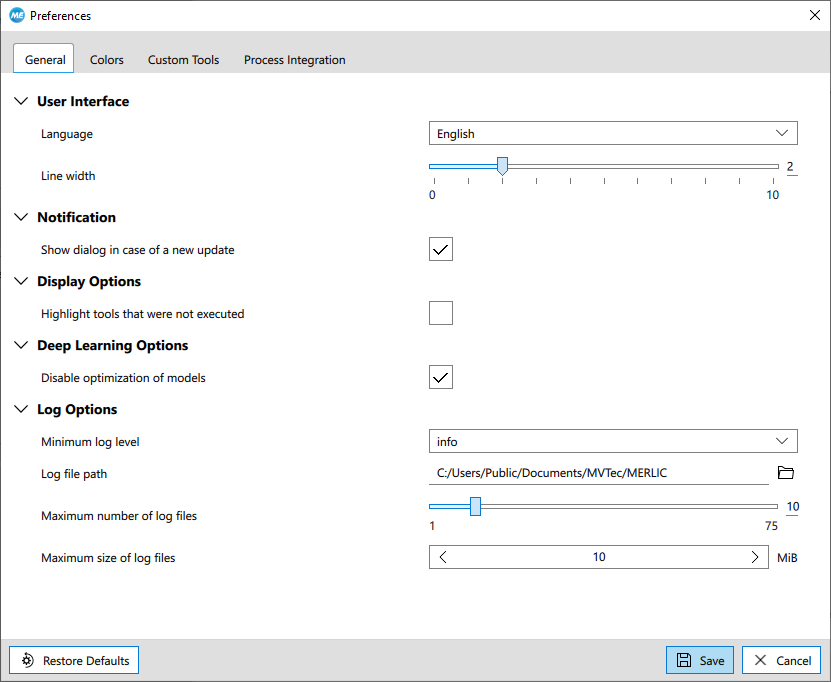
If you want to configure the logging, e.g., to define a specific location or size for the log file, you can set your preferences via "Edit → Preferences → General".
|
Log option |
Description |
|---|---|
|
Minimum log level |
This property defines the used log level. Logging of messages of a given level generally includes the logging of all messages of stricter levels. The available log levels are the following:
|
|
Log file path |
This property defines the path to the directory in which the log file is stored. Use the |
|
Maximum number of log files |
This property defines the number of recently created log files that are kept in the log file directory while MERLIC is running for the case that one of the log files exceeds the configured maximum size. Log files are deleted starting with the oldest log file. If none of the log files exceed the configured maximum size, the number of log files in the log folder is not limited. Additionally the log folder will contain log files that are currently being created. |
|
Maximum size of log files |
This property defines the maximum size of the log files in bytes. If the maximum size of the log file is reached, MERLIC will start to log the new messages into a new file. Minimum value: 1 048 576 = 1 Megabyte |
 button to select the location for the log files.
For more information about logging options see the topic The MERLIC INI File.
Logging Information for MERLIC RTE
If you are using the process integration mode of MERLIC and want to be able to check the complete data exchange between the PLC and MERLIC, you can configure the logging settings accordingly. Set the property "Threshold" to "info" to ensure that the data exchange is also written to the log files. Settings smaller than 1 megabyte are ignored and the default setting will be 10 megabytes for the maximum file size.
For more information about process integration with MERLIC, see MERLIC Runtime Environment.
Collecting Information for Support
MERLIC provides an additional program that can be used to collect hardware information on your system. If you run into problems and need to contact your local distributor for help, you can use this program to collect hardware information on your system. The program collects information on the available cameras, image source configurations (ISM configurations), log files, and INI files on your system. This information helps the support team to find a solution for your problem more quickly.
To collect the information, you can proceed as follows:
- Open the Windows start menu.
- Navigate to the folder "MVTec MERLIC 5.8" and click on the menu entry "MERLIC 5.8 Collect Support Information". When starting the program, a command prompt is automatically opened and the program starts collecting the information. As soon as the program has finished, the command prompt is closed again.
- The information is collected in the .zip file "MERLIC_Support_Information.zip" in the directory that is set as log file path in your MERLIC preferences, i.e., in the INI file. By default, the file explorer is opened automatically with the respective location. If not, open the file explorer and go the location of your log file path to access the .zip file.
- Provide the generated .zip file to your local distributor.