画像取得シーケンスのサンプル
以下の項では、複数の画像取得シーケンスの例を示します。すべての例は、「$schema」キーワードで JSON スキーマを参照しています。これを使用することで、ファイルが有効かどうかを、画像取得シーケンス向けに定義されているスキーマに従って検証できます。
2 つの画像ソースのシーケンス
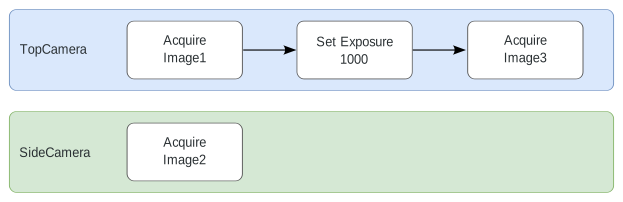
このシーケンス例では、カメラデバイスを表す 2 つの画像ソースを構成しています。
カメラ「TopCamera」は 3 つの手順を実行するように構成されています。まず、名前「Image1」で画像を取得します。次に、カメラの露光時間を設定します。最後の手順で、別の画像を名前「Image3」で取得します。カメラ「SideCamera」は、単一の画像のみを名前「Image2」で取得します。
次の図は、このシーケンス例のレーンを示しています。
該当するシーケンスファイルの構成は次のようになります。
コピー
{
    "$schema": "http://download.mvtec.com/acquisition-sequence-v2.0.schema.json",
    "Version": "2.0",
    "Lanes": [
        {
            "DeviceType": "ImageSource",
            "DeviceId": "TopCamera",
            "AlternativeParameterSet": null,
            "Actions": [
                {
                    "Type": "AcquireImage",
                    "Attributes": {
                        "ImageName": "Image1"
                    }
                },
                {
                    "Type": "SetParameter",
                    "Attributes": {
                        "ParameterName": "[Consumer]exposure",
                        "ParameterValue": 1000.0
                    }
                },
                {
                    "Type": "AcquireImage",
                    "Attributes": {
                        "ImageName": "Image3"
                    }
                }
            ]
        },
        {
            "DeviceType": "ImageSource",
            "DeviceId": "SideCamera",
            "AlternativeParameterSet": null,
            "Actions": [
                {
                    "Type": "AcquireImage",
                    "Attributes": {
                        "ImageName": "Image2"
                    }
                }
            ]
        }
    ]
}
3 つの画像ソースのシーケンス
このシーケンス例では、3 つのレーンを構成しています。
1 つ目と 2 つ目のレーンはカメラの動作を定義し、3 つ目のレーンは照明に使用する周辺デバイスの動作を定義しています。
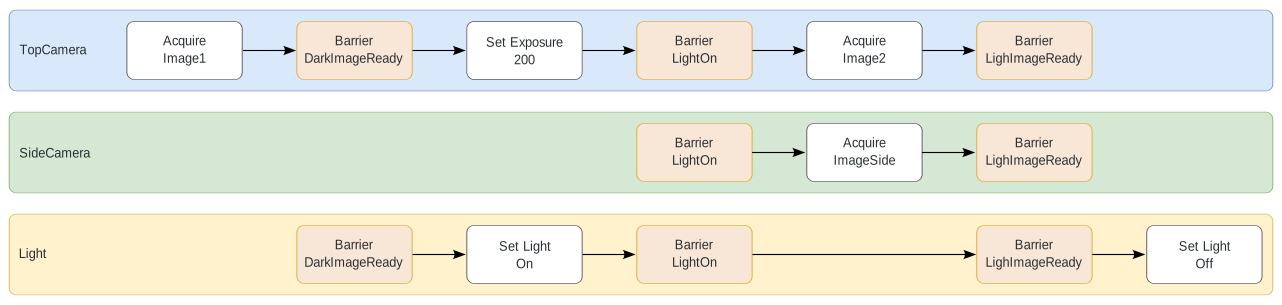
該当するシーケンスファイルの構成は次のようになります。
コピー
{
    "$schema": "http://download.mvtec.com/acquisition-sequence-v2.0.schema.json",
    "Version": "2.0",
    "Lanes": [
        {
            "DeviceType": "ImageSource",
            "DeviceId": "TopCamera",
            "AlternativeParameterSet": null,
            "Actions": [
                {
                    "Type": "AcquireImage",
                    "Attributes": {
                        "ImageName": "Image1"
                    }
                },
                {
                    "Type": "Barrier",
                    "Attributes": {
                        "BarrierName": "DarkImageReady"
                    }
                },
                {
                    "Type": "SetParameter",
                    "Attributes": {
                        "ParameterName": "[Consumer]exposure",
                        "ParameterValue": 200.0
                    }
                },
                {
                    "Type": "Barrier",
                    "Attributes": {
                        "BarrierName": "LightOn"
                    }
                },
                {
                    "Type": "AcquireImage",
                    "Attributes": {
                        "ImageName": "Image2"
                    }
                },
                {
                    "Type": "Barrier",
                    "Attributes": {
                        "BarrierName": "LightImageReady"
                    }
                }
            ]

        },
        {
            "DeviceType": "ImageSource",
            "DeviceId": "SideCamera",
            "AlternativeParameterSet": null,
            "Actions": [
                {
                    "Type": "Barrier",
                    "Attributes": {
                        "BarrierName": "LightOn"
                    }
                },
                {
                    "Type": "AcquireImage",
                    "Attributes": {
                        "ImageName": "ImageSide"
                    }
                },
                {
                    "Type": "Barrier",
                    "Attributes": {
                        "BarrierName": "LightImageReady"
                    }
                }
            ]
        },
        {
            "DeviceType": "ImageSource",
            "DeviceId": "Light",
            "AlternativeParameterSet": null,
            "Actions": [
                {
                    "Type": "Barrier",
                    "Attributes": {
                        "BarrierName": "DarkImageReady"
                    }
                },
                {
                    "Type": "SetParameter",
                    "Attributes": {
                        "ParameterName": "Light"
                        "ParameterValue": "On"
                    }
                },
                {
                    "Type": "Barrier",
                    "Attributes": {
                        "BarrierName": "LightOn"
                    }
                },
                {
                    "Type": "Barrier",
                    "Attributes": {
                        "BarrierName": "LightImageReady"
                    }
                },
                {
                    "Type": "SetParameter",
                    "Attributes": {
                        "ParameterName": "Light"
                        "ParameterValue": "Off"
                    }
                }
            ]
        }
    ]
}