Read from File
Use this tool to read text from a file.
Enter the path of the file that should be read at the parameter File Name. Open the file for reading by setting the parameter "Connect" to 1. Use the button for executing MERLIC once  to execute this tool in single steps. This gives you the possibility to read the text step by step. Close the file by setting the parameter "Connect" to 0 and executing MERLIC once . The file can be accessed by other processes while it is opened by the MVApp.
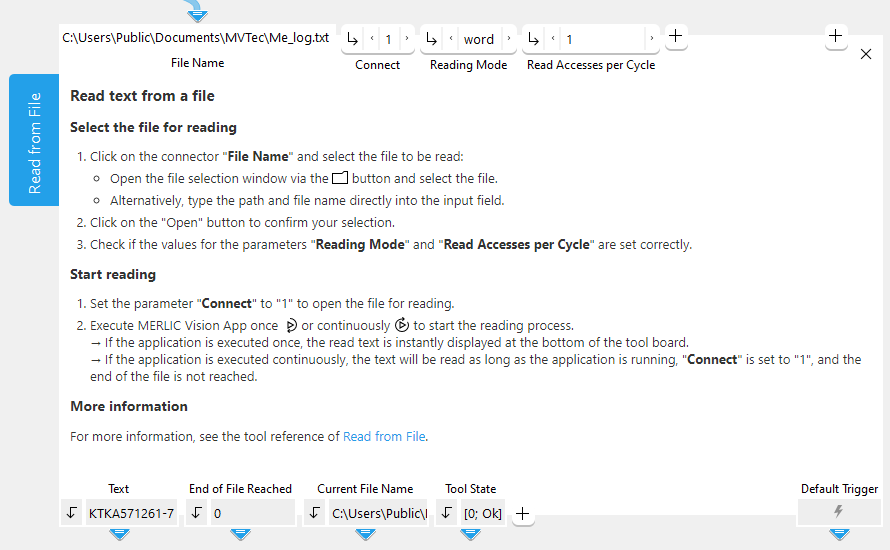
Parameters
Basic Parameters
File Name:
This parameter defines the name and path of the file from which the text is read. It is set to "Me_log.txt" by default which is located in the directory "%USERPROFILE%\Documents". You can change or select the desired file name and path at the corresponding connector. If you define a relative file path, the file is searched relative to the default directory "%USERPROFILE%\Documents". However, if your MVApp was already saved when you define a relative file path, the file is searched relative to the directory in which the MVApp is located.
Connect:
This parameter defines if the connection to the file is activated or deactivated. The parameter is set to 0 by default. This means that the connection to the file is not active and therefore the file is not opened for reading. If you want to start reading the selected file, you have to set the parameter to 1 to open the file.
Since the tool is executed with every change of values, we recommend to set the parameter "Connect" to 0 until the tool has been completely configured.
Reading Mode:
This parameter defines the mode for the reading. It is set to "word" by default. You can change the "Reading Mode" at the corresponding connector.
|
Value |
Description |
|---|---|
|
character |
The text is read character by character. |
|
word |
The text is read word by word. |
|
line |
The text is read line by line. |
Read Accesses per Cycle:
This parameter defines how many read accesses are permitted if the MERLIC Vision App is executed once. The parameter is set to 1 by default. This means, that if the "Reading Mode" is set to "word", exactly 1 word is read per cycle.
Additional Parameters
File Handle:
This parameter can be used to specify the handle of the file that is to be read, i.e., from the previous tool, where a "File Handle" is already defined. If this parameter is set, the parameter "File Name" will be ignored and the file for which the "File Handle" is defined will be used instead.
Results
Basic Results
Text:
This result contains the text that was read from file as a string.
End of File Reached:
This result gives information whether the end of the file is reached. It is returned as a Boolean value. If its value is 1, the end of the file is reached.
Current File Name:
This result contains the name and absolute file path of the file that was read in the last iteration, e.g., "C:\Users\Public\Documents\MVTec\MERLIC\Me_log.txt".
Tool State:
"Tool State" returns information about the state of the tool and thus can be used for error handling. Please see the topic Tool State Result for more information about the different tool state results.
Additional Results
File Handle Used:
This result represents the handle of the file from which the text was read. It can be used by a following tool to write or read. It should be avoided that several tools use the same handle to read from the same file or write to the same file simultaneously since this may lead to unexpected effects.
Processing Time:
This result returns the duration of the most recent execution of the tool in milliseconds. The result is provided as additional result. Therefore, it is hidden by default but it can be displayed via the  button beside the tool results. For more information see the section Processing Time in the tool reference overview.