Delay Execution
Use this tool to delay the execution of your MERLIC Vision App. The tool can be inserted at any position of your application.
You may use it for several test scenarios, e.g., you could simulate the varying execution time of vision tools. In this case, you can take the result "Random Number" of the tool Get Execution Info as input for this tool to realize the execution time variations. Another scenario is in conjunction with communication tools. You may use the tool "Delay Execution" if you want to wait after an I/O until the other device had enough time to respond.
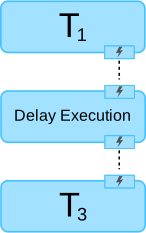
If you want to delay the execution of a single MERLIC tool instead of the whole MERLIC Vision App, you have to use a trigger connection to explicitly trigger the execution of the tool "Delay Execution" as shown in the following image.
This tool has no results since it is only used to delay the execution.
Execution Behavior
The behavior of this tool regarding the execution differs from the default behavior. Usually a MERLIC tool is executed in the following cases:
- The MERLIC Vision App is explicitly executed in continuous mode.
- The MERLIC Vision App is explicitly executed in "Run Once" mode.
- A MERLIC Vision App with the tool is opened in the MERLIC Creator.
- A parameter value of the tool has been changed in the MERLIC Creator.
However, the tool Delay Execution is only executed in the following cases:
- The MERLIC Vision App is explicitly executed in continuous mode.
- The MERLIC Vision App is explicitly executed in "Run Once" mode.
This ensures that the delay is not applied when loading an MVApp or changing a parameter value of the tool.
Parameters
Basic Parameters
Milliseconds:
This parameter defines how long the execution of the MERLIC Vision App is delayed. It is defined in milliseconds and set to 10 ms by default.
Results
Basic Results
Tool State:
"Tool State" returns information about the state of the tool and thus can be used for error handling. Please see the topic Tool State Result for more information about the different tool state results.
Additional Results
Processing Time:
This result returns the duration of the most recent execution of the tool in milliseconds. The result is provided as additional result. Therefore, it is hidden by default but it can be displayed via the  button beside the tool results. For more information see the section Processing Time in the tool reference overview.