Adding a Plugin Instance
The " Communication" tab of the MERLIC RTE Setup enables you to check which communication plugins are currently available on the connected system. You can add new instances of the plugins to the MERLIC RTE Setup, check the current configuration of the plugin instance, and adjust the configuration for the process integration MERLIC can be used in machine vision systems that are integrated in a manufacturing machine. The machine controller, e.g., a programmable logic controller (PLC), must be able to control an integrated vision system, to monitor the execution, and to query the results. Therefore, MERLIC provides a process integration mode to enable the communication with a machine controller.
The process integration mode can be started with the application "MERLIC RTE" that is provided with the MERLIC installation.. If you are finished with your configuration, you can save the changes and start the plugin directly in the MERLIC RTE Setup. For more information about how to change the configuration and how to start the plugin, see Configuring Communication Plugins and Starting and Stopping Communication Plugins.
Communication" tab of the MERLIC RTE Setup enables you to check which communication plugins are currently available on the connected system. You can add new instances of the plugins to the MERLIC RTE Setup, check the current configuration of the plugin instance, and adjust the configuration for the process integration MERLIC can be used in machine vision systems that are integrated in a manufacturing machine. The machine controller, e.g., a programmable logic controller (PLC), must be able to control an integrated vision system, to monitor the execution, and to query the results. Therefore, MERLIC provides a process integration mode to enable the communication with a machine controller.
The process integration mode can be started with the application "MERLIC RTE" that is provided with the MERLIC installation.. If you are finished with your configuration, you can save the changes and start the plugin directly in the MERLIC RTE Setup. For more information about how to change the configuration and how to start the plugin, see Configuring Communication Plugins and Starting and Stopping Communication Plugins.
Adding a New Instance of a Communication Plugin
- Open the "Communication" tab in the MERLIC RTE Setup.
- If MERLIC RTE is not running yet, start it via the "Start MERLIC RTE" button. Otherwise, the configuration service for the communication plugins are not available.
- Click on the button "Add plugin instance" to get the list of all plugins that are currently available for the process integration.
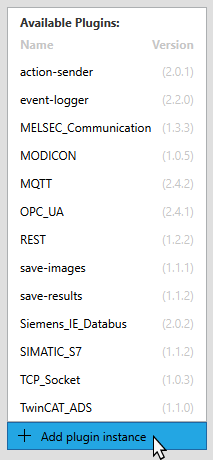
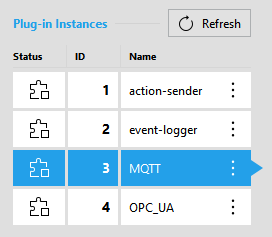
- Select the desired plugin to add a new instance of the plugin for the configuration. The plugin instance is now shown in the list on the top left side.
- The current configuration of the respective plugin instance is shown on the right side of the "Communication" tab. The parameters of the respective plugin will be loaded with its default values. For more information about the configuration of a plugin instance, see Configuring Communication Plugins
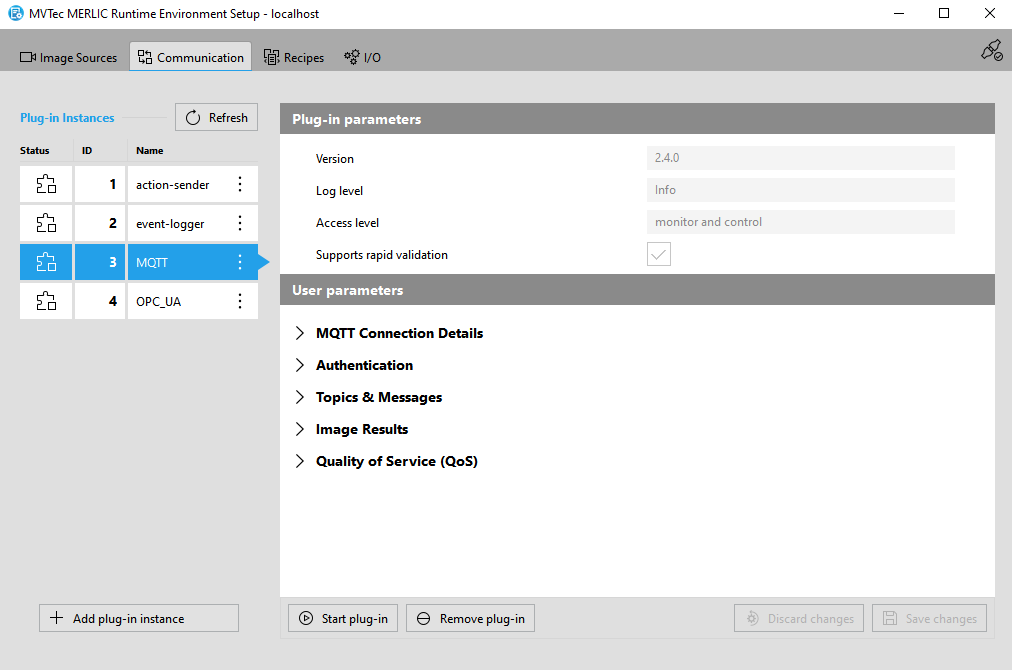
List of Plugin Instances
Each plugin instance is shown with its execution status, ID, and name. If you add multiple instance of a plugin, all instances of this plugin will show the same name. However, the IDs of the plugin instances are unique.
The status of a plugin instance is indicated by an icon:
|
Icon |
Description |
|---|---|
|
|
This icon indicates that the instance of the plugin is currently running. |
|
|
This icon indicates that the instance of the plugin is currently not running. |


Removing a Plugin Instance
If you remove a plugin instance from the MERLIC RTE Setup, all changes to the parameters of the plugin instance will be lost. If a new instance of the plugin is added, the configuration is loaded with the default values of the parameters.
You can remove a plugin instance in the following ways:
- Click on the menu icon
 of the respective plugin instance on the left and select "
 Remove".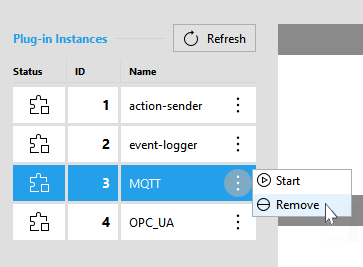
- Select the respective plugin instance on the left and click on the button " Remove plugin" on the bottom of the MERLIC RTE Setup.
The status of the plugin instance is no matter when removing the instance. It can be removed while the instance is running or stopped.