Combined Measuring
With these tools, you can perform additional measurements based on previous results:
Common Use Cases
Use this overview to find the right tool to measure relationships of multiple regions of interest (ROI).
|
Use Case |
Tool |
Usage |
|---|---|---|
|
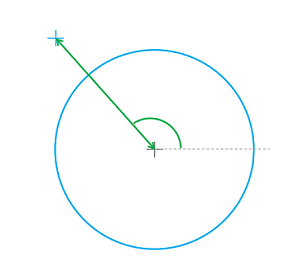
Fit a circle to points. At least three contour points are necessary to fit a circle. The points can be created in the tool or connected from a single previous tool like Create Point. To get the properties of the circle use the tool Get Circle Properties. |
||
|
Fit a segment to points. At least two points are necessary to fit a segment. The points can be created in the tool or connected from a single previous tool like Create Point. To get the properties of the segment use the tool Get Segment Properties. |
||
|
|
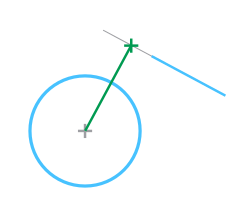
Measure distances between a circle and a point that may be positioned in, on or outside of the circle. The circle and the point must be connected from previous tools like Create Circle and Create Point. |
|
|
|
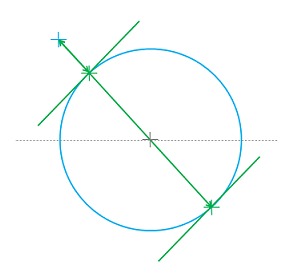
Measure perpendicular distances between a circle and a segment that may intersect, touch or lie outside the circle. The circle and the segment must be connected from previous tools like Create Circle and Create Segment. |
|
|
|
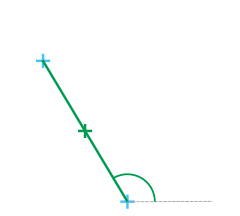
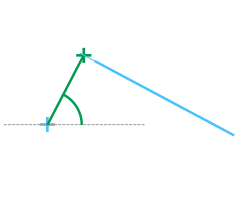
Measure the distance between two points as well as the orientation of the corresponding distance segment. The points can be created in the tool or connected from previous tools like Create Point. |
|
|
|
Measure several distances and the orientation between a segment and a point. Three distances are measured in this tool: the perpendicular distance, the minimum distance, and the maximum distance. The segment and the point must be connected from previous tools like Create Segment and Create Point. |
|
|
|
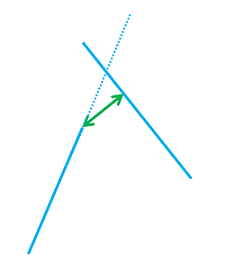
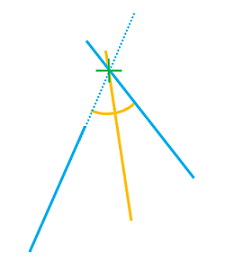
Measure the perpendicular distance and the angle between two segments. The tool provides additional information like the angle bisector. The segments must be connected from previous tools like Create Segment. |