Visualization
The following example shows two tool flows The tool flow of a MERLIC Vision App (MVApp) represents the sequence of tools and tool connections that have been configured for the MVApp. It defines the individual image processing steps that are performed when the MVApp is executed and visualizes dependencies between tools. The tool flow of the current MVApp is displayed in the Tool Flow panel of the MERLIC Creator. with parallelization. The tool flows are equivalent with regard to their execution order, although the tool T2 is arranged in different rows. Since both tools T1 and T2 are connected to the acquisition tool A, they are parallel concerning their connections and thus start their execution at the same time.
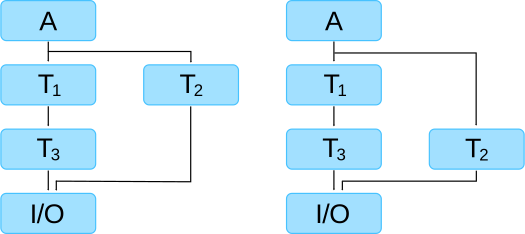
The horizontal arrangement of tools has no influence on the execution order, since the connections determine the data flow. The direction of the data flow is represented by the arrow direction. The tools are executed from top to bottom as visualized by the tool flow. The data are always transferred top down because the results of a tool can only be connected to the tool parameters of subsequent tools. It is not possible to create a connection from a tool result to a parameter of a previous tool or to a tool in the same row in the Tool Flow panel. In the example above the tool T3 receives its input data in both tool flows from the tool T1.


