MERLIC 26.03 comes with a lot of new and improved functionality. Here, you can find a quick overview of some of the most interesting changes. To see the list of all updates in this MERLIC version, please refer to the release notes.
New MERLIC Versioning and Licensing
Starting with this MERLIC version, the versioning system and licensing model of MERLIC has changed.
The versioning system of MERLIC is now based on the year and month of release (YY.MM). The new MERLIC version is therefore called MERLIC 26.03. It is available in two packages: "MERLIC" and "MERLIC Professional".
For both MERLIC packages, any number of camera devices can now be used. There is no longer any restriction on the number as in the previous licensing model.
In addition, there are two licensing add-ons that can be acquired in addition to the "MERLIC" package: "MERLIC Deep Learning Add-On" and "MERLIC Custom Tools Add-On".
A license for "MERLIC Professional" allows you to use all features of MERLIC, including MERLIC tools with MERLIC Deep Learning Add-on and integration of custom MERLIC tools.
A license for "MERLIC" is sufficient if you have no need for MERLIC tools with MERLIC Deep Learning Add-on or the integration of custom MERLIC tools. However, you can extend this license with the available MERLIC add-ons, also at a later time, to fit the requirements of your applications.
New Feature "Frontend Observability"
MERLIC makes way to enable observability of its components.
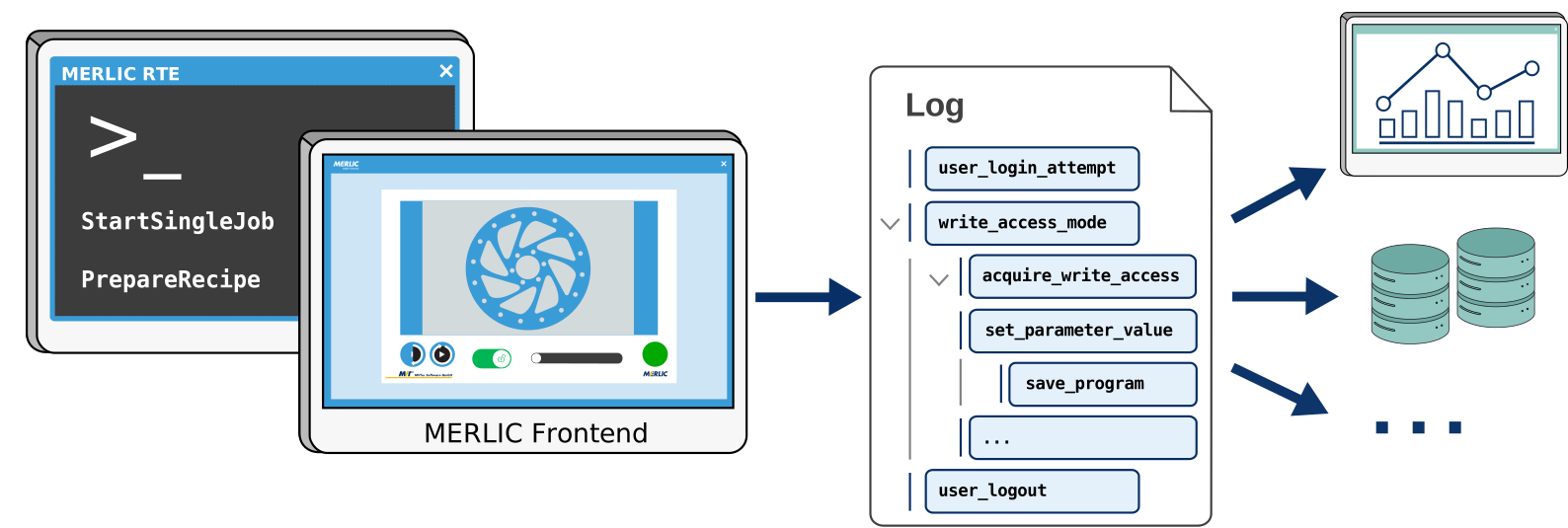
An important feature of MERLIC is the ability to modify MVApps during the process via the MERLIC Frontend. In this MERLIC version, a new feature is introduced, enabling observability functionality for the MERLIC Frontend. MERLIC RTE now provides an open interface to tie Frontend interaction into an observability pipeline, which allows the transmission of recorded traces such as parameter changes or user logins to any compatible observability product.
This enables users to track what happens in the MERLIC Frontend during MERLIC RTE mode and create an audit-trail.
Please contact our MVTec technical support if you want to try out the current state of the observability of the MERLIC Frontend. They will provide you with information on how to set up MERLIC for observability.
Improved "Write Access" Widget
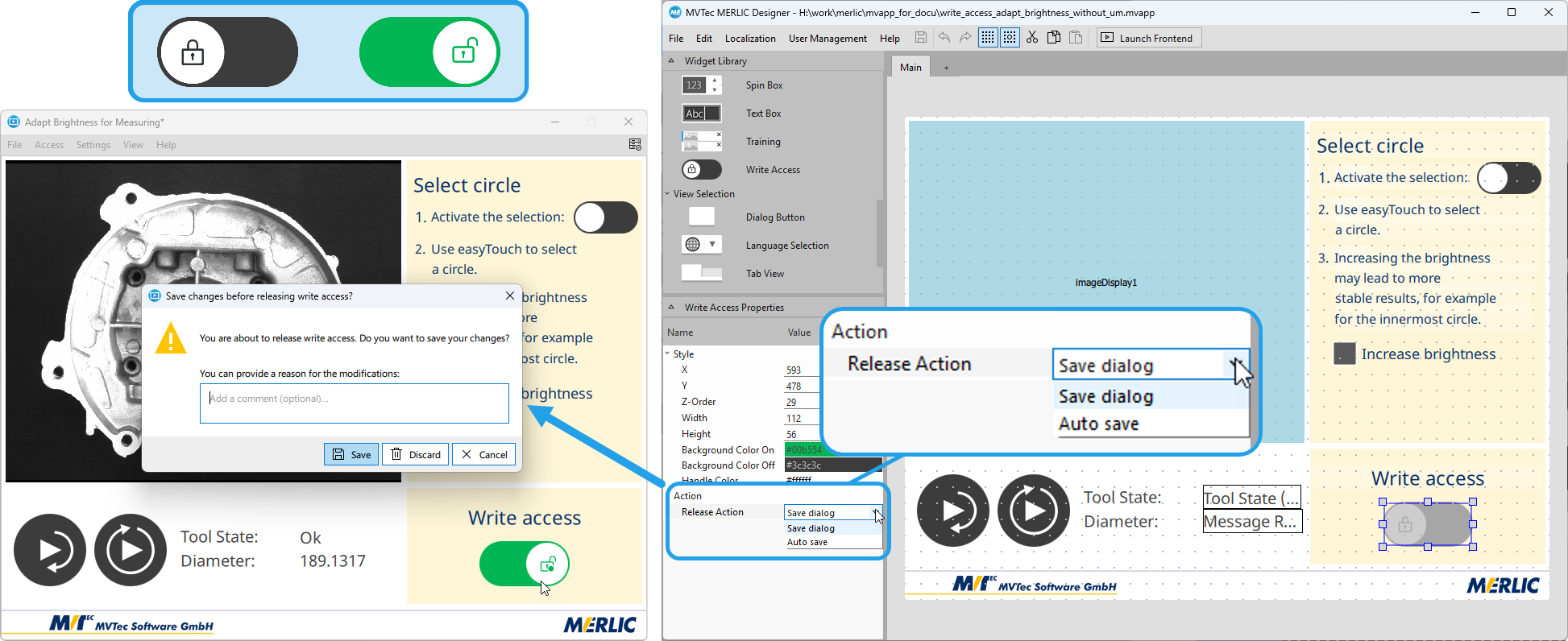
This MERLIC version comes with an improved write access for the MERLIC Frontend. When starting the Frontend, write access is automatically granted or disabled depending on the connected MERLIC server. When starting the Frontend in the Frontend Designer while creating the Frontend design, the "Write Access" widget is now disabled because write access is automatically granted. The widget is only enabled when the Frontend is connected to a MERLIC RTE instance. In addition, the icon for the "Write Access" widget has been improved to make it easier for Frontend users to differentiate the widget from the "easyTouch Button" widget. The widget now also depicts whether write access is currently granted in the Frontend and whether there are any unsaved changes.
The configuration options for the "Write Access" widget have also been extended. When creating the Frontend design for an MVApp, it is now possible to choose a so called release action, which will be triggered when releasing the Frontend write access while there are still unsaved changes. You may choose between saving the changes automatically or showing a save dialog, which allows Frontend users to discard the changes or to specify a reason for the changes. In combination with the user management, this also allows configuring multiple "Write Access" widgets with different release actions, for example, on different views for users with different authorization rights.
With the improved write access mode, also the documentation of the write access mode has been improved. It now describes more clearly the intended use, the differences depending on the server to which the Frontend is connected, and how to enable write access in MERLIC RTE mode.

Upcoming Feature: ADS Communication Plug-in
We are currently working on a new communication plug‑in that will support data exchange and device control via the TwinCAT Automation Device Specification protocol.
This plug‑in will enable MERLIC applications to interact with TwinCAT systems more seamlessly and efficiently. The plug-in will be provided as a separate installation package for MERLIC in the MVTec Software Manager (SOM). Once available, it can be added to your existing MERLIC installation.
Stay tuned for more details.
New Concept Tool "Tile Images"
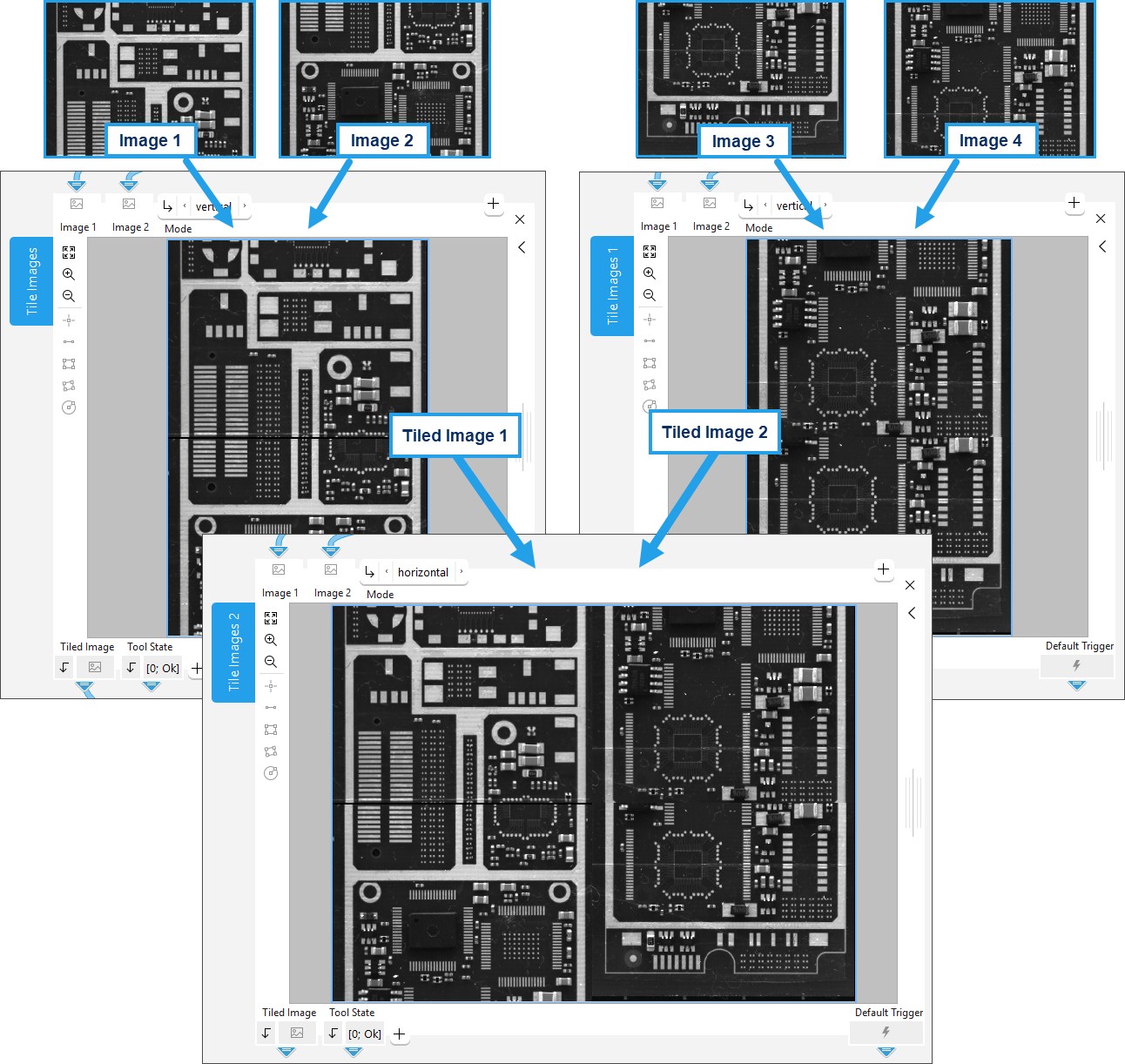
MERLIC has been extended by a new concept tool "Tile Images". It enables you to tile two images containing the same number of channels into one image. The images can be tiled either horizontally or vertically. If desired, you can use the tool multiple times to subsequently create an image based on a sequence of tiled images. In combination with acquisition sequences, this enables you to combine images that were acquired from a line scan or area camera.
Concept tools are preliminary MERLIC tools with new functionality in an early stage of development. You can test and evaluate the concept tools and contribute to future development by providing us feedback on the preliminary version. This helps us improving upcoming MERLIC tools and to decide further development steps for future MERLIC versions.
Tool Improvements
To profit from the improvements of the new HALCON version, the HALCON libraries used by MERLIC have been upgraded to HALCON 25.11 Progress. Some MERLIC tools have been extended to use functionality of the new underlying HALCON version and to integrate further improvements due to user feedback.
Improvements for Deep OCR
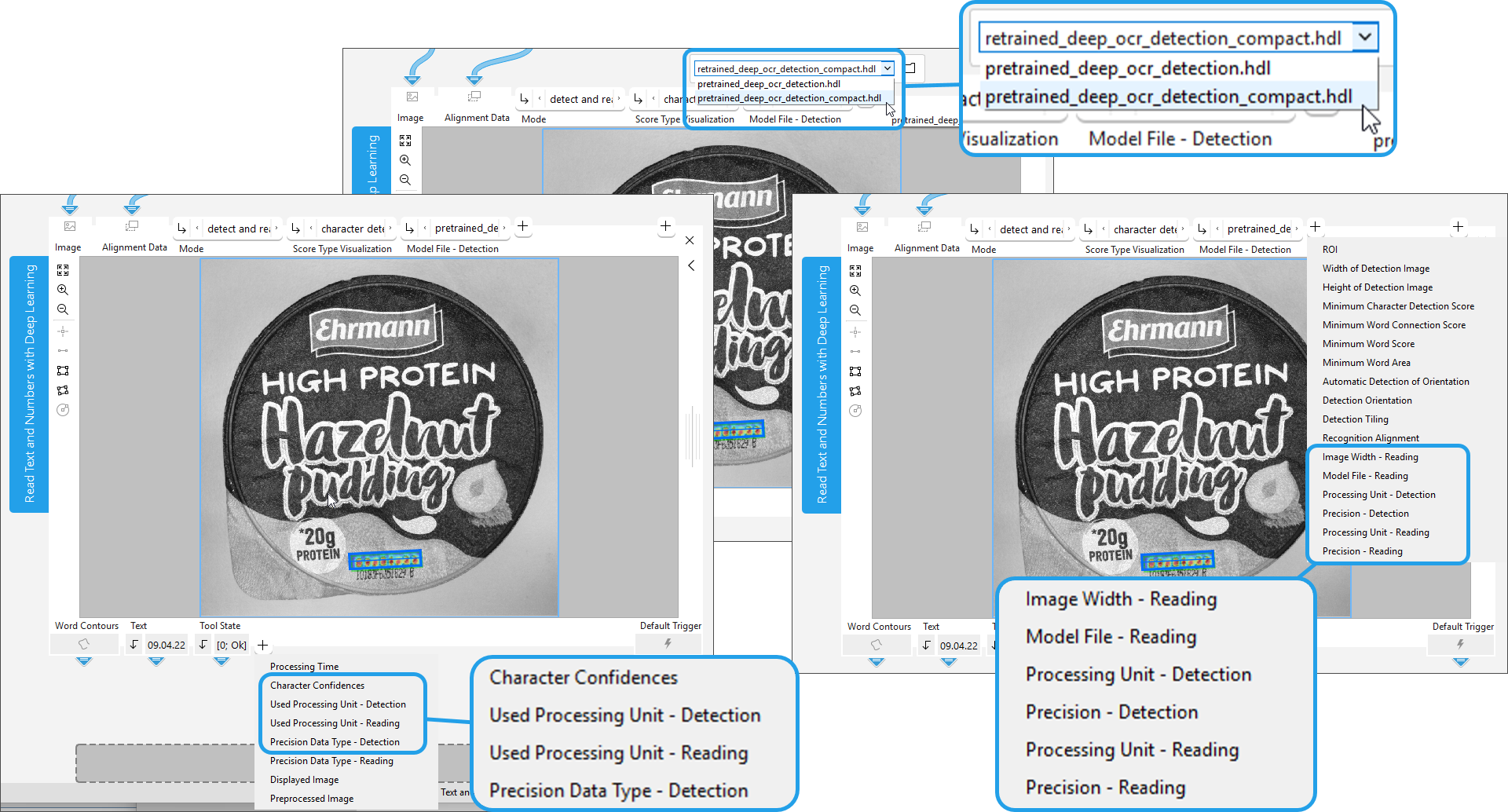
The MERLIC tool "Read Text and Numbers with Deep Learning" has been improved in many ways. It has been extended with a new Deep Learning model for the reading mode. The new model file "pretrained_deep_ocr_reading_compact.hdl" is more compact and can be used if time and memory are important factors for you.
The tool now also supports Deep OCR models that have been optimized in the MVTec Deep Learning Tool.
In addition, the parameters have been adjusted to allow configuring the Processing Unit, Precision, and Precision Data Type individually for the detection mode and the reading mode. In this context, further parameter names and result names have been revised for consistency and to make it easier to see which parameters can be set individually for the detection and reading mode.
Improved print quality verification for 2D data code reading
The MERLIC tools for reading 2D data codes now support the newest version of the verification standards for print quality inspection: ISO/IEC 15415:2024 for print quality inspection of two-dimensional barcodes and the ISO/IEC 29158:2025 for assessing the symbol quality of direct marked parts (DPM). This update affects the following tools:
- Read Aztec Code
- Read Data Matrix ECC 200
- Read PDF417
- Read QR Code
In this context, the parameter value for the ISO/IEC 29158 standard has been renamed from "ISO/IEC TR 29158 (AIM DPM-1-2006)" to "ISO/IEC 29158" in the tools "Read Aztec Code", "Read Data Matrix ECC 200", and "Read QR Code".
Usability Improvements for Accessing Help
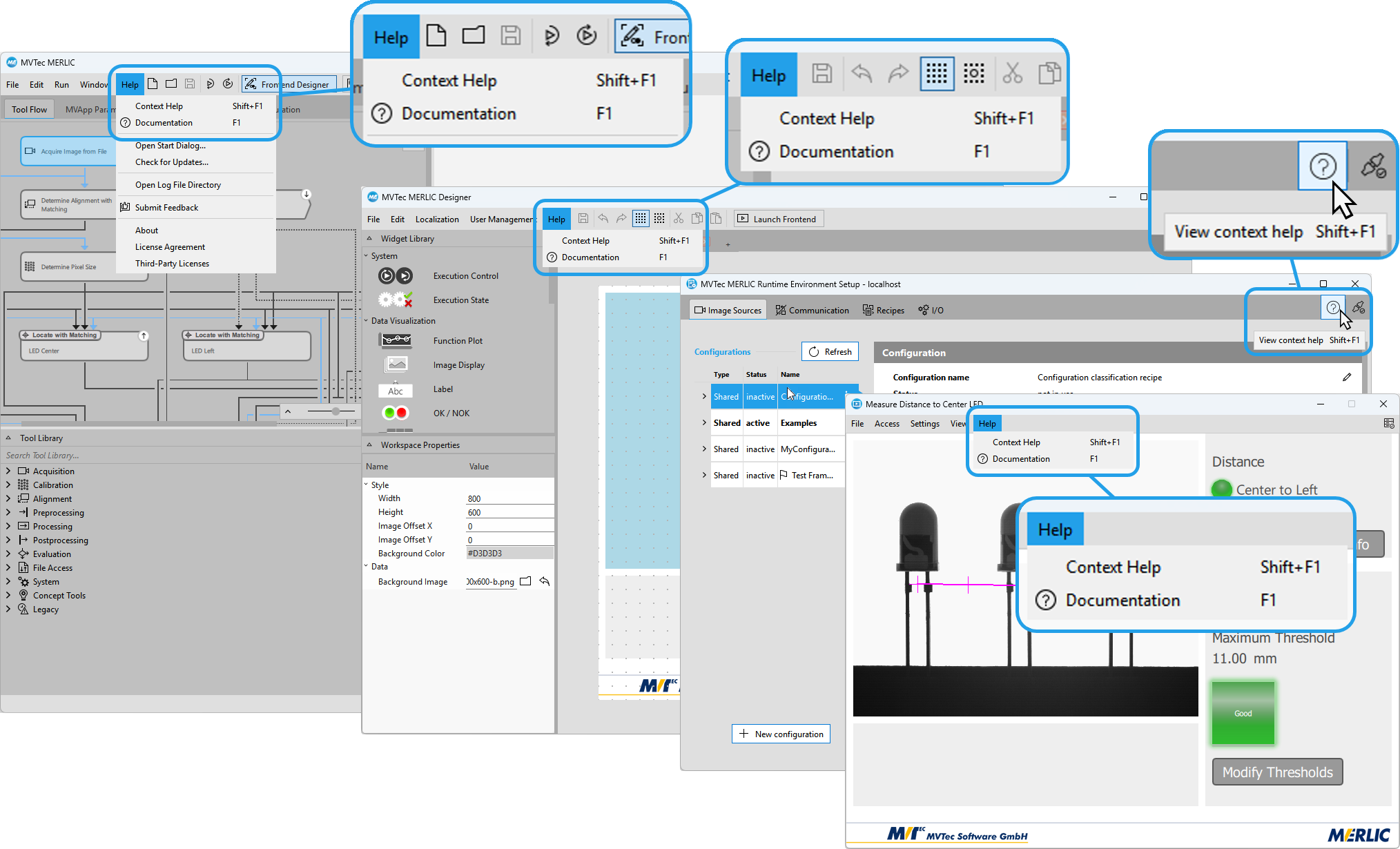
The usability of the help menus has been enhanced to provide more intuitive access to documentation. The "Help" menus in all components now provides menu entries to access context sensitive help and the start page of the MERLIC manual. In addition, the respective keyboard shortcuts are now also clearly indicated. The MERLIC RTE Setup has been extended by a new help button on the top-right corner. In addition to the keyboard shortcut, you can now also use the help button to open the context help for the respective tab in the MERLIC RTE Setup.
Improvements for the "OPC UA" Plug-in
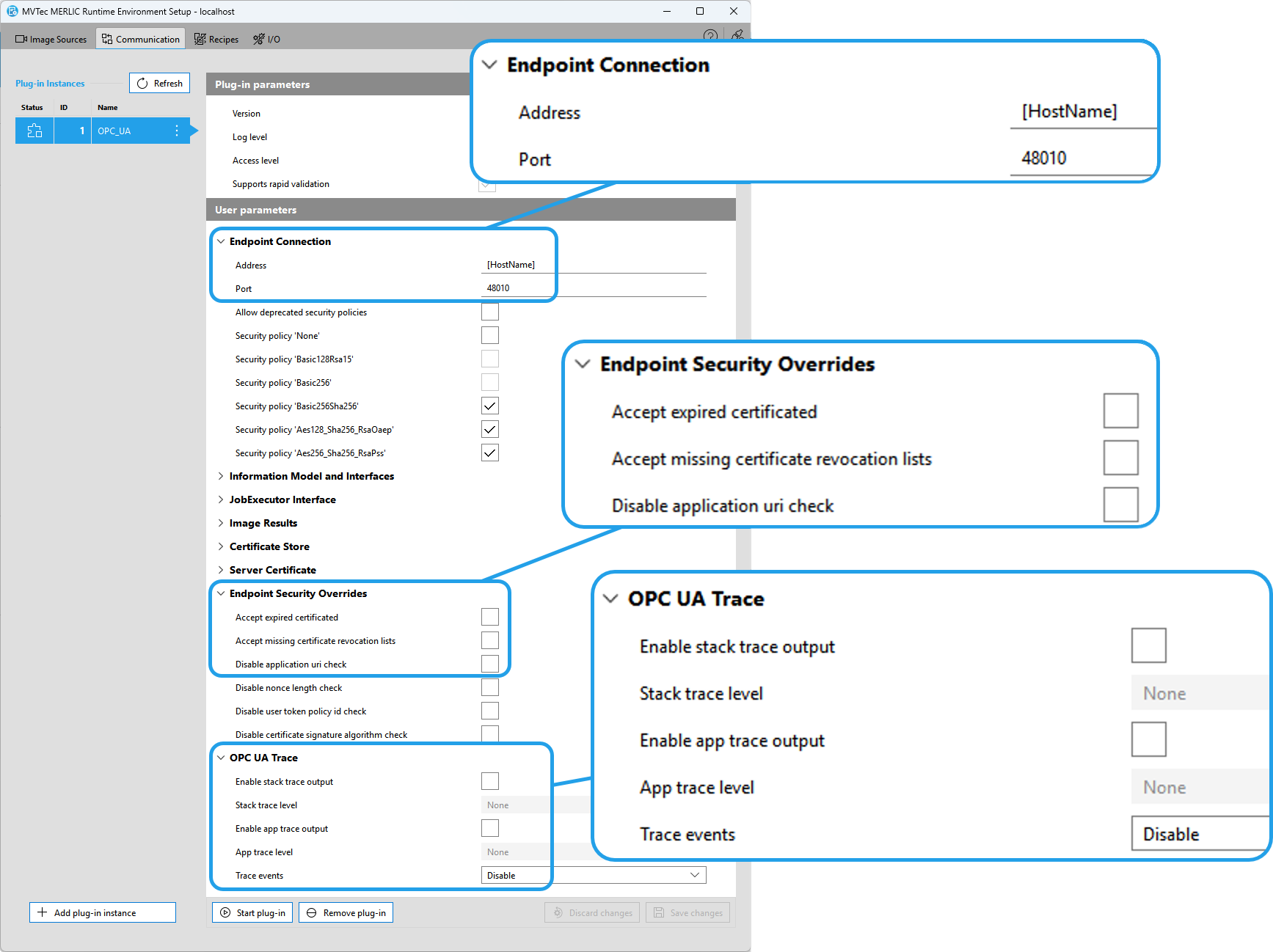
For the "OPC UA" plug-in several improvements have been made. The Unified Automation OPC UA SDK has been updated to version 2.01. In addition, the following improvements for the plug-in configuration have been made.
Changes for "trace" information
The plug-in now redirects the "trace" information from the stack and application directly into the MERLIC RTE log files removing the need of a separate log file. The plug-in configuration in the category "OPC UA Trace Settings" has been adjusted accordingly.
Configuration of the "Endpoint Connection"
The configuration of the "Endpoint Connection" has been extended by two new parameters "Address" and "Port", which can be used to define the IP address (IPv4 or IPv6) or host machine, and the port the connection. In this context, the "URL" parameter has been removed as it is no longer needed.
Configuration for the "Server Certificate"
Due to the changes for the configuration of the "Endpoint Connection", the default values of the "Domain name" parameter in the "Server Certificate" category has been changed from "[NodeName]" to "[HostName]".
Configuration for "Endpoint Security Overrides"
In the category "Endpoint Security Overrides", some parameters have been renamed for more clarity:
- "Accept missing CRLs" has been renamed to "Accept missing certificate revocation lists"
- "Disable ApplicationUri check" has been renamed to "Disable application uri check"
- "Disable UserToken PolicyId check" has been renamed to "Disable user token policy id check"
Changes for Legacy MERLIC Tools
Removed legacy tools
The MERLIC tools "Acquire Image from Camera", "Read from Socket", and "Write to Socket" are now no longer available. The tools were set as legacy since MERLIC version 5.0 and have now been completely removed.
MVApps containing these tools need to be updated in the new MERLIC version. We recommend using the Image Source Manager (ISM) to acquire images from camera devices. For the communication via sockets, we recommend using the additional communication plug-in "TCP Socket".
Tools newly set as legacy
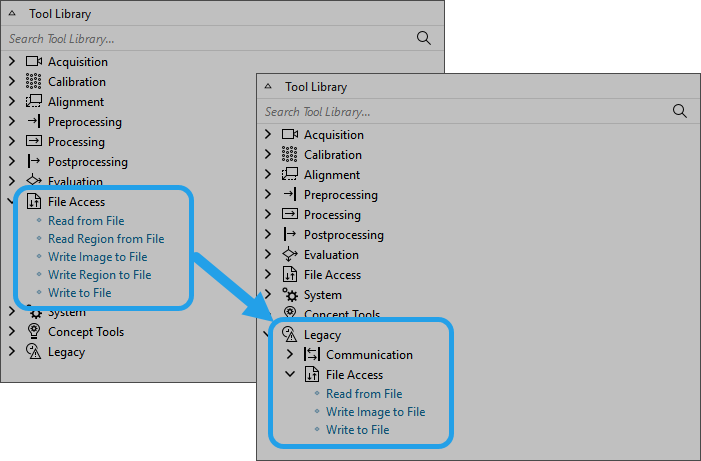
Starting with this MERLIC version, the MERLIC tools "Read from File", "Write Image to File", and "Write to File" are now set as legacy. They have been moved to the tool category "Legacy > File Access". The tools are still available to provide backward compatibility but they will no longer be maintained or updated in upcoming MERLIC. We recommend using the communication plug-ins "save-results" and "save-images" instead.


