Write Access in the Frontend
When running a MERLIC Frontend, two different modification modes can be distinguished: a MERLIC Frontend with active write access and a MERLIC Frontend without write access.
Acquired vs. Released Write Access
If write access is acquired in the MERLIC Frontend, the control is given to the MERLIC Frontend. In this mode, user interactions such as executing the MVApp or modifying parameters are possible, provided the Frontend design of the MVApp is configured accordingly with the respective widgets.
If write access is released, the control is returned to the communication device used for MERLIC RTE. This means, executions and modifications can be triggered only by the communication device, for example, a programmable logic controller (PLC).
Concept and Default Mode
The default mode of write access depends on the server to which the MERLIC Frontend is connected. A MERLIC Frontend can connect to either an instance of MERLIC Creator or an instance of MERLIC RTE.
If the MERLIC Frontend is connected to a MERLIC Creator, write access is automatically granted in the MERLIC Frontend. This is usually the case when the MERLIC Frontend is started from the MERLIC Creator or the Frontend Designer while implementing the MVApp and its Frontend design.
If the MERLIC Frontend is connected to a MERLIC RTE instance, usually in productive use, write access is automatically disabled in the MERLIC Frontend. In this case, the control is given to the communication device used for MERLIC RTE.
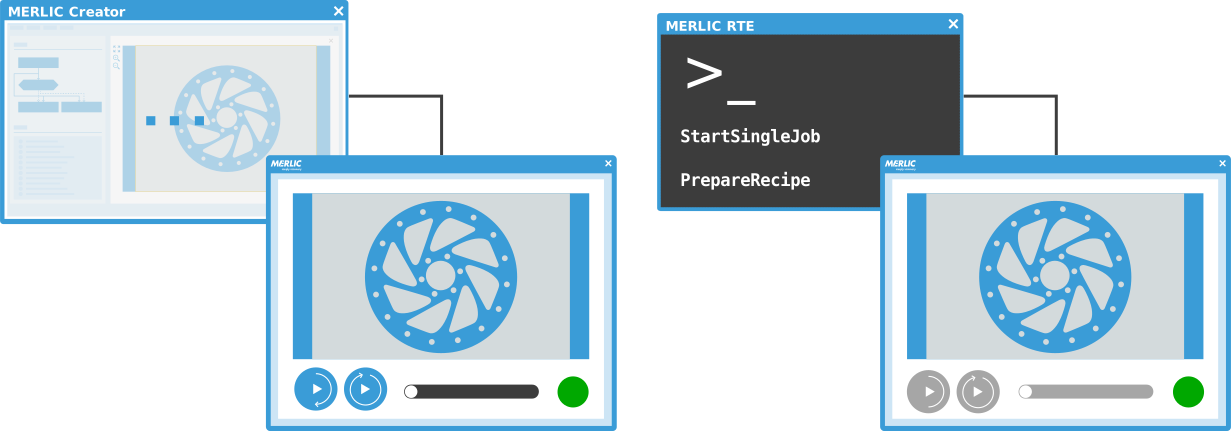
To accommodate use cases where it is required to allow user interactions and modifications in the MERLIC Frontend while MERLIC RTE is running, MVApps can be configured to enable users acquiring write access. If the MVApp is configured accordingly and then loaded in MERLIC RTE mode, users are allowed to acquire write access in the MERLIC Frontend to apply and test the desired modifications.
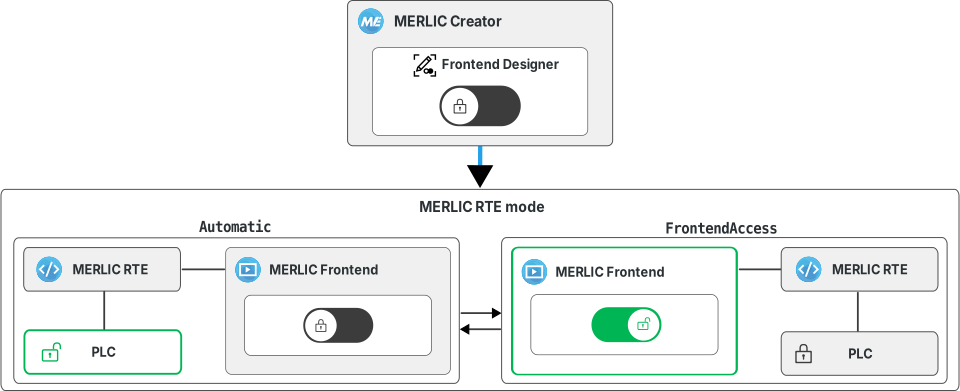
The following sections describe how to enable acquiring write access in the MERLIC Frontend. For more information on using the write access mode during MERLIC RTE, see Acquiring and Releasing Write Access in the Frontend.
In MERLIC RTE mode, write access in the MERLIC Frontend is intended only for temporary use. For example, to adjust some parameters and validate the changes with a few executions. Afterward, write access should be released to return control to the used communication device such as a programmable logic controller (PLC). The write access mode in the MERLIC Frontend is not intended for continuous use!
Setting up the MVApp for Write Access
To enable users of the MERLIC Frontend to acquire write access during MERLIC RTE, the Write Access widget must be added to the Frontend design of the MVApp.
- Open the MVApp in MERLIC Creator.
- Open the Frontend Designer.
- Add the "Write Access" widget to the Frontend design.
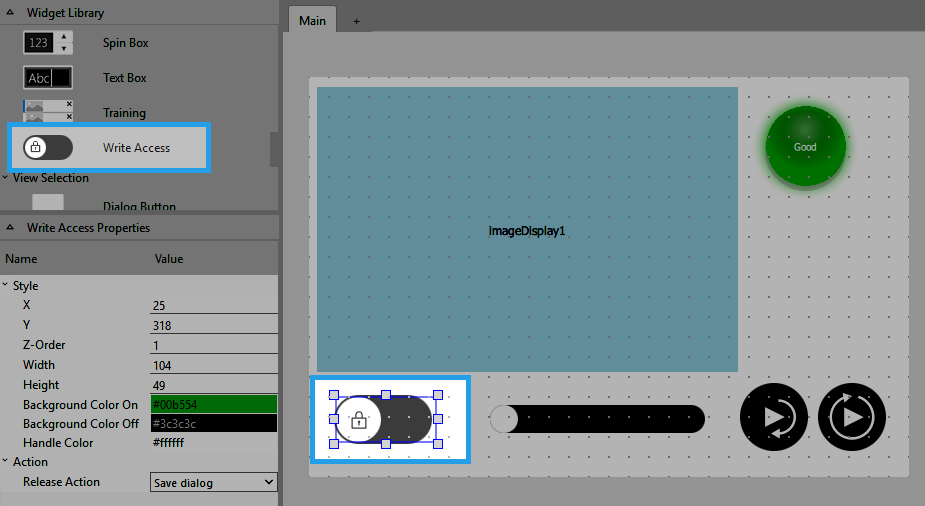
- Optionally, customize the layout and properties of the widget. For more information, see Write Access.
- Save the changes.
When loading the MVApp in MERLIC RTE mode via a recipe file, users can then use the widget in the MERLIC Frontend to acquire write access. For more information, see Acquiring and Releasing Write Access in the Frontend.
Enabling Write Access Only for Selected Users
If you want to enable the activation of write access only for a selected group of users, you can use the MERLIC user management and design the Frontend with multiple views. This way, you can add the "Write Access" widget to a specific view that is only accessible for selected users. For more information, see Setting up the User Management and Working with Views.


