The User Login in the MERLIC Frontend
If a user management data base has been set up for a MERLIC Vision App, you have to enter your user credentials when opening the application in the Frontend. Without valid login details, you have no access to the application in the Frontend. This enables you to control the access permissions of the Frontend for individual users.
To get more information about how to enable and adjust the user management settings, please refer to the chapter Setting up the User Management.
Logging In to the Application
Logging in When Opening a MERLIC Vision App
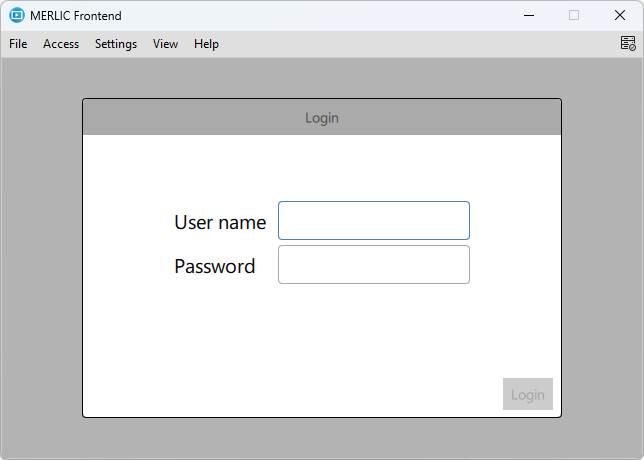
- Open the MERLIC Vision App in the Frontend. The login dialog is automatically displayed.
- Enter your user name and password and click 'Login' to open the application in the Frontend.
The Frontend is displayed depending on your access rights. If you have write permissions for a view, you can use all widgets in the view and also make adjustments at the parameter values. If you have only read permissions for a view, you may only see which elements are contained in the view, but you may not make any adjustments. However, if you have no access rights to a view, it will not be visible for you. To get more information about the differences between the access rights, please refer to the chapter Assigning Access Rights.
If a different user wants to login to the application in the Frontend, you can open the login dialog again and change the user.
Changing the User in the Frontend
- Open the Frontend menu entry 'Access' and click on 'Login' to display the login dialog of the Frontend.
- Enter your user name and password and click 'Login' to open the application for the new user.
Changing the Password
If the user accounts are set with the 'Password Change' option, the users are allowed to change their password directly from the Frontend.
- Open the Frontend menu entry 'Access' and click on 'Change Password'.
- Enter your current password and then the new password.
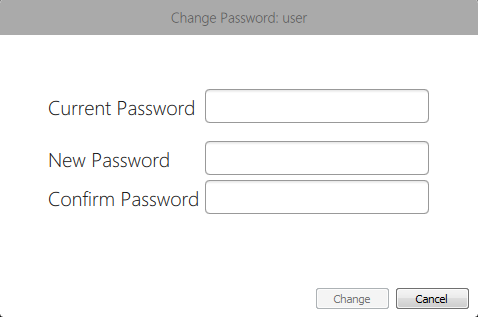
- Click 'Change' to adopt the changes.
Logging out of the Application
Open the Frontend menu entry 'Access' and click on 'Logout "USERNAME"' to log out of the application. The Frontend window will then display the login dialog.


