Acquiring and Releasing Write Access in the Frontend
By default, write access is only available for MERLIC Frontends that are connected to an instance of MERLIC Creator. MERLIC Frontends that are connected to an instance of MERLIC RTE, usually in productive use, are locked for user interactions and modifications. When MERLIC RTE is running, users can acquire write access in the MERLIC Frontend only when the currently loaded MVApp has been set up accordingly. For more information on setting up the MVApp to allow acquiring write access during MERLIC RTE, see Write Access in the Frontend.
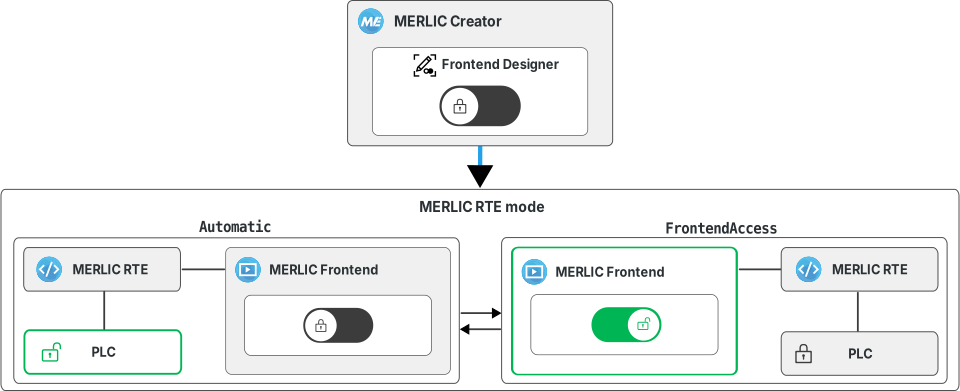
In MERLIC RTE mode, write access in the MERLIC Frontend is intended only for temporary use. For example, to adjust some parameters and validate the changes with a few executions. Afterward, write access should be released to return control to the used communication device such as a programmable logic controller (PLC). The write access mode in the MERLIC Frontend is not intended for continuous use!
Acquiring the Write Access
To acquire write access for the MERLIC Frontend during MERLIC RTE, you have to use the "Write Access" widget.
-
Click on the handle of the "Write Access" widget. The control will be given to the MERLIC Frontend. The activated write access mode is also indicated by the widget icon
 . As soon as write access is acquired, the internal state of MERLIC changes to "OperationalFrontendAccessMode". For more information, see section Internal State Changes.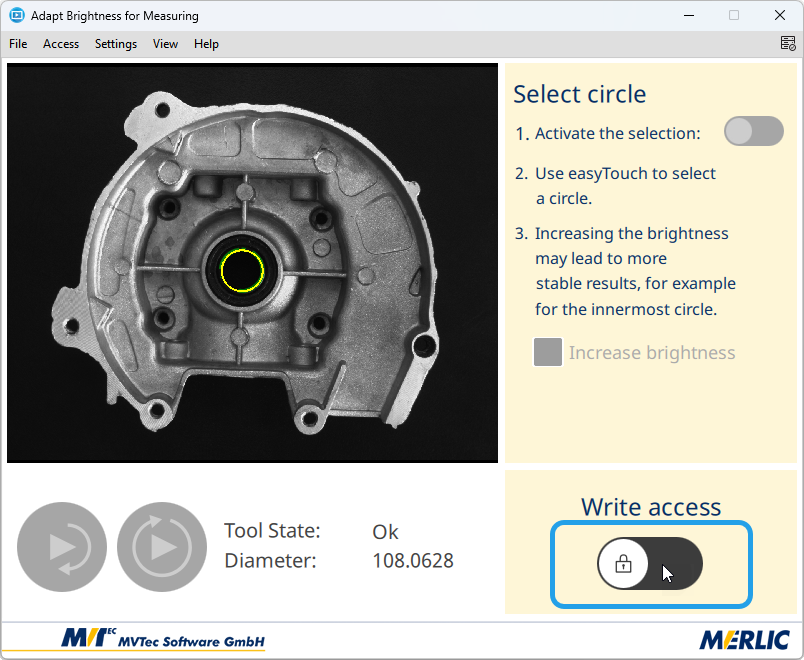
-
Make the desired parameter changes and test runs as required.
The write access in the MERLIC Frontend remains active until it is explicitly released. To return control to your communication device, you have to release write access explicitly.
Releasing the Write Access
To transfer the control back to the communication device, you have to release write access explicitly in the MERLIC Frontend. After releasing the write lock, user interactions in the Frontend are not possible anymore and the write permission is back at your communication device. The internal state of MERLIC changes back to "Ready". For more information, see section Internal State Changes.
You can release write access in different ways:
Using the "Write Access" Widget
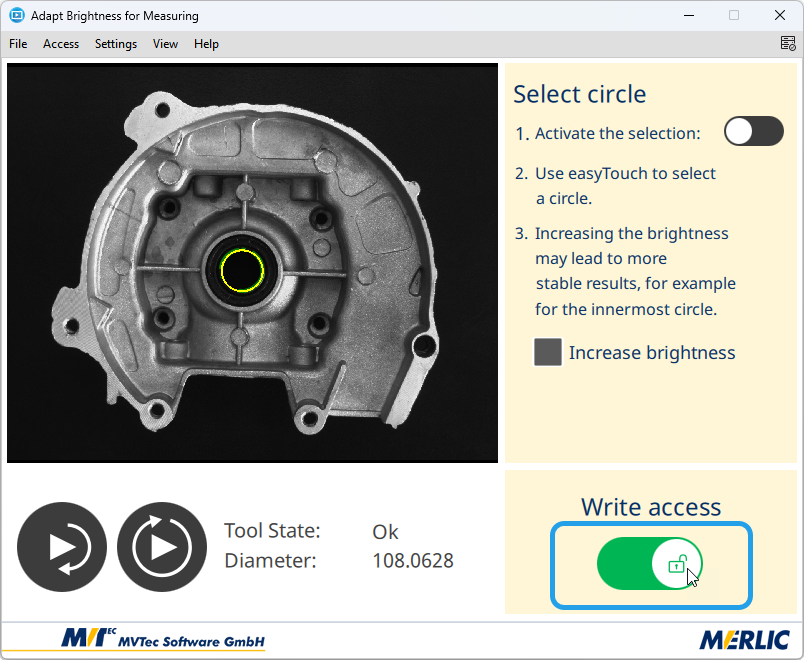
Click on the handle of the "Write Access" widget. In case multiple "Write Access" widgets are available, for example, on different tabs for different user groups, only the widget that was used to acquire write access can be used to release it.
Using the MERLIC Frontend Menu or Keyboard Shortcut
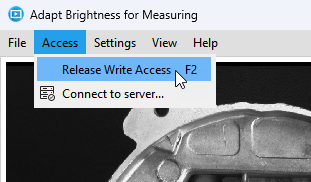
Open the Frontend menu "Access" and click on "Release Write Access". Using this option also triggers the release action that is configured for the respective "Write Access" widget.
The menu entry is only available if the Frontend properties for the MVApp are configured to show the menu bar. Alternatively, you can use the keyboard shortcut F2.
Closing the MERLIC Frontend window
If you close the window of the MERLIC Frontend while the write access mode is active, write access is automatically released.
It is not possible to adjust any values of the recipe file from the MERLIC Frontend. If you made any changes at parameter values that are actually set via the recipe file, you cannot adopt these changes in the recipe.
These changes will be lost when a recipe file is loaded, that is, when the control is switched back to your communication device and the "PrepareRecipe" command is triggered. Releasing write access does not cause the recipe file to be reloaded. Therefore, these kind of changes remain in the current application only as long as the "PrepareRecipe" command is not triggered.
Internal State Changes
State Changes when Acquiring Write Access
As soon as write access is acquired in the MERLIC Frontend, the internal state of MERLIC changes to the "OperationalFrontendAccessMode". In this mode, the respective communication device or control system is not allowed to trigger any commands for the execution of the MVApp or loading a recipe file.
If a digital I/O device or camera device with GenICam compliant digital I/O channels is used, the "Ready" signal is set to 0 when MERLIC is in "OperationalFrontendAccessMode". However, it is still possible to query the results of the MVApp execution. When checking the MERLIC state, it is possible that the "Ready" signal is set to 1 briefly. If a digital I/O device is used, all its previously set result signals will be set to zero when the Frontend access is engaged.
States Changes when Releasing Write Access
When releasing write access in the MERLIC Frontend, the internal state of MERLIC changes to "Ready" (via the modes "Preoperational" and "OperationalAutomaticMode").
If a digital I/O device or camera device with GenICam compliant digital I/O channels is used, the "Ready" signal is set to 1 to indicate that MERLIC is ready for commands from the device.
If you are using a digital I/O device or camera device with GenICam compliant digital I/O channels, the value of the "Ready" signal could lead to a misconception about the current state of MERLIC because the "Ready" signal is also expected to be set to 0 if MERLIC processes a command of the communication device or the control system, for example, the "StartSingleJob" command.
For example, if the communication device triggers the "StartSingleJob" command, the respective signal for the single execution is set to 1. MERLIC starts with the single execution as soon as the command has been recognized. If a user acquires write access for the MERLIC Frontend and MERLIC receives this request exactly during the time delay in which the signal for the single execution has not yet been recognized, MERLIC will change to the "OperationalFrontendAccessMode" mode because the respective request was recognized first. The expected single execution will not be processed successfully. However, it might seem as if MERLIC processes the "StartSingleJob" command because the "Ready" signal has been set to 0. It is not possible to track why the "Ready" signal has been set to 0 because internal MERLIC states "SingleExecution" and "OperationalFrontendAccessMode" cannot be queried when using a digital I/O device or camera devices with GenICam compliant digital I/O channels.
To avoid any misconceptions and to ensure a correct manufacturing process, we recommend to acquire write access in the Frontend only with careful consideration of the current manufacturing process and in synchronization with the machine controller.
We also recommend to restrict the right to acquire write access to a selected group of users to ensure that only authorized users have access to this functionality. For more information about the user management of MERLIC, see Setting up the User Management.


