 Concept Tools
This tool category provides so called "concept tools" of MERLIC.
A concept tool is a preliminary MERLIC tool with new functionality in an early stage of development. You can test and evaluate the new functionality of a concept tool and you can give feedback on the preliminary version of the tool early on. We appreciate all feedback on a concept tool. It helps us to improve upcoming MERLIC tools and to decide further development steps for future MERLIC versions.
Concept tools are fully tested and stable for productive use. However, they may change in future MERLIC versions and compatibility is not guaranteed.
Limitations of Concepts Tools
There are some limitations that apply to tools of this tool category:
- Besides a short documentation in the Quick Info panel of a concept tool, no further documentation is provided.
- Concept tools with deep learning functionality are only available for you to test if your MERLIC license fulfills the respective requirements. Find out more in the topic Deep Learning - AI.
- The name of the concept tool as well as the names of tool parameters and results may change in future MERLIC versions.
- We cannot guarantee that the compatibility is provided in future MERLIC versions.
- We cannot guarantee that the concept tool will also be part of MERLIC in future versions.
Current Concept Tools
In this MERLIC version, the following concept tool is provided:
- Add Overlay to Image: This tool can be used to add various overlays to an image.
- Reconstruct Surface with Photometric Stereo: This tool can be used to reconstruct a surface using the photometric stereo technique.
- Tile Images: This tool can be used to tile two images either horizontally or vertically.
All concept tools of a MERLIC version can be found in the tool category "Concept Tools". Concept tools with deep learning functionality are sub-categorized as "Concept Tool - AI". In the Tool Flow panel, a concept tool can be recognized by the respective icon of the tool category .
The number and type of concept tools that are provided in MERLIC may vary in each MERLIC version. Thus, in future MERLIC versions it might be the case that multiple concept tools or none at all will be provided. If no concept tools are available in a MERLIC version, the tool category will not be visible in the Tool Library.
How to Provide Feedback on a Concept Tool
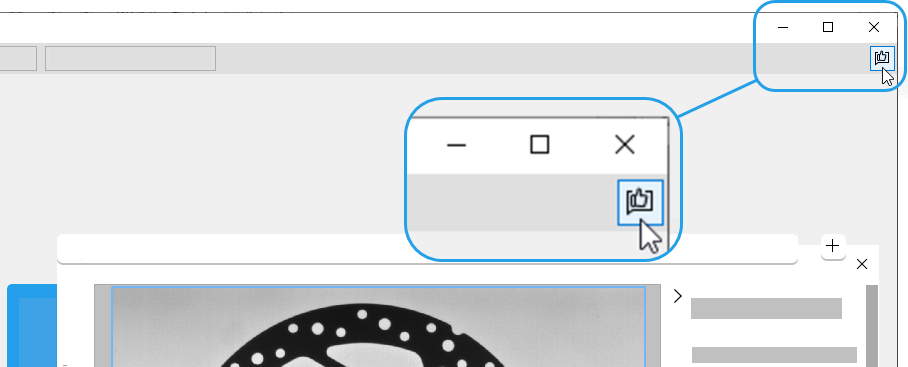
You can provide your feedback or new ideas directly from the MERLIC Creator in two ways:
- Open the MERLIC Creator and click on the following icon on the top right of the menu bar:

- Open the MERLIC Creator and click on the menu item "Help" in the menu bar. There you can find the menu entry "Submit Feedback":
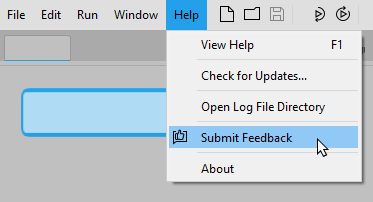
No matter which way you chose, you will be automatically forwarded to the MVTec MERLIC feedback page on the MVTec website. Here, you can submit your feedback in the form.


