Deep Learning - AI
With these tools, you can use deep learning technology to categorize images. The term deep learning (DL) refers to a family of machine learning methods. MERLIC provides tools for the methods classification and anomaly detection. The distinguishing feature is either an anomaly or a previously defined class.
Detect Anomalies in the Global Context
License Requirements
To use the MERLIC tools of the "Deep Learning - AI" category, one of the following license criteria must be fulfilled:
- You have a license for the "MERLIC Professional" package.
- You have a license for the "MERLIC" package and the "MERLIC Deep Learning Add-on".
Support of AI Accelerator Hardware
MERLIC comes with Artificial Intelligence Acceleration Interfaces (AI²) for the NVIDIA® TensorRT™ SDK and the Intel® Distribution of OpenVINO™ toolkit. They enable you to use AI accelerator hardware that is compatible with the NVIDIA® TensorRT™ SDK or the OpenVINO™ toolkit to optimize deep learning models for inference in MERLIC tools with deep learning functionality. As a result, significantly faster deep learning inference times can be achieved.
To get more general information about the AI² interface, e.g., the system requirements and how to use hardware that can be accelerated via the OpenVINO™ toolkit or NVIDIA® TensorRT™ in MERLIC, see the topic AI² Interfaces for Tools with Deep Learning.
Common Use Cases
Use this overview to find the right deep learning tool.
|
Task |
Tool |
Usage |
|---|---|---|
|
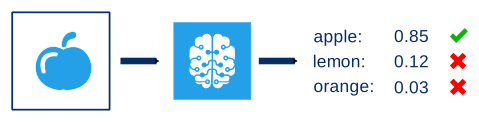
Classify an entire image into one class out of a given set of classes.
Use this tool if you have a data set where all classes are represented equally and enough data for all classes is present. The classification model can learn the features explicitly during training. Thus, its highly likely that this method will perform better than an anomaly detection. |
For example, differentiate "good" samples and "bad" samples. In order to do this, you must first teach the deep learning model which images belong to the "good" category and which images belong to the "bad" category. To teach the neural network, use the MVTec Deep Learning Tool. The workflow is as follows: Define classes, label your images accordingly, and finally, train the deep learning model. The training will result in a so-called classifier. Import this classifier into MERLIC and apply it to new images. These images will then be categorized into the previously defined classes. |
|
|
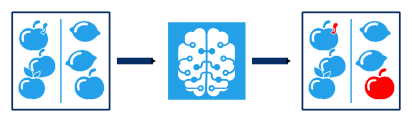
Assign to each pixel the likelihood that it shows an unknown feature. A score is assigned to every pixel of the input image, indicating how likely it shows an unknown feature, that is, a structural anomaly.
Use this tool to find structural anomalies in images in order to differentiate between "good" samples and "bad" samples. A "good" sample is an image without defects whereas a "bad" sample is an image defect. This tool is a good solution if you have only few images or if you don't know how the defects that will appear later on, because you only need good samples to train the model. |
To find anomalies, you first need to train the deep learning model. It is sufficient to train how good samples (without anomalies) look like. Bad samples are optional but can help to improve the model. After the training, the deep learning model will be able to decide whether new images have a defect or not and where in the image the defect is located. |
|
|
Assign to each pixel the likelihood that it shows either an unknown feature or that it violates constraints regarding the image content. This likelihood is returned in a score that is assigned to every pixel of the input image. It indicates how likely it shows a structural anomaly such as an unknown feature on a smaller scale or a logical anomaly such as a constraint violation regarding the image content on a larger scale.
Use this tool to find structural and logical anomalies in images in order to differentiate between good samples, that is, images without defect, and bad samples, that is, images with defect. This tool is a good solution if you are searching for logical anomalies on a large scale. However, it takes a lot of images to train the deep learning model used to detect anomalies in a global context. As long as a large enough data set is available, this should be no problem, as the MVTec Deep Learning Tool is designed to work with many images. Thus, if you have a large data set to train the model, the tool "Detect Anomalies in the Global Context" could also be your choice when looking for structural anomalies, as it is much easier to train a deep learning model with lots of images using the MVTec Deep Learning Tool instead of the training mode in the MERLIC tool "Detect Anomalies". |
To find anomalies in the global context, you first need to train a deep learning model with the MVTec Deep Learning Tool or MVTec HALCON. Import this deep learning model into MERLIC and apply it to new images. The deep learning model will be able to decide whether new images have a defect or not and where in the image the defect is located. |
|
|
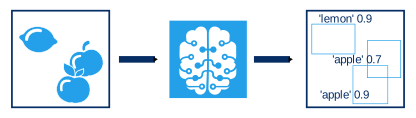
Find objects of pre-defined object classes and located them in the image. Depending on the used deep learning model, you can also get the respective regions of the objects.
Use this tool if you have a data set where all classes are represented equally and if enough data for all classes are present. The deep learning model can learn the features explicitly during training. For example, you can use this tool if you want to pick up objects and place them in the right position. In addition, you can use this tool if you want to distinguish multiple instances of the same class by using an instance segmentation model. |
To locate objects with this tool, you first need to train a deep learning model which can then be used as input for this tool. You can use deep learning models for object detection or instance segmentation which have been trained with the MVTec Deep Learning Tool or MVTec HALCON. The deep learning model will be able to recognize objects of the given classes and mark where in the image the objects are located. |
|
|
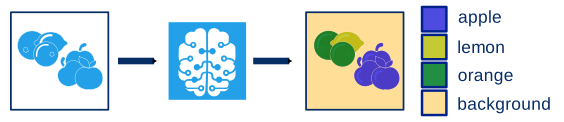
Assign each pixel of an image to a given class using a deep learning network for semantic segmentation and recognize regions of pixels belonging to the same class.
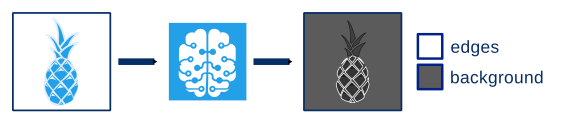
In the example above, the input image is segmented in four different classes. Every pixel of the input image is assigned to a class but neither the three different instances of the class "apple" nor the two different instances of the class "orange" are distinguished objects. A special case of semantic segmentation is edge extraction where the model is trained to distinguish between two classes:
In contrast to instance segmentation, the semantic segmentation method does not distinguish between multiple instances of the same class. If your application requires to distinguish objects of the same class, you can use the tool "Find Objects". |
To segment images with pixel precision into predefined classes, you first need to train a deep learning model for semantic segmentation with the MVTec Deep Learning Tool or MVTec HALCON. You can then use this deep learning model in the MERLIC tool "Segment Image Pixel-Precisely" and apply it to the images. When moving the mouse pointer over the image in the Tool Board, a label with information on the segmentation is displayed at the mouse pointer. It shows the name of the class that is assigned to the pixel at the current mouse position as well as the corresponding confidence.
|