Communication Tab
The " Communication" tab of the MERLIC RTE Setup enables you to configure all types of communication plugins both on the local system and on remote systems.
MERLIC provides several standard and example communication plugins that can be used immediately after the installation of MERLIC. There are also additional communication plugins that are available as separate installation packages for MERLIC in the MVTec Software Manager (SOM). These can be used in MERLIC after installing the respective SOM package.
It is also possible to configure custom communication plugins that were implemented using the provided SDK for the plugin development. For more information, see the Communication Plugin Development Manual.
Requirements
The configuration options on the "Communication" tab are only available if the MERLIC RTE Setup is connected to a running instance of MERLIC RTE. If you want to configure communication plugins on a remote system, you have to make sure to run MERLIC RTE on the remote system before connecting the MERLIC RTE Setup. Otherwise, no plugin can be added or configured because no configuration service is available. For more information on connecting to a remote system, see Connecting the MERLIC RTE Setup.
The "Communication" tab is only available if MERLIC RTE Setup is connected to a MERLIC RTE instance. Make sure to first start MERLIC RTE before connecting the MERLIC RTE Setup.
Overview
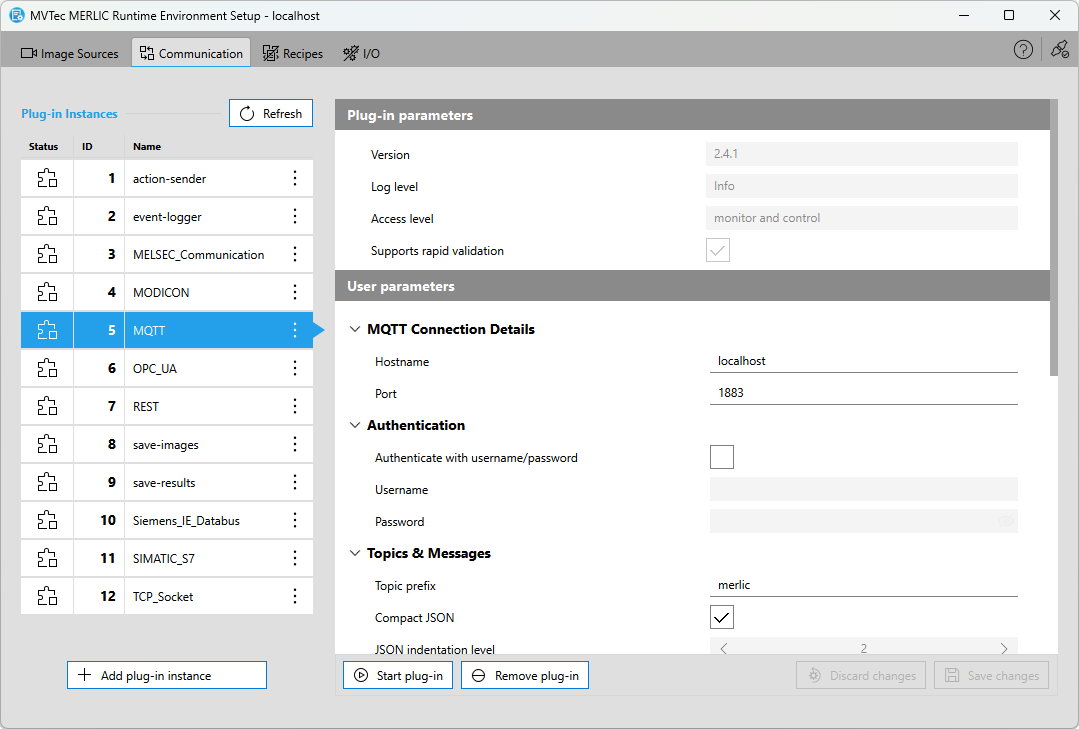
On the left of the "Communication" tab, you can check which plugins are currently available for use. You can also add new instances of the respective plugins for the configuration. The main area on the right shows the parameters of the plugin instance which is currently selected. If you select a plugin instance that has been configured before, the latest configuration is loaded. Otherwise, the default configuration is shown. If you are finished with your configuration, you can save the changes and start with the execution of the plugin.
Communication plugins can be instantiated multiple times, that is, you can use multiple instances of a plugin with an individual configuration. In the "Communication" tab, you can therefore work with instances of the respective plugin. If you add a new plugin instance, you can check the current configuration for this instance and adjust the available user parameters that have been defined in the implementation of the respective plugin. In addition, you can also start and stop the selected instances of the communication plugins in the "Communication" tab.
Get More Information
You can find more information on the available communication plugins, their configuration, and usage in the following chapters: