Viewing and Activating Sequences
When creating an image source configuration and image source, a base acquisition sequence is automatically created. If you also saved alternative parameter sets for your image sources, managed sequences are also created automatically. Custom sequences must be created and configured manually.
You can get an overview of the available acquisition sequences for a specific image source configuration on the "Image Sources" tab of the MERLIC RTE Setup. This overview also enables you to change the currently active sequence and to select a default sequence for the image source configuration.
Viewing the Available Acquisition Sequences
The list of acquisition sequences is shown in the overview of the image source configurations.
- In the "Image Sources" tab of the MERLIC RTE Setup, select the image source configuration.
- Check the available sequences on the right. For simplicity, the overview of the acquisition sequences is only shown when at least one acquisition sequence is available in addition to the base sequence. This is the case when custom sequence files have been manually placed in the configuration directory or when alternative parameter sets have been saved for at least one of the image sources in the configuration
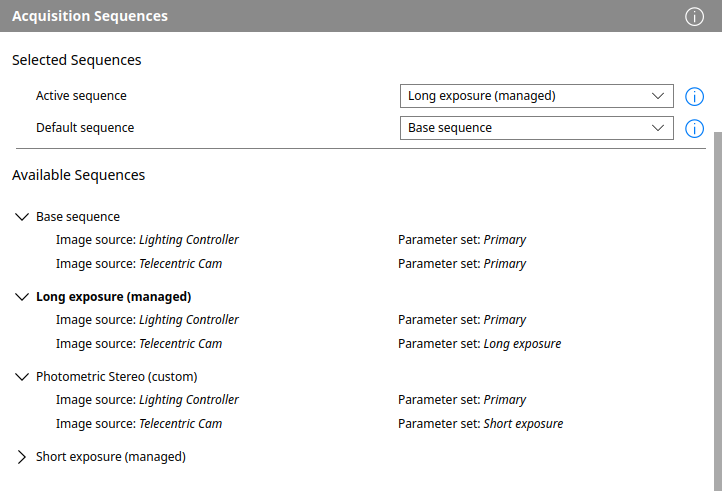
The available acquisition sequences are listed as rows at the top level of a tree view. Each sequence has an arrow button next to it which allows you to collapse or expand it; this is just a matter of visualization. All acquisition sequences are listed, including the base sequence at the top. The other sequences are indicated as either "managed" or "custom" in parentheses. The active sequence is set in bold font. If a sequence has any issues that prevent it from being used or would otherwise affect its usage, an error or warning icon is shown towards the end of each affected sequence. You can hover those icons to learn more about the specific issue in a tooltip.
Below each sequence, the image sources used by that sequence are listed. For the base sequence or any managed sequences, this will always correspond to the full set of image sources in the configuration and is automatically kept up-to-date when adding or removing image sources. For custom sequences, it is up to the sequence author to define which image sources are to be used. This can be a subset of those available in the configuration, or it can even refer to image source which have not (yet) been added to the configuration. In the latter case, such a custom sequence would shown a corresponding issue.
For each image source, the right-hand column will indicate the corresponding parameter set. The base sequence will always use the primary parameter set for each image source. To understand how the presence of alternative parameter sets affects the corresponding managed sequences, see the section Relation between Parameter Sets and Acquisition Sequences in Saving Parameters of Cameras or Peripheral Devices. For custom sequences, an alternative parameter set can be freely specified for each image source used; if it doesn't exist, this will result in an issue.
Activating an Acquisition Sequence
Above the overview of the available sequences, you can select the active acquisition sequence for the image source configuration.
When choosing a different active sequence, it will be activated. This means that for all the image sources used by the sequence, the given parameter set will be loaded into the corresponding device. This will discard any unsaved changes to the devices' current parameters. Depending on the number of devices, their types and the manufacturers, this can typically take anywhere from a few milliseconds to several seconds.
Once a sequence has been activated, it will be executed when MERLIC acquires images for the execution of an MVApp. There is only an active sequence when the configuration is itself active.
When using MERLIC RTE, the preparation of a recipe will cause the activation of the sequence specified by the recipe. Even if a recipe does not explicitly specify a sequence by name, the default sequence will be activated instead. This ensures that when using MERLIC RTE in production, the active acquisition sequence fits the recipe's demands and will always be executed starting from the established parameter sets.
Setting the Default Acquisition Sequence
The default sequence represents the acquisition sequence that will be automatically used by ISM when the respective image source configuration is activated. In MERLIC RTE, when preparing a recipe that does not specify an acquisition sequence explicitly, the default sequence is activated instead. Each image source configuration has a "default sequence". By default, the base sequence is set as default sequence.
You can set a different default sequence, in the combo box below the active sequence. You can define a different default sequence for each image source configuration with acquisition sequences. Unlike the active sequence, a default sequence can be chosen regardless of whether the configuration is active.


