Executing the MVApp (I/O Camera)
Triggering a Single Execution
To start an execution, you need to know how the input channels of your device are configured. To be precise, you have to know, which input channel is selected for the "StartSingleJob" signal in order to set the correct signal.
- If you are not sure how your I/O device is configured, look up the current configuration for the input channels:
- Open the MERLIC RTE Setup and go to the "I/O" tab.
- Select the I/O device and check which input channel is selected for "StartSingleJob".

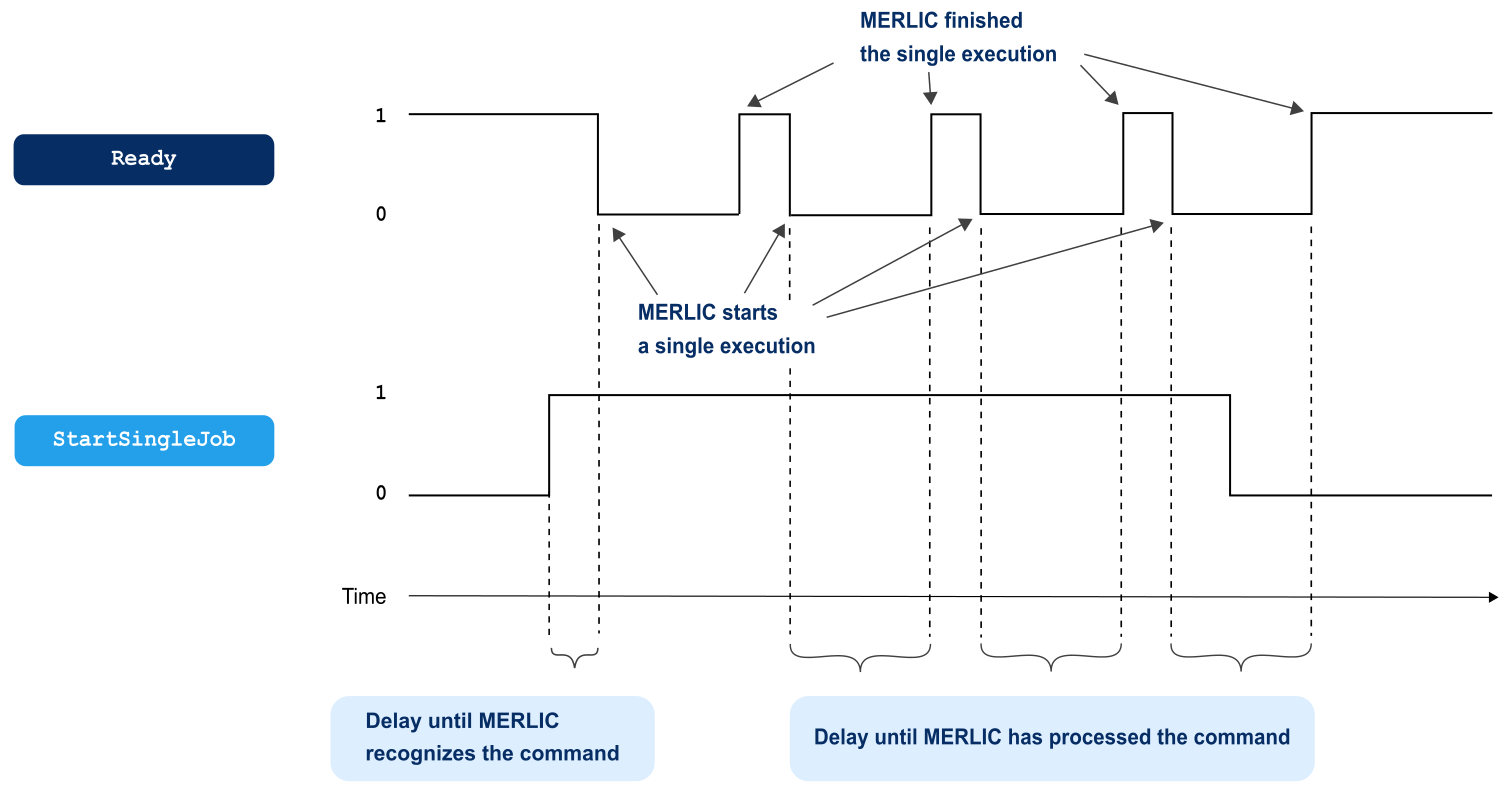
- Set the input channel for the "StartSingleJob" signal to 1 to trigger a single execution. The command is level triggered. This means that the "Ready" signal will be repeatedly and briefly set to 1 because the next inspection is immediately triggered by the level 1 of the "StartSingleJob" signal.
|
Signal |
Description |
|---|---|
|
StartSingleJob |
If the selected channel for "StartSingleJob" is set to 1, a single execution of the MVApp is triggered. |
Synchronization
The following graphic shows the handshaking process for the command "StartSingleJob". If the signal for the single execution has been set to 1, the "Ready" signal is set to 0 and MERLIC starts to execute the MVApp in a single iteration. After the MVApp iteration, the "Ready" signal is set back to 1 and MERLIC checks again if any signal is set to 1. If the "StartSingleJob" signal is still set to 1, the same procedure is repeated. The "Ready" signal is set to 0 and another single execution of the MVApp is performed. Afterward, the "Ready" signal is set to 1 again.
As long as the signal for the single execution is set to 1, MERLIC will repeat executing the command. If you want to avoid that the MVApp is executed repeatedly, you have to reset the "StartSingleJob" signal to 0 as soon as the "Ready" signal is set to 0 because the command is processed as soon as the "Ready" signal is 0.
If a continuous execution was triggered by a concurrently running source, for example, by a Hilscher device or by a communication plug-in such as MQTT, the "Ready" signal is set to 0 and the result signals including "ResultState" are continuously updated as long as the continuous execution is running. When the continuous execution has finished, the last result may be set before or after the "Ready" signal is set back to 0.


