Getting the MVApp Results (I/O Camera)
When using a digital I/O device for the process integration MERLIC can be used in machine vision systems that are integrated in a manufacturing machine. The machine controller, e.g., a programmable logic controller (PLC), must be able to control an integrated vision system, to monitor the execution, and to query the results. Therefore, MERLIC provides a process integration mode to enable the communication with a machine controller. The process integration mode can be started with the application "MERLIC RTE" that is provided with the MERLIC installation. mode of MERLIC, you can query the results of the latest MVApp iteration. The results are transmitted via the respective output channels that are assigned for the MVApp results in the device configuration tab of the MERLIC RTE Setup. They are indicated with the name "Result" followed by an ID, for example, "Result0". To clearly identify which result is returned for a specific output pin, we recommend checking which MVApp result is selected for each digital output.
Limitation
If the MVApp result that has been requested contains a tuple A tuple is a list of elements, e.g., numeric values and strings., only the value of the first tuple element is transmitted to the device. The values of the other tuple elements can not be accessed. Therefore, it is recommended to avoid defining tool results that might get tuple values as MVApp result for the process integration.
In addition, when the state machine changes to the "Stopped" state, all its previously set result signals will be set to zero. This includes the case that MERLIC shuts down or write access for the Frontend is acquired.
Checking the Digital Outputs for the MVApp Results
- If you are not sure how your I/O device is configured, look up the current configuration for the output channels:
- Open the MERLIC RTE Setup and go to the "I/O" tab.
- Select the I/O device and check which output channels are selected for the signals, especially for the "Result" signals and the "ResultState" signal.
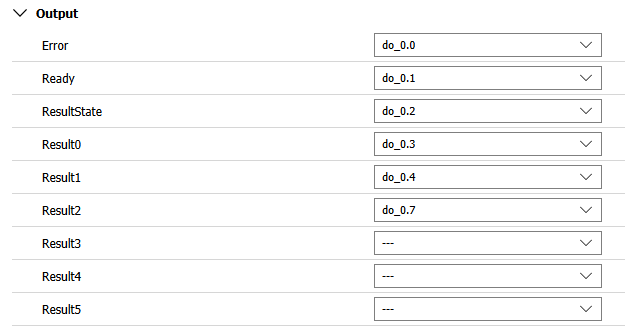
- Now, you can monitor the "ResultState" signal at your device. If the signal is active, the results of the latest execution are available. You can then check the signal of each result. Keep in mind that only Boolean results can be transmitted. For example, if the respective pins are connected to LEDs or lamps, you can easily monitor if the light is switched on.
The following signals are reserved for the transmission of the results and the state of the results. The number of available signals depends on the number of available pins on your device.
|
Signal |
Description |
|---|---|
|
ResultState |
This signal can be used to check the state of the queried result data. If it is set to 1, the processing was carried out correctly and the queried results are up-to-date. If it is set to 0, the processing failed or was aborted. In this case, no results might be available or the existing result values might not be up-to-date, for example, the values might be outdated and from a previous execution.
|
|
Result0 ... Resultn |
These digital output signals can be used to transmit an MVApp result to the device. Only results with data type BOOL can be transmitted when using |
Synchronization
The results are generated during the execution of the MVApp. Therefore, the results should only be queried if the "Ready" signal is set to 1 again. This ensures that the queried results have been correctly generated for the last iteration.


