MVApp Results
An MVApp result represents a result of a MERLIC tool that is accessible for the external communication source, for example, a programmable logic controller (PLC), when using MERLIC in the process integration MERLIC can be used in machine vision systems that are integrated in a manufacturing machine. The machine controller, e.g., a programmable logic controller (PLC), must be able to control an integrated vision system, to monitor the execution, and to query the results. Therefore, MERLIC provides a process integration mode to enable the communication with a machine controller. The process integration mode can be started with the application "MERLIC RTE" that is provided with the MERLIC installation. mode. To enable the transmission of the tool results, you have to define which tool results you want to set as transferable to the external source and add these tool results to the MVApp results. If you are using a communication plug-in, you can also add image results of a tool to the MVApp results to enable the transmission of the resulting images to the respective plug-in.
The definition of the MVApp results needs to be done in the MERLIC Creator. This means, you first have to open the respective MERLIC Vision App in the MERLIC Creator to select the tool results for the transmission.
The following sections give more information about the specification of MVApp results.
If a tool result containing a tuple is transmitted during the process integration mode only the first value of the tuple is transmitted.
Adding Tool Results to the MVApp Results
You can add the desired tool results of a specific tool to the MVApp results as follows:
- Select the tool in the Tool Flow panel to display its tool board in the tool workspace.
- Choose the tool result that you want to add and click on the following icon:
 . You can also choose "Add to MVApp results..." after a right-click on the tool result.
 - Enter a unique name for the MVApp result.

- Select the data type from the drop down list. In case of an image result, the data type is already preset and cannot be changed. For all other types of results, you can choose from various data types of the standard IEC 61131. For more information about the data types, see Supported Data Types.

When using a digital I/O device or camera device with GenICam compliant Digital I/O channels, only MVApp results with data type BOOL will be transmitted.
- Confirm your settings by clicking "Add".
As soon as a tool result is set as MVApp result, the respective icon is highlighted in green .

In addition, the respective tool is also marked in the Tool Flow panel with the icon  to indicate that at least one result of this tool is set to be transferable to the external source. In the example image below, the icon at tool Determine Alignment with Matching indicates that at least one of its tool results is set as MVApp result.

For more information on the visualization of different tool states, see Tool States.
Overview of MVApp Results
The panel "MVApp Parameters and Results" in the MERLIC Creator shows a table with all specified MVApp results. They are listed according to their data type. However, image results are always listed last and separately from other data types.
The table shows information for each MVApp result: the name of the MVApp result, information about the referenced tool result, the respective data type, and also the position of the MVApp result within the corresponding data type.
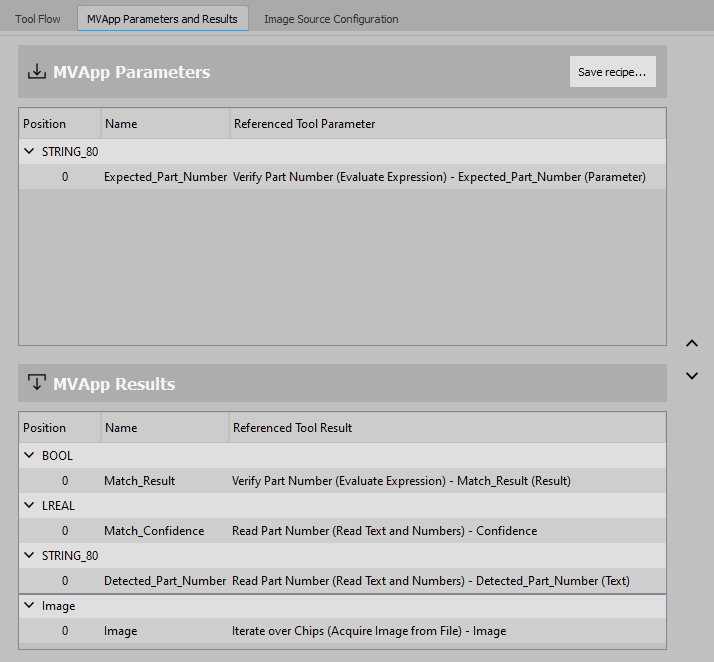
The position of a result can be adapted by dragging it with the mouse or the angle buttons on the right. This panel also allows creating a recipe with the current data set of MVApp parameters and MVApp results via the "Save recipe..." button. For more information, see Creating a MERLIC Recipe.
Removing MVApp Results
To remove a result from the MVApp results, use the context menu of the tool result.
- Right-click on the respective tool result to open the context menu.
- Click on "Remove from MVApp result" to remove the tool result from the set of MVApp results.



