Executing the MVApp (Hilscher)
When using a Hilscher card for the process integration, you can execute the MERLIC Vision App in single steps or in a continuous mode. A single execution can be triggered with the command "StartSingleJob". The respective command code is 1. The continuous execution can be started with the command "StartContinuous" with the command code 5. The commands must be defined in the protocol that is sent from the PLC to MERLIC, that is, in FromPLCProtocol.
Prerequisites
The "StartSingleJob" and "StartContinuous" commands can only be called if a recipe has been loaded via the "PrepareRecipe" command. If an execution is triggered, the MVApp that is referenced in the currently prepared recipe will be executed with the respective parameter values. Therefore, you have to make sure that the desired recipe is prepared before sending the command for the execution.
Starting the Execution
You have to set the CommandCode member of the protocol FromPLCProtocol accordingly to start an execution of an MVApp:
|
Member |
Value |
Description |
|---|---|---|
|
CommandCode |
1 |
Set the CommandCode to 1 to trigger the command "StartSingleJob". The MVApp will be executed once. |
|
CommandCode |
5 |
Set the CommandCode to 5 to trigger the command "StartContinuous". The MVApp will be executed continuously. |
The protocol FromPLCProtocol that is sent from the PLC to MERLIC could be defined as shown in the following example:
TYPE
FromPLCProtocol :
STRUCT
    Preamble : 17;
    CommandCode : 1;
    Selector : <any>;
END_STRUCT
END_TYPE
The value of CommandCode is set to 1. Therefore, MERLIC recognizes the command "StartSingleJob" and starts the execution of the MVApp if MERLIC is in "Ready" state.
Synchronization
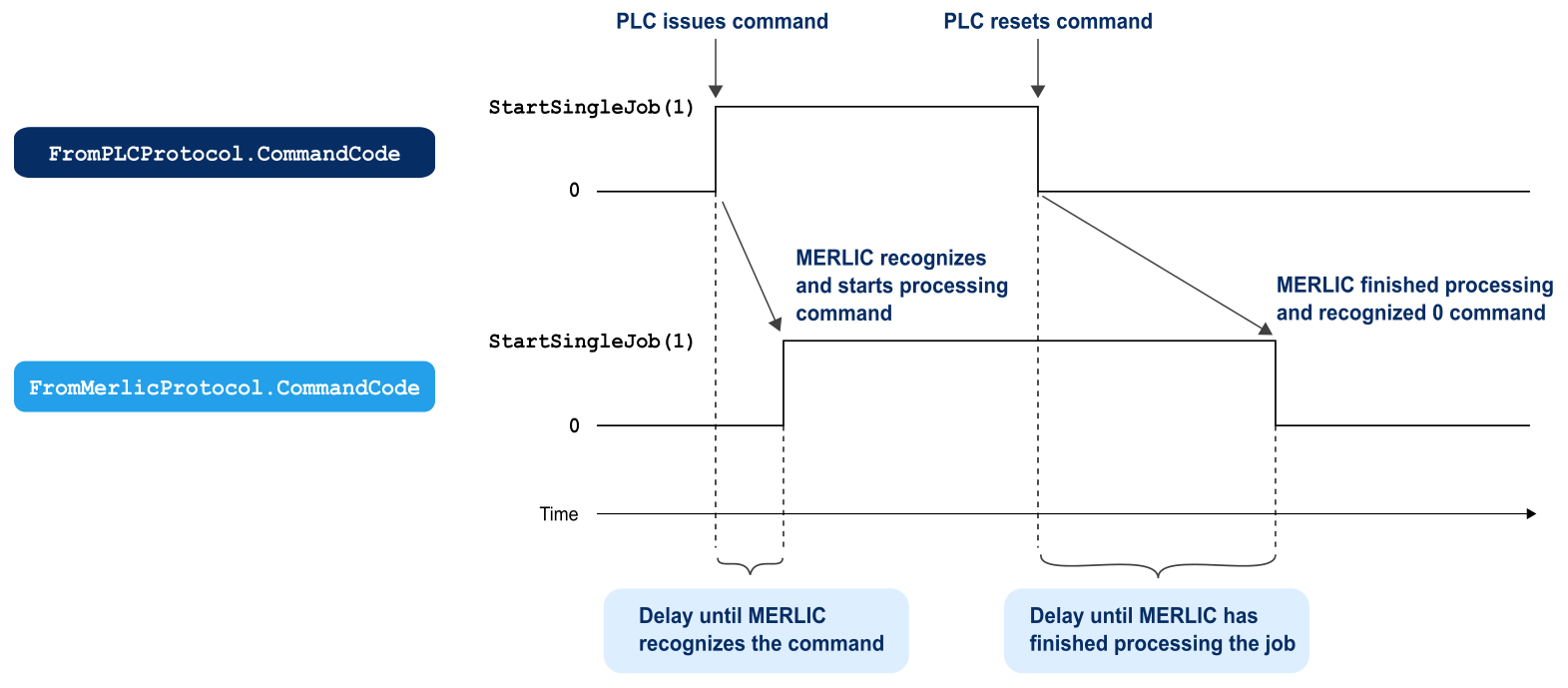
The following graphic shows the handshaking process for the command "StartSingleJob". The PLC triggers a single execution by setting CommandCode in the protocol FromPLCProtocol to 1. When MERLIC recognized the command, the CommandCode member in the protocol FromMerlicProtocol is also set to 1 as confirmation for the PLC, and MERLIC starts to execute the MVApp in a single iteration. As soon as the PLC receives the confirmation from MERLIC that the command was recognized, the CommandCode member in FromPLCProtocol is set to 0 to finalize the handshaking process. After finishing the single iteration of the MVApp, MERLIC checks which CommandCode is sent from the PLC and proceeds accordingly.