Determine Pixel Size
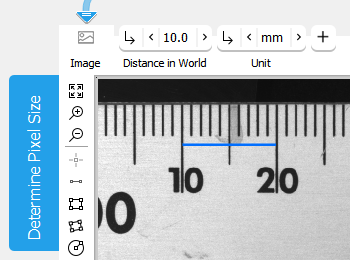
This tool enables you to use a region of interest (ROI) to define a known length, i.e., the scale for a specific unit in an image and therefore determine the pixel size at a certain distance to the camera. This ROI can be connected from a previous tool where it was determined or it can be directly created in this tool using the ROI buttons. Subsequently, the known length has to be entered in the parameter connectors "Distance in World" and "Unit". After calibration, the coordinate system has its center, i.e., position [0,0], at the image center. It is a right-handed system, which means that a counterclockwise 90° rotation leads from the x-axis to the y-axis. The result can then be used as calibration data for further processing.
Parameters
Basic Parameters
Image:
This parameter represents the image in which the scale is defined.
Distance in World:
This parameter defines the corresponding distance in the world to the specified reference distance represented by the "Reference ROI". The unit of the distance is specified in the parameter "Unit".
Unit:
This parameter defines the "Unit" for the calibration information. It is set to "mm" by default. You can change its value at the corresponding connector.
|
Value |
Description |
|---|---|
|
nm |
The calibration information is specified in nm. |
|
μm |
The calibration information is specified in μm. |
|
mm |
The calibration information is specified in mm. |
|
cm |
The calibration information is specified in cm. |
|
m |
The calibration information is specified in m. |
|
point |
The calibration information is specified in point. |
|
pica |
The calibration information is specified in pica. |
|
inch |
The calibration information is specified in inch. |
|
foot |
The calibration information is specified in foot. |
|
yard |
The calibration information is specified in yard. |
Additional Parameters
Reference ROI:
This parameter contains the graphical representation of the reference distance, i.e., a distance of a known length that can be used to define a scale for a specific unit and the corresponding pixel size. It is represented as an ROI.
By default no "Reference ROI" is defined. If you want to use a "Reference ROI" for the calibration, you either have to connect the parameter to an appropriate ROI result of a previous tool to make sure that a "Reference ROI" is transmitted to this tool or you have to draw a new "Reference ROI" into the image using the available ROI buttons. Once a "Reference ROI" has been defined, it is necessary to enter the known length at the parameters "Distance in World" and "Unit".
This tool only supports the use of a single ROI. If the "Reference ROI" contains multiple ROIs, only the last created ROI will be used for the processing. If the "Reference ROI" is represented by a circular ROI, the diameter of the circle is used as reference distance. If a (paraxial) rectangle is used as "Reference ROI", the major length along its orientation is used as reference distance.
Results
Basic Results
Calibration Data:
This result contains the determined calibration data needed for the correction of possible lens distortions and the position of the camera with respect to the image plane. It is determined on the basis of the determined "Pixel Size".
Pixel Size:
This result contains the determined "Pixel Size" of the specified "Distance in World" and "Reference ROI". The result is returned as real number.
Tool State:
"Tool State" returns information about the state of the tool and thus can be used for error handling. For more information, see Tool State Result
Additional Results
X Axis:
This result returns the determined x-axis. The result is returned as a contour and visualized in red.
Y Axis:
This result returns the determined y-axis. The result is returned as a contour and visualized in green.
Processing Time:
This result returns the duration of the most recent execution of the tool in milliseconds. The result is provided as additional result. Therefore, it is hidden by default but it can be displayed via the  button beside the tool results. For more information see the section Processing Time in the tool reference overview.
Application Examples
This tool is used in the following MERLIC Vision App examples:
- measure_distance_segment_circle_calibrated.mvapp
- measure_distance_to_center_led.mvapp


