Connection States
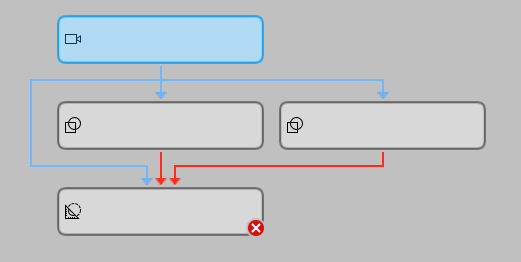
MERLIC differentiates between different states of a connection within the Tool Flow panel. This classification supports you while configuring your application within the Tool Flow panel. The connection states apply for data connections as well as for trigger connections.
The following connection states are distinguished:
Normal
This connection state applies to all connections that are not in the state "Selected" or "Error". Connections in this state are visualized in black within the Tool Flow panel. This enables you to get an overview of all connections in the Tool Flow panel that are currently not in focus.
Selected
This connection state applies to all connections of the tool that is currently selected in the Tool Flow panel. This means, that all incoming and outgoing connections of the selected tool are also classified as selected. Connections in this state are highlighted in blue within the Tool Flow panel. However, in case of a structural error, the connection is highlighted in red.
Error
This connection state applies to all connections with structural errors in the tool flow, e.g., if a parameter of a tool is connected to results of two different tools. Connections in this state are highlighted in red. This helps you to easily recognize the connections that have to be adapted. Read the topic Error Causes to get more information.
MERLIC visualizes only the first structural error that has been detected within the Tool Flow panel. If you do not fix a new error immediately but proceed to adjust the MERLIC Vision App, possible subsequent errors will not be highlighted in the Tool Flow. This may lead to unclear connection states because a subsequent error will only be highlighted if the first structural error has been fixed. Therefore, we recommend to fix an error as soon as it is indicated in the Tool Flow panel.
Visualization
The following image shows how the states of the connections are visualized in the Tool Flow panel: