Selecting the Languages for the Frontend
If you want to enable the use of the Frontend in multiple languages, you first have to define which languages shall be available in the Frontend. This can be done in the MERLIC Designer as described below.
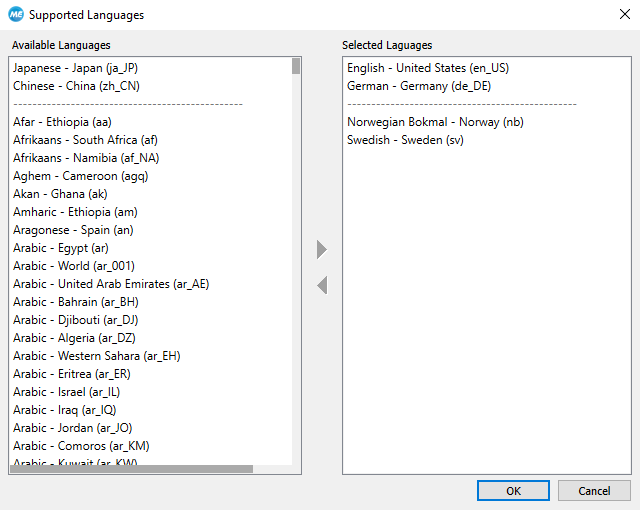
- Click on the Designer menu entry "Localization" and select "Select Languages..." to open the dialog of supported languages. On the left of the dialog, the list of available languages is displayed. It comprises a wide variety of languages including country specific language variations. On the right, the list of languages is displayed that will be available in the Frontend.
- Select desired languages you want to provide for the Frontend and add them to the list of selected languages by double-clicking or by using the arrow buttons.
- Click "OK" to confirm your selection.
To ensure that the texts are displayed in the selected languages, you have to translate them in a separate translation process. MERLIC provides some default translations for the standard MERLIC languages, e.g., German. However, there still might be some texts that require a translation, e.g., texts that have been added manually to the widgets.
The chapter Translating the Frontend Texts contains a detailed description of the translation process for the Frontend texts.


