Translating the Frontend Texts
MERLIC already provides some translations for the standard MERLIC languages. These comprise the translation for the following kind of texts:
- Title of the Frontend window
- Frontend menu bar
- Login dialog of the Frontend
- Names of connected tool parameters and results
- Error messages
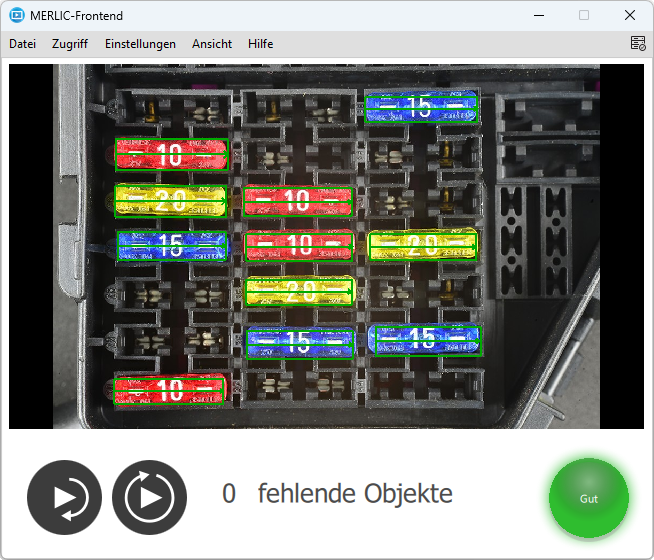
If you change the language in the Frontend to one of the standard MERLIC languages, e.g., German, these kind of texts will be automatically displayed in the correct language without any further translation effort.
However, if you select a language that is no standard MERLIC language, e.g., Swedish, you have to add the translations of the texts in a separate translation process. The same also applies for all widget texts that have been defined in the Designer. The following section describes in detail how to translate the texts of the Frontend.
Translation Process
The translation process consists of the following working steps:
 Exporting the texts into a translation file
- Open the Designer menu entry "Localization → Export Translation Files (.ts)". A list of all languages is displayed that have been added via the Designer menu "Localization → Select Languages...".
- Select the language for which you want to add a translation. You may also select "All" to export a translation file for each available language in the list.
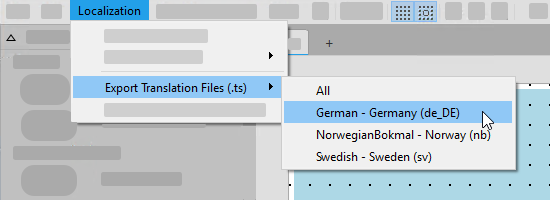
- Select the location where the exported translation files are stored in the directory dialog. You can save the file(s) in an arbitrary location on your computer. They are stored under a predefined name beginning with "Frontend@_" followed by the respective language ending, e.g., "Frontend@_de_DE.ts". They contain each text entry that is defined in the widget of your Frontend design.
Translating the texts in the translation file
- Open the exported translation file with any text editor of your choice. However, we recommend you to use the Qt Linguist, a free Qt translation tool, because it provides support for an easy translation of the texts. It also enables the translation into several languages at the same time.
- Translate the text entries in your translation file.
- Text editor
If you are translating the texts in a text editor, you will see the relevant text parts in an XML format like this:
Copy<source>missing objects</source>
<translation type="unfinished"></translation>Add the translation of the source texts in the translation tags and remove the declaration "type="unfinished"".
Copy<source>missing objects</source>
<translation>fehlende Objekte</translation>
- Qt Linguist
If you are using the Qt Linguist, click on the text you want to translate.
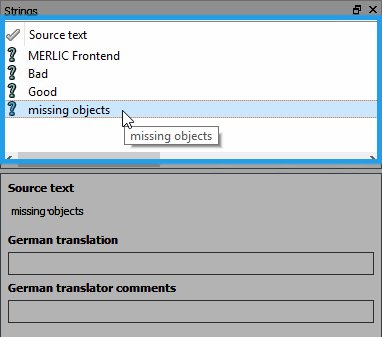
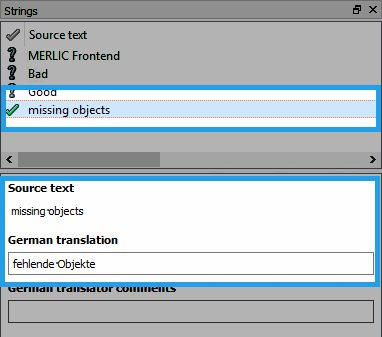
Add the translation of the selected source text into the input field for the translation. Confirm your translation of the source text by clicking on the question mark that is displayed on the left for each text entry in the list of source texts.
- Text editor
- Save your changes in the translation file.
Importing the translation file with the new texts
- Open the Designer menu entry "Localization → Import Translation Files (.ts)".
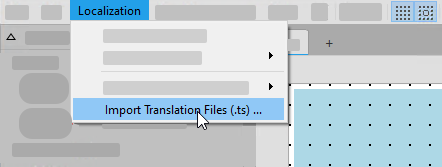
- Select the translation files with the new translated texts from the file selection dialog.
- Click "Open" to import the selected files. The translated texts are then instantly available in the Frontend.
- Save the MERLIC Vision App to store the language settings for the application.
Available Texts for Translation
In the process of exporting the texts for the translation, MERLIC distinguishes between the standard MERLIC languages (German, English, Japanese, and Simplified Chinese) and additional languages, e.g., Swedish, because MERLIC already provides some translations for the standard MERLIC languages.
Texts for MERLIC Languages and Additional Languages
You have the possibility to translate the following kinds of Frontend texts for all languages:
- Title of the Frontend window
- Widget texts that have been defined in the Designer when creating the Frontend design. This can be predefined texts or individual texts that have been added or adjusted by the user in the widget properties, e.g., an individual text in the Label widget.
Texts for Additional Languages
To enable as much localization as possible for additional languages as for standard MERLIC languages, the export of the translation file generates additional text entries to the translation file of an additional language, e.g., Swedish. This enables you to also translate the following texts in all additional languages:
- Menu bar of the Frontend
- Login dialog of the Frontend
- Error messages
- Texts shown at the buttons in dialog windows
Each additional text entry comes with a translation comment that contains further information about the type of the text. This helps to understand where these texts are displayed and facilitates the decision which translation would be the best.
Since MERLIC already provides the translation of these texts in the standard MERLIC languages, they are only exported for additional languages.
Restrictions
Currently, it is not possible to translate each kind of text that is displayed in the Frontend. If a text is transferred from the MERLIC Creator, e.g., a parameter value, it is not exported to the translation file and therefore cannot be translated.


