Samples of Acquisition Sequences
In the following, we provide examples for different acquisition sequences. All examples use the "$schema" keyword to reference the JSON schema that can be used to validate whether the file is valid according to the schema defined for acquisition sequences.
Sequence of Two Image Sources
In this example sequence, two image sources representing camera devices are configured.
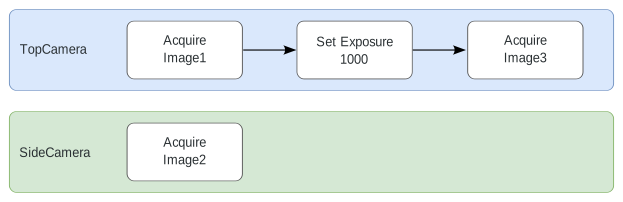
The camera "TopCamera" is configured to perform three steps. First, an image is acquired with the name "Image1". Then, the exposure time of the camera is set. In the last step, another image is acquired with the name "Image3". The camera "SideCamera" only acquires a single image with the name "Image2".
The following graphic illustrates the lanes of this example sequence.
The configuration in the respective sequence file looks like the following:
{
    "$schema": "http://download.mvtec.com/acquisition-sequence-v2.0.schema.json",
    "Version": "2.0",
    "Lanes": [
        {
            "DeviceType": "ImageSource",
            "DeviceId": "TopCamera",
            "AlternativeParameterSet": null,
            "Actions": [
                {
                    "Type": "AcquireImage",
                    "Attributes": {
                        "ImageName": "Image1"
                    }
                },
                {
                    "Type": "SetParameter",
                    "Attributes": {
                        "ParameterName": "[Consumer]exposure",
                        "ParameterValue": 1000.0
                    }
                },
                {
                    "Type": "AcquireImage",
                    "Attributes": {
                        "ImageName": "Image3"
                    }
                }
            ]
        },
        {
            "DeviceType": "ImageSource",
            "DeviceId": "SideCamera",
            "AlternativeParameterSet": null,
            "Actions": [
                {
                    "Type": "AcquireImage",
                    "Attributes": {
                        "ImageName": "Image2"
                    }
                }
            ]
        }
    ]
}
Sequence of Three Image Sources
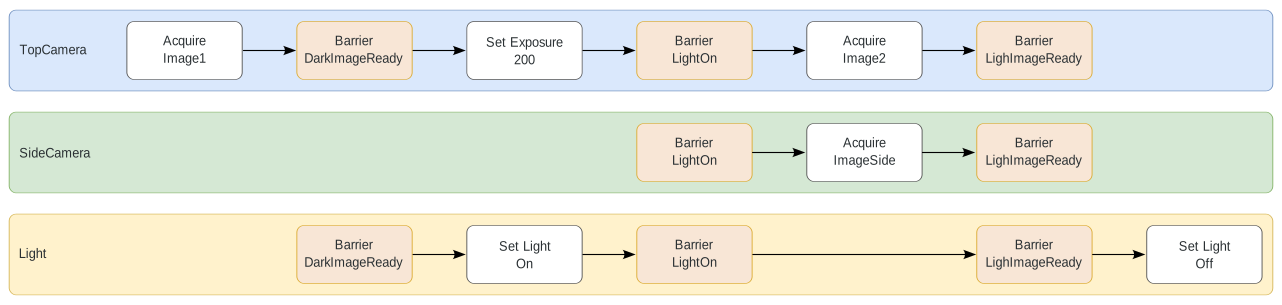
In this example sequence, three lanes are configured.
The first two lanes define the behavior of cameras and the third lane defines the behavior of a peripheral device used for the lighting.
The configuration in the respective sequence file looks like the following:
{
    "$schema": "http://download.mvtec.com/acquisition-sequence-v2.0.schema.json",
    "Version": "2.0",
    "Lanes": [
        {
            "DeviceType": "ImageSource",
            "DeviceId": "TopCamera",
            "AlternativeParameterSet": null,
            "Actions": [
                {
                    "Type": "AcquireImage",
                    "Attributes": {
                        "ImageName": "Image1"
                    }
                },
                {
                    "Type": "Barrier",
                    "Attributes": {
                        "BarrierName": "DarkImageReady"
                    }
                },
                {
                    "Type": "SetParameter",
                    "Attributes": {
                        "ParameterName": "[Consumer]exposure",
                        "ParameterValue": 200.0
                    }
                },
                {
                    "Type": "Barrier",
                    "Attributes": {
                        "BarrierName": "LightOn"
                    }
                },
                {
                    "Type": "AcquireImage",
                    "Attributes": {
                        "ImageName": "Image2"
                    }
                },
                {
                    "Type": "Barrier",
                    "Attributes": {
                        "BarrierName": "LightImageReady"
                    }
                }
            ]

        },
        {
            "DeviceType": "ImageSource",
            "DeviceId": "SideCamera",
            "AlternativeParameterSet": null,
            "Actions": [
                {
                    "Type": "Barrier",
                    "Attributes": {
                        "BarrierName": "LightOn"
                    }
                },
                {
                    "Type": "AcquireImage",
                    "Attributes": {
                        "ImageName": "ImageSide"
                    }
                },
                {
                    "Type": "Barrier",
                    "Attributes": {
                        "BarrierName": "LightImageReady"
                    }
                }
            ]
        },
        {
            "DeviceType": "ImageSource",
            "DeviceId": "Light",
            "AlternativeParameterSet": null,
            "Actions": [
                {
                    "Type": "Barrier",
                    "Attributes": {
                        "BarrierName": "DarkImageReady"
                    }
                },
                {
                    "Type": "SetParameter",
                    "Attributes": {
                        "ParameterName": "Light"
                        "ParameterValue": "On"
                    }
                },
                {
                    "Type": "Barrier",
                    "Attributes": {
                        "BarrierName": "LightOn"
                    }
                },
                {
                    "Type": "Barrier",
                    "Attributes": {
                        "BarrierName": "LightImageReady"
                    }
                },
                {
                    "Type": "SetParameter",
                    "Attributes": {
                        "ParameterName": "Light"
                        "ParameterValue": "Off"
                    }
                }
            ]
        }
    ]
}

