Write to File
This tool is set as legacy. It is still available to provide backward compatibility but it will no longer be maintained or updated in upcoming MERLIC versions.
We recommend using the communication plug-in save-results instead.
Use this tool to write text to a file.
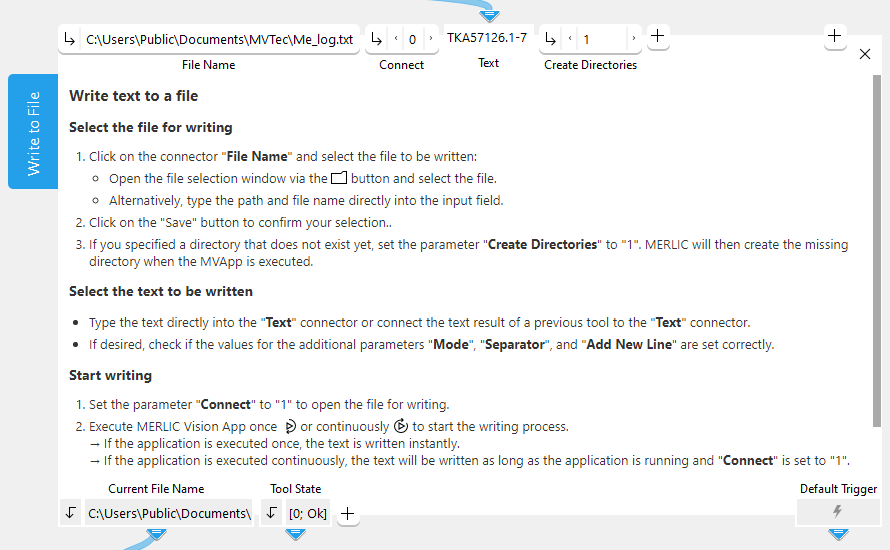
Enter the path and file name at the parameter "File Name". The file will be created and opened by the MVApp if the connector "Connect" is set to 1 and the MVApp is executed. As long as the file is opened by the MVApp it can not be used by another process. If "Connect" is set to 1, the write operation is applied for each execution of the MVApp. Use the button for executing MERLIC once  to execute this tool in single steps. This gives you the possibility to write the text step by step. You can close the file by setting the connector "Connect" to 0.
Execution Behavior
The behavior of this tool regarding the execution differs from the default behavior. Usually a MERLIC tool is executed in the following cases:
- The MERLIC Vision App is explicitly executed in continuous mode.
- The MERLIC Vision App is explicitly executed in "Run Once" mode.
- A MERLIC Vision App with the tool is opened in the MERLIC Creator.
- A parameter value of the tool has been changed in the MERLIC Creator.
However, the tool "Write to File" is only executed in the following cases:
- The MERLIC Vision App is explicitly executed in continuous mode.
- The MERLIC Vision App is explicitly executed in "Run Once" mode.
This ensures that write operations are not applied when loading an MVApp or changing a parameter value of the tool.
Parameters
Basic Parameters
File Name:
This parameter defines the name and path of the file in which the text is written. The file is created when the tool is executed for the first time. It is set to "Me_log.txt" by default which is located in the directory "%USERPROFILE%\Documents". You can change or select the desired file name and path at the corresponding connector. If you define a relative file path, the file is searched relative to the default directory "%USERPROFILE%\Documents". However, if your MVApp was already saved when you define a relative file path, the file is searched relative to the directory in which the MVApp is located.
Connect:
This parameter defines if the connection to the file is activated or deactivated. The parameter is set to 0 by default. This means that the connection to the file is not active and therefore the file is not created or opened for writing. If you want to start writing the data to the file, you have to set the parameter to 1 and execute the MVApp via "Run" or "Run Once".
Since the tool is executed with every change of values, we recommend to set the parameter "Connect" to 0 until the tool has been completely configured.
Text:
This parameter contains the text that is written to the file. The text can be defined as a string, a number, or a mixed tuple containing both. The parameter is empty by default. This means that you have to define the text either by typing the text directly into the input field or by using an available text result from a previous tool, e.g., Read Text and Numbers.
You may connect exactly one result of a previous tool to the connector of this parameter. Thus, if you want to write a combination of two or more tool results to the file, you first have to create a tuple that contains the combined data using the tool Evaluate Expression.
Create Directories:
This parameter defines whether MERLIC creates the directory that is specified in the parameter "File Name" in case it does not exist yet. The parameter is set to 0 by default which means that no directory will be created. If the parameter is set to 1 and the directory that is specified in "File Name" does not exist, MERLIC will create the missing directory as soon as the MVApp is executed.
Additional Parameters
File Handle:
This parameter can be used to specify the handle of the file that is to be written, i.e., from the previous tool, where a "File Handle" is already defined. If the "File Handle" is set, "File Name" will be ignored and the file for which the "File Handle" is defined will be used instead.
Mode:
This parameter defines the mode in which the data are written to the selected file. It is set to "overwrite" by default. You can select between the following modes at the corresponding connector. The parameter has no effect in case the "File Handle" is connected with a previous tool.
|
Value |
Description |
|---|---|
|
overwrite |
If this mode is selected, the data in the parameter "Text" will overwrite all data in the selected file when it is opened for writing. The file is opened for writing when the parameter "Connect" is set to 1. The previous data will be lost. To overwrite a file several times the parameter "Connect" has to be set to 0 and back to 1 each time. |
|
append |
If this mode is selected, the data in the parameter "Text" will be appended at the end of the data in the selected file. Thus the previous data will not be lost. |
Separator:
This parameter defines the type of separator that is added between the data in "Text" that is written to the file. It is set to "space" by default. You may select between the following separator types in the corresponding connector.
|
Value |
Description |
|---|---|
|
space |
The data are written into the file separated by a space. |
|
comma |
The data are written into the file separated by a comma. |
|
semicolon |
The data are written into the file separated by a semicolon. |
|
dot |
The data are written into the file separated by a dot. |
|
colon |
The data are written into the file separated by a colon. |
|
tabulator |
The data are written into the file separated by a tabulator. |
|
none |
The data are written into the file without any separator. |
Add New Line:
This parameter defines if a new line is added at the end of the text that is written to file. The parameter is set to 1 by default. This means that a new line is added between the data. If you want to write all data into the same line, set the value to 0.
Results
Basic Results
Current File Name:
This result contains the name and absolute file path of the text file that was saved in the last iteration, e.g., "C:\Users\Public\Documents\MVTec\MERLIC\Me_log.txt".
Tool State:
"Tool State" returns information about the state of the tool and thus can be used for error handling. For more information, see Tool State Result
Additional Results
File Handle Used:
This result represents the handle of the file in which the text was written. It can be used by a following tool to write or read. The same handle to read from or write to the same file simultaneously should not be used by several tools since this may lead to unexpected effects.
Beside this result, this tool has no further results that are visible within MERLIC. The actual result is the file in which the text is written.
Processing Time:
This result returns the duration of the most recent execution of the tool in milliseconds. The result is provided as additional result. Therefore, it is hidden by default but it can be displayed via the  button beside the tool results. For more information see the section Processing Time in the tool reference overview.
Application Examples
This tool is used in the following MERLIC Vision App examples:
- measure_distance_to_center_led.mvapp


