 ROI
ROI
With these tools you can convert a region to a region of interest (ROI) and vice versa, as well as create a ROI with the shape of a circle, point, rectangle, paraxial rectangle, or segment:
Common Use Cases
Use this overview to find the right tool to create ROIs or to convert ROIs or regions.
|
Aim |
Tool |
Usage |
|---|---|---|
|
|
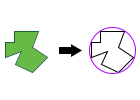
Use this tool to convert one or more regions into a predefined type of ROI. |
|
|
|
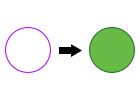
Use this tool to convert one or more ROIs from a single tool to a united region or multiple individual regions. |
|
|
|
Use this tool to create one or more circular ROI. A default circle is automatically generated when the tool is inserted. You may adapt the size and position of the circle or add further circles using the ROI button |
|
|
|
Use this tool to create one or more ROI in form of a paraxial rectangle. Paraxial rectangles are always perpendicular to the coordinate system with an orientation arrow pointing from left to right. A default paraxial rectangle is automatically generated when the tool is inserted. You may adapt the size and position of the paraxial rectangle or add further ones using the ROI button |
|
|
|
Use this tool to create one or more ROI in form of a point. A default point is automatically generated when the tool is inserted. You may adapt the position of the point or add further points using the ROI button |
|
|
|
Use this tool to create one or more ROI form of a rectangle. Rectangles can be rotated any degree with an orientation arrow pointing in any direction. This might be useful in tools with a processing direction like Read Text and Numbers. A default rectangle is automatically generated when the tool is inserted. You may adapt the size, position, and orientation of the rectangle or add further ones using the ROI button |
|
|
|
Create one or more ROI in form of a segment. A default segment is automatically generated when the tool is inserted. You may adapt the length and position of the segment or add further ones using the ROI button |
 .
. .
. .
. .
. .
.

