Communication between Plug-in and PLC
- MELSEC iQ-F Series
- MELSEC iQ-R Series
- MELSEC-L Series
- MELSEC-Q Series
In detail, the PLC needs to pass the desired command by setting the value for the respective field "gMV_ReqCommandCode". As soon as MERLIC recognizes the command, it sets the value of the field "gMV_AckCommandCode" to the same value to confirm that the command has been received. MERLIC also starts to execute the respective command and then waits for the PLC to reset the command code. When MERLIC recognizes that the PLC has reset the value of the "gMV_ReqCommandCode" field and MERLIC has already finished the execution of the command, it also resets the value for the "gMV_AckCommandCode" field.
Available Commands
The ability to control the behavior of MERLIC from the PLC is conveyed through two fields:
- gMV_ReqCommandCode (requested command code)
- gMV_AckCommandCode (acknowledged command code)
The "gMV_ReqCommandCode" field belongs to the data section in which the PLC should write. In contrast, the "gMV_AckCommandCode" field belongs to the data section in which the plug-in writes and from which the PLC should only read. Both of these fields shall contain integer values of data type INT encoding the following admissible commands:
|
Command |
Code |
|---|---|
|
NoCommand |
0 |
|
SelectModeAutomatic |
1 |
|
PrepareRecipe |
2 |
|
UnprepareRecipe |
3 |
|
StartSingleJob |
4 |
|
StartContinuous |
5 |
|
Halt |
6 |
|
Reset |
7 |
|
Stop |
8 |
|
Abort |
9 |
|
DequeueResult |
10 |
|
AcknowledgeError |
11 |
Aside from the "actions" that are used to control the state of the vision system, this list above contains a neutral option "NoCommand", as well as the commands "DequeueResult" and "AcknowledgeError".
For more information about the available states of MERLIC and its transitions, see MERLIC State Machine. For more information about the result modes and the error handling, see Setting Up the Connection to the PLC.
Synchronization via Handshake
When the PLC sends a command to the vision system, the following handshake is used to ensure that both sides are properly synchronized:
Initially, the values of both "gMV_ReqCommandCode" and "gMV_AckCommandCode" are set to 0. This indicates that neither a command is requested nor a command is currently being executed. To send a command, the PLC first writes the respective command code to the "gMV_ReqCommandCode" field. The plug-in continuously polls the "gMV_ReqCommandCode" field to look for changes of this value. Upon detecting a new command code value, the plug-in writes the same command code to the "gMV_AckCommandCode" field and initiates the execution of this command. Based on the value of the "gMV_AckCommandCode", the PLC detects that the value has been mirrored. It assumes that the requested command was recognized and that the plug-in started to execute the command. Therefore, it can now safely reset the value of "gMV_ReqCommandCode" to 0.
Then, the plug-in notices that the field "gMV_ReqCommandCode" has been reset. However, it will keep the value of the command that is currently being executed in the "gMV_AckCommandCode" field until the command has finished its execution. Keep in mind that the commands for "StartSingleJob" and "StartContinuous" count as successfully executed as soon as the actual job has started. This means that the configured image sources have started the asynchronous grab and that they are ready to receive a trigger signal. In addition, the state has changed to "SingleExecution" or "ContinuousExecution", respectively.
If the command has finished execution and the PLC has already reset the "gMV_ReqCommandCode" field to 0, the "gMV_AckCommandCode" field is also reset to 0. The PLC can now assume that the command has completed and that the vision system is ready to receive the next command. The graphic below shows the handshake process using the example of a "StartSingleJob" and "Halt" command.
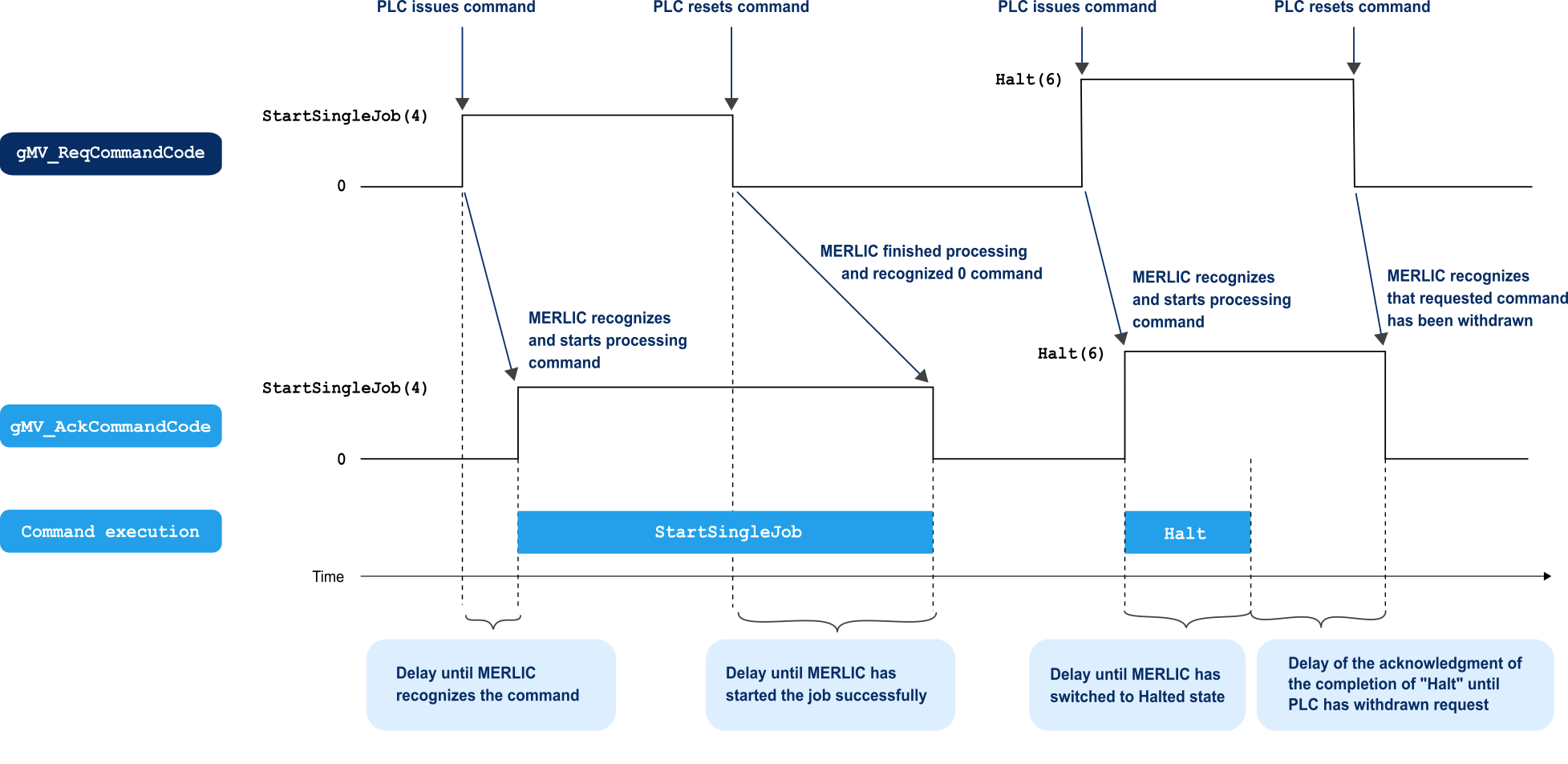
To send the command for "StartSingleJob", the PLC writes the command code 4 to the "gMV_ReqCommandCode" field. When the plug-in reads the command code 4, it acknowledges the command by writing 4 to the "gMV_AckCommandCode" field and starts the execution of the "StartSingleJob" command. As soon as the PLC reads the value 4 in the "gMV_AckCommandCode" field, it resets the value of "gMV_ReqCommandCode" to 0. If the execution of the "StartSingleJob" command has started and the state has changed to SingleExecution, the plug-in resets the value of "gMV_AckCommandCode" to 0 to show the PLC that it is ready to receive the next command.
In our example, a "Halt" command is requested next. The PLC writes the respective command code 6 to the "gMV_ReqCommandCode" field. The plug-in reads the new command code, starts the execution of the "Halt" command, and sets the "gMV_AckCommandCode" to 6 to indicate that the command is being executed. This time, let us assume that the command finishes execution quickly, before the PLC had time to react. In this case, the plug-in will wait until the PLC has reset "gMV_ReqCommandCode" to 0 before resetting the "gMV_AckCommandCode" field to 0. During this time, no further executions of the "Halt" command take place. When the PLC finally resets "gMV_ReqCommandCode" to 0, the plug-in will also reset "gMV_AckCommandCode" to indicate that it is ready for the next command.


