 Rectangle
This widget allows you to insert a rectangle to your Frontend. You can use it to structure your user interface visually.
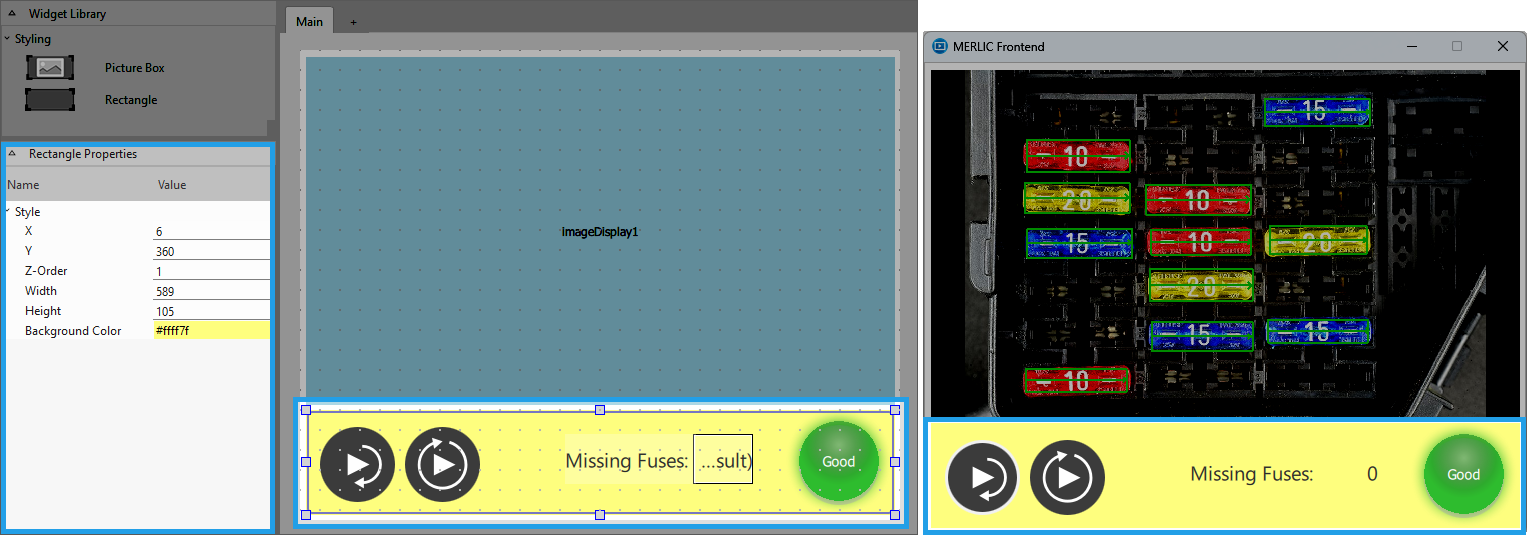
Style
X, Y:
Adjust the position of the widget by typing the desired coordinate values of the upper left corner into the input field.
Z-Order:
Adjust the z-order of the widget by typing the desired value into the input field. This defines which widget is displayed on top if several widgets are positioned at the same place, for example, if widget "A" has "Z-Order" "0" and widget "B" has "Z-Order" "1", widget "B" will be displayed on top of widget "A".
Width:
Adjust the width of the widget. The width is defined in pixels and set to 260 by default. To change the value, type the new width into the input field. It must be at least 20 and not be bigger than 2147483647.
Height:
Adjust the height of the widget. The height is defined in pixels and set to 68 by default. To change the value, type the new height into the input field. It must be at least 20 and not be bigger than 2147483647.
Background Color:
Adjust the background color of the widget using this property. To change the color, click into the color field and select a new color in the color selection dialog or enter the color code manually.
Application Example
This widget is used in the following MERLIC Vision App examples:
- adapt_brightness_for_measuring.mvapp
- check_pen_parts.mvapp
- check_single_switches.mvapp
- classify_and_inspect_wood.mvapp
- classify_pills.mvapp
- count_bottles_with_deep_learning.mvapp
- count_frozen_dough_with_training.mvapp
- demonstrate_evaluate_expression.mvapp
- detect_anomalies_of_bottles.mvapp
- detect_anomalies_of_bottles_in_the_global_context.mvapp
- detect_only_scratches_with_photometric_stereo.mvapp
- evaluate_ecc_200_print_quality.mvapp
- find_and_count_screw_types.mvapp
- measure_distance_segment_circle_calibrated.mvapp
- measure_distance_to_center_led.mvapp
- read_best_before_date_with_orientation.mvapp
- recognize_color_of_cables.mvapp
- segment_pill_defects.mvapp
- segment_pills_by_shape.mvapp


