December 14, 2018 | Developers Corner

Training a deep learning classifier with HALCON on the embedded board Jetson TX2

Learn how to train a deep learning classifier with HALCON on both a PC and an embedded Jetson TX2 board, from image acquisition to model training and inference, for efficient machine vision applications.

Deep learning technologies allow a wide range of applications for machine vision. Based on these technologies, MVTec offers various operators and tools within HALCON and MERLIC – often in combination with embedded boards and platforms (more information about this can be found in our section about Embedded Vision).

In this article, we describe how to train a deep learning classifier with HALCON on a standard PC together with the embedded board NVIDIA Jetson TX2 and a Basler GigEVision camera.

Prerequisites

Therefore, we set up the following technical components:

  • Standard PC with a powerful NVIDIA GPU with HALCON 17.12 installation or above.
  • System with a NVIDIA GPU with HALCON 17.12 installation or above (we used NVIDIA Jetson TX2 + power supply and HALCON 17.12 for Arm-based x64 systems).
  • 2 HALCON dongles (dependent upon you want to switch the dongles between the systems)

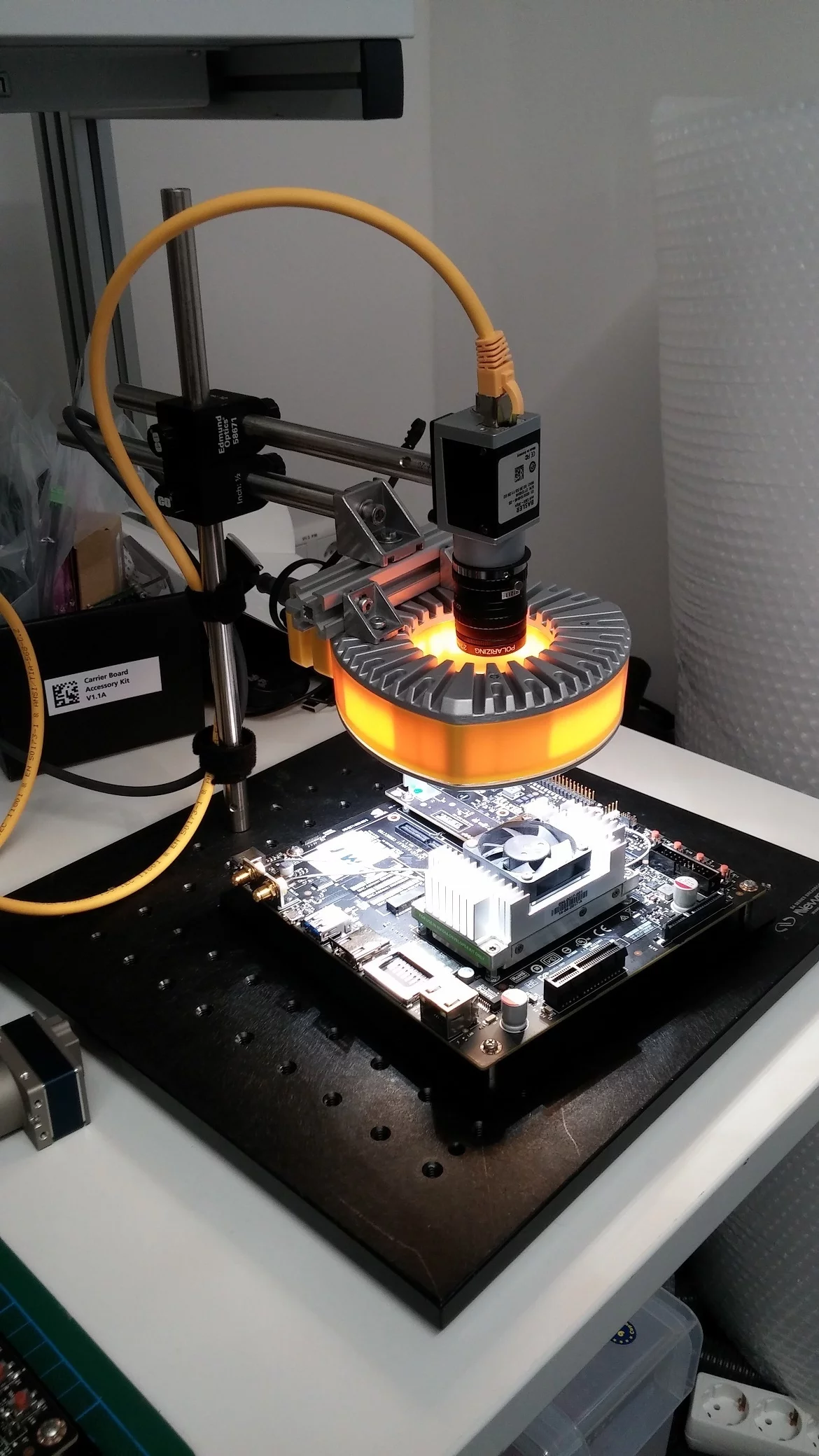
To set up a live system – and not working only with offline images – you additionally need the items below. You can see, within the brackets, what we used.

  • GigEVision camera (Basler ace acA1300-30gc ICX445)
  • Lens (6mm, V.S. Technologies SV-0614 (B1211), 0.5mm distance ring, polarizing filter to avoid specular reflections)
  • Lighting setup (EFFI-Ring including polarizing filter to avoid specular reflections)
  • Stativ system (Newport opto-mechanical mounting sets)
  • Additional parts for identification (NVIDIA Jetson TX2, Raspberry Pi 3, background and our hands)

For a comfortable handling, we applied a switch for connecting the camera to the PC and the NVIDIA Jetson. Otherwise, you have to plug and unplug the camera in between the systems. If you don’t want to use an external power supply for the camera, you need a PoE-camera and an active switch.

Acquiring the images

Starting from scratch, using deep learning technologies, requires millions of images. With HALCON’s pretrained deep learning nets, only around 400 images per class are required. For speedy and easy acquisition of the data, we developed a simple recording script, which can be downloaded on this site. Please note that for the execution of this script, some external procedures are needed. You may find them in the complete download package at the end of this site.

If you press your mouse button down, the images grabbed from the camera are stored on the HDD in the correct folder structure ( ./images/XXXX/imgNNNN, where XXXX is the name of the class and NNNN the sequence number). You may configure the script to fit your objects you would like to distinguish.

Please make sure, you have Jumbo Frames activated for your network interface card where the camera is connected. On Linux-based systems, you may do so by typing: udo ifconfig eth0 mtu 1492

Rules for acquiring the images:

  • Make sure that the object covers most of the image. This is especially important if you have the background as a class.
  • The classifier uses – if you do not preprocess the images – the complete image content, including the background as well. Therefore, you should make sure, that the object itself covers a larger portion of the images. Otherwise, the classifier may train the background and not the appearance of the object.
  • Provide every perspective of the object that may occur in the target application.
  • Check if the objects are distinguishable on the target size of 224x224. If this is not the case, you may think about dissecting your image in smaller portions and performing the inference on them. Doing so, you need to combine the single decisions to a final one.

For our system, we performed the acquisition of the training images on the PC, since the training itself is also performed here. Basically, it does not matter if the acquisition takes place on the embedded board or the PC, as long as the same setup is used for training as for the live inference of the net. But of course, the data can be acquired on the embedded board and transferred to the PC afterward for the next step. Please note: For easier operation, the script crops the images shown in the live view to the space without the red overlay.

Please note: For easier operation, the script crops the images shown in the live view to the space without the red overlay.

Train the model

Basically, the training can be done on both platforms. However, we highly recommend doing it on the more performant system (PC in our case) since the training may take some time depending on the configuration, e.g. the used batch size, and the used hardware. The script reads the training images and prepares them for the training, which is mostly resizing the image to 225x225. It is also possible to automatically vary the given training set by a process called augmentation. The corresponding convenience procedure augment_images may automatically alter the image content by rotation, cropping, mirroring and local or global brightness variation.

The process of the training can be checked by the graphics provided by the script. The values for training and validation error should start at a high value and lower during the iterations. After the training converges, the classifier is written to disk in order to transfer it to the target platform if necessary.

Transfer the model

The *.hdl file created by the script in the previous step can be transferred from the PC to the Jetson TX2. This can be done comfortably using a network connection and a transfer software like WinSCP or by simply using a USB-Stick.

Perform the inference

After all previous steps are completed, the system is ready to use. The last script is pretty straightforward – it grabs images from the camera, applies the deep learning net and show the results. The output should look similar to the output of the acquisition script besides the inference result.

For easier handling, you may use a SSH client like PuTTY. This allows to show the output of the Jetson on the PC. Please make sure you enabled X11 forwarding and started an X-server on the PC to display the graphical output of the script on your remote platform. Furthermore, make sure you activate the high-performance mode of the Jetson. On the development system we used, the script jetson_clocks.sh can be executed to use all available cores. If this is activated, you should see the CPU fan rotating.

Download complete source code

Published on: December 14, 2018

Further News

MVTec MERLIC 26.03 is available now
With MERLIC 26.03, developing and operating machine vision applications becomes more consistent and scalable. The release introduces the unified MVTec versioning format (YY.MM) and a simplified, package-based licensing model with flexible add-ons.
Read more
MERLIC
New version of the Deep Learning Tool significantly boosts Deep OCR performance
With Deep OCR Alignment and other improvements, Deep Learning Tool 26.03 enhances speed and efficiency for OCR applications. New models, optimized training, and CUDA 12.8 support bring higher performance with lower memory usage.
Read more
Deep Learning Tool
New MVTec Academy course: Mosaicking – stitching images with HALCON
This basic training introduces you to the mosaicking technologies in HALCON. The course shows you how to combine several images into one large mosaic image. Thus, this technology enables you to create a large image of an object or scene that would ot…
Read more
Academy
HALCON
New MVTec Academy course: Parallel programming with HALCON
This advanced training introduces you to the concept of parallel programming with HALCON. The application of parallel programming allows you to optimize the performance of your HALCON program and take full advantage of multicore or multiprocessor ha…
Read more
Academy
HALCON
Opticum d.o.o. becomes a MVTec Certified Integration Partner
The company based in Vojnik, Slovenia, specializes in industrial printing, machine vision, weighing, labeling, and traceability, serving primarily the pharmaceutical industry.
Read more
Certified Integration Partner
VST Taiwan becomes a new member of MVTec’s partner network
The automated optical inspection (AOI) specialist VST Taiwan has joined the MVTec Certified Integration Partner Program and offers services in optical system design, mechanical structure planning, and key vision components.
Read more
Certified Integration Partner
New version 1.6.5 of the MVTec Software Manager
The latest version of the MVTec Software Manager is now available and brings several enhancements to improve usability and performance.
Read more
MVTec
New MVTec Academy course "Develop a custom tool for MERLIC"
This advanced training introduces you to the development of custom tools for MERLIC to extend the existing MERLIC tool library.
Read more
Academy
MERLIC
New version 25.12 of the MVTec License Server released
With MVTec License Server Cloud-Ready 25.12, HALCON licenses can be borrowed, enabling operation during network failures and offline.
Read more
MVTec
MVTec Deep Learning Tool 25.12 is out now
On December 4, 2025, we released the new version 25.12 of the MVTec Deep Learning Tool and thus consistently further developed our portfolio for AI-based machine vision.
Read more
Deep Learning Tool
MVTec welcomes new partner Micro-Epsilon
We are pleased to welcome Micro-Epsilon, a globally operating specialist in high-precision sensor and measurement technology, to our Technology Partner Program.
Read more
Technology Partner
New MVTec Academy course "Image acquisition: The interface for modern camera technology"
This training course will introduce you to the new image acquisition operators. Through practical exercises, you will learn the necessary technical terms and concepts, and deepen your knowledge.
Read more
Academy
HALCON
HALCON 25.11 is available now
The new version of MVTec HALCON is now available for download. This version again brings some improvements as well as new features, such as Continual Learning – Classification, a new technology that makes training and maintaining classification model…
Read more
HALCON
DISYS joins MVTec Partner Network with expertise in advanced vision systems
The company from Schio, Italy, develops fully customized AI-powered solutions for diverse industries, from manufacturing to pharma, automotive, packaging, and food & beverage.
Read more
Certified Integration Partner
New MVTec Academy course "Code integration with language interfaces"
This advanced training course covers the integration and use of the HALCON library in software projects written in C, C++, C#, Visual Basic .NET, and Python.
Read more
Academy
HALCON
New MVTec Academy course "Image acquisition with GigE Vision"
This advanced course provides in-depth information on using GigE Vision cameras with HALCON.
Read more
Academy
HALCON
VRAiA CORP S.L. joins the MVTec Partner Network
The company from Aspe (Alicante, Spain) applies robotics and machine vision in tire production, focusing on final inspection and quality assurance.
Read more
Certified Integration Partner
robomotion strengthens the MVTec Partner Network
The German company specializes in customized automation solutions for demanding applications in food, medical technology, packaging, and plastics industries.
Read more
Certified Integration Partner
Halley Informatica strengthens the MVTec Partner Network
The division Halley Machine Vision specializes in 3D vision and robot guidance solutions for industrial automation and quality control.
Read more
Certified Integration Partner
Trifid Automation s.r.o. joins the MVTec Partner Network
The company from Slovakia provides advanced machine vision solutions for quality control and inspection across automotive, rubber, engineering, and wood industries.
Read more
Certified Integration Partner
MVTec MERLIC 5.8 is available now
MVTec MERLIC 5.8 makes developing and operating vision applications easier than ever, with improved error handling, centralized recipe management, and faster, more flexible deployment.
Read more
MERLIC
GosTech Kft. joins the MVTec Partner Network
With expertise in machine vision, optical and electrical measurement, and automation, GosTech Kft. delivers high-value solutions across multiple industries.
Read more
Certified Integration Partner
Digiinov SA adds industrial software and machine vision know-how to the MVTec Partner Network
The Swiss company supports machine builders with industrial software development and customized machine vision solutions based on HALCON.
Read more
Certified Integration Partner
New MVTec Academy course "Hand-eye calibration"
In this advanced course, you will learn how to perform hand-eye calibration using HALCON.
Read more
Academy
HALCON
SIGA Vision Ltd joins the MVTec Partner Network
Backed by the Mpac group, SIGA Vision delivers seamless vision systems and turnkey solutions for food and beverage, consumer goods, and healthcare industries.
Read more
Certified Integration Partner
VISOR – AOI and automation specialist joins the MVTec Partner Network
Founded in 2007, VISOR develops customized AOI and automation solutions and is today a leading provider of industrial vision systems in Southeastern Europe.
Read more
Certified Integration Partner
Smart Services becomes a new member of MVTec’s partner network
Smart Services has joined the MVTec Certified Integration Partner Program, offering machine vision solutions for identification, measurement, object and position detection, and quality inspection.
Read more
Certified Integration Partner
Herzog VSA becomes a certified integration partner of MVTec
The Herzog VSA specialises in challenging machine vision projects, with a strong focus on 3D data processing, line scan camera applications, and hybrid 2D/3D systems.
Read more
Certified Integration Partner
Agmanic Vision becomes a new member of MVTec’s partner network
Computer vision specialist Agmanic Vision has joined the MVTec Certified Integration Partner Program and delivers AI-driven solutions for quality control, robotics, and embedded applications.
Read more
Certified Integration Partner
New version 25.08 of the MVTec License Server released
The update makes it easier to run the License Server as a Windows system service and provides improved access to documentation.
Read more
MVTec
MVTec welcomes Optotune as new partner
MVTec is pleased to welcome Optotune Switzerland AG as the latest company to join its Technology Partner Program. Through this collaboration, MVTec’s powerful machine vision software is complemented by Optotune’s cutting-edge focus-tunable lenses and…
Read more
Technology Partner
Certified Integration Partner Autolab becomes a new member of MVTec’s partner network
Autolab GmbH is the latest addition to MVTec's Certified Integration Partner Program, delivering advanced solutions for visual quality inspection and inline measurement using deep learning and classical machine vision.
Read more
Certified Integration Partner
New MVTec Academy course "Inspect the print quality of bar and 2D data codes"
In this advanced training course, you will learn how to perform print quality inspection for bar and data codes using HALCON and MERLIC.
Read more
Academy
HALCON
MERLIC
Preview version of HDevelopEVO: new update now available
Faster, more intuitive, and interactive programming: All HALCON users can now download the new IDE preview version.
Read more
HALCON
New MVTec Academy course "Defect detection"
This basic training introduces you to defect detection with MVTec HALCON. In this training, you learn different approaches and what to consider when developing a defect detection application. Then, you solve some challenging applications with differe…
Read more
Academy
HALCON
Visione Artificiale srl becomes a new member of MVTec’s partner network
Visione Artificiale srl has joined the MVTec Certified Integration Partner Program, offering turnkey vision solutions for quality control, defect detection, robot guidance, and process optimization.
Read more
Certified Integration Partner
Bertram Elektrotechnik becomes a new member of MVTec's partner network
Automation specialist Bertram Elektrotechnik adds its expertise in robotics, test engineering, and image processing to the MVTec Certified Integration Partner Program.
Read more
Certified Integration Partner
New MVTec Academy course "Working with regions"
This basic training introduces you to the concept of regions in HALCON. You learn how to create regions manually as well as by different segmentation approaches, process regions, and access different features of regions.
Read more
Academy
HALCON
New MVTec Academy course "Speed up deep learning with AI²"
his advanced training shows you how to optimize your deep learning applications in terms of inference runtime and memory requirements using MVTec’s AI Accelerator Interface (AI²).
Read more
Academy
HALCON
MERLIC
MVTec HALCON software box with surfer – new version
HALCON 25.05 is available now
The new version of MVTec HALCON is now available for download. With this release, MVTec focuses on improving HALCON’s ease-of-use and rule-based machine vision.
Read more
HALCON
Advancing Anomaly Detection: VAND 2025 Challenge at CVPR 2025
We’re thrilled to announce the Visual Anomaly and Novelty Detection (VAND) 2025 challenge, a premier event at CVPR 2025. Sponsored by Voxel51, Intel, and MVTec, this challenge aims to push the boundaries of anomaly detection in industrial application…
Read more
MVTec
MVTec Deep Learning Tool 25.04 is out now
On April 30, 2025, we released the new version 25.04 of the MVTec Deep Learning Tool and thus consistently further developed our portfolio for AI-based machine vision.
Read more
Deep Learning Tool
MVTec on Campus celebrates 5 years with Vision Hero campaign
MVTec Software GmbH is proud to announce the 5-year anniversary of its successful educational initiative MVTec on Campus. To mark this special milestone, MVTec is launching a unique and engaging campaign: Vision Heroes – Saving Yogurt Village.
Read more
MVTec
MVTec MERLIC 5.7 is available now
With the new version MERLIC 5.7, MVTec continues their established path with MERLIC – easy process integration combined with powerful machine vision methods. The new version improves the usability of MERLIC Runtime Environment (RTE) and optimizes the…
Read more
MERLIC
New MVTec Academy course "Read bar codes"
This basic training teaches you how to read bar codes with HALCON and MERLIC.
Read more
Academy
HALCON
MERLIC
Mission Accomplished: MVTec's Christmas Quiz
As we wrap up our Christmas quiz, we’re excited to share the fantastic results.
Read more
MVTec
MVTec Software