Your time and cost savings software
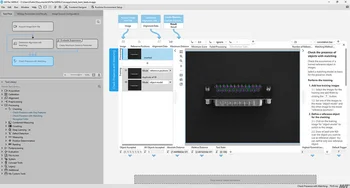
MVTec MERLIC offers a clear and streamlined user interface with a large view of the image to be processed at the center of the workspace. The tool library is located on the left side and contains standard tools for industrial machine vision.
Each tool is graphically represented in the workspace, making all steps of the vision application traceable at all times. The image-centered design allows the application to be configured directly through the image – without programming and without extensive parameter settings.
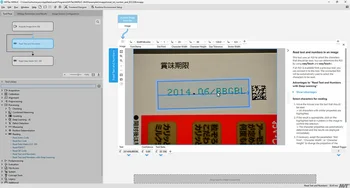
A key feature of MVTec MERLIC is the easyTouch concept. easyTouch supports application development by interactively guiding the user to the solution. When moving the mouse pointer over the image, MERLIC automatically detects and highlights relevant objects.
Objects can be selected with a single mouse click, without the need to configure complex parameters. Some tools additionally support easyTouch+, allowing multiple objects to be selected simultaneously to fine-tune parameters more precisely. This concept reduces configuration effort and accelerates the development of vision applications.
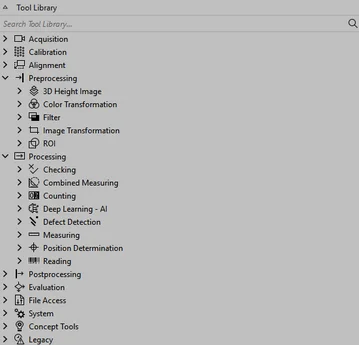
MVTec MERLIC includes an extensive tool library for typical industrial machine vision tasks. These include, but are not limited to:
The tools can be automatically connected or manually linked via drag-and-drop. This allows for the creation of complete machine vision applications without programming.
MVTec MERLIC provides tools for 3D image processing based on height maps. These enable tasks such as reading embossed text and other 3D machine vision applications.
MERLIC includes tools for processing images from 3D sensors or 3D cameras. This allows inspections to be carried out using the existing 2D tools in MERLIC.
The available features include:
Guidelines for configuring 3D sensors can be found in the "Acquisition" chapter of the general MERLIC manual, which is included with the MERLIC installation. Additional information is available on the English MERLIC website.
MVTec MERLIC enables the simultaneous use of multiple frontends. Frontends can be operated locally at the machine or via remote connections.
This allows parameters and results to be checked and adjusted remotely without working directly at the system. Multiple frontends with different designs can be used in parallel, such as for the technician at the machine and for evaluation or monitoring purposes. The processing speed remains unchanged.
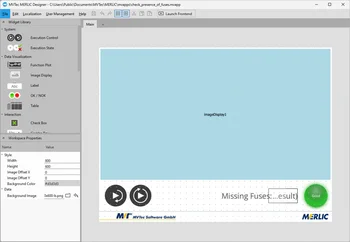
With the MERLIC Designer, custom user interfaces for vision applications can be created. Widgets can be placed via drag-and-drop and linked to parameters of MERLIC tools.
The properties of the widgets can be adjusted with just a few clicks. It is also possible to integrate company logos or customize the design to match the corporate identity. Multiple frontends can be created per application, for example, for different user levels.
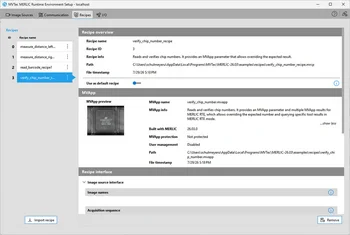
MVTec MERLIC provides a graphical user interface for managing and configuring MERLIC applications. This includes:
The runtime environment setup can also be connected to remote systems to perform configurations remotely.
MVTec MERLIC supports USB3 Vision and GigE Vision compatible cameras, as well as image acquisition hardware with the GenICam GenTL standard. Digital camera interfaces are supported through the digital I/O control of GenICam.
The Image Source Manager (ISM) decouples the image acquisition source from the tool flow. This allows MERLIC applications to be transferred and executed between systems without needing to adjust the camera settings. Image sources can be easily managed and configured via the graphical user interface.
MVTec MERLIC can be extended with custom tools. These custom tools are created in the development environment HDevelop by MVTec HALCON and integrated into MERLIC.
A HALCON development license is required for development. The "Custom Tools" add-on is necessary for execution in MERLIC. This allows for the addition of specific requirements without changing the standard workflow.
MVTec MERLIC allows the protection of applications (MVApps) through password assignment. The password protection can be activated for each MVApp in the MERLIC Creator.
When password protection is enabled, a password must be entered when loading the MVApp in the MERLIC Creator in order to make changes. This is particularly useful when MERLIC applications need to be shared with third parties without allowing them to make adjustments.
The password protection helps safeguard MVApps from unauthorized access and secure the intellectual property of the application.
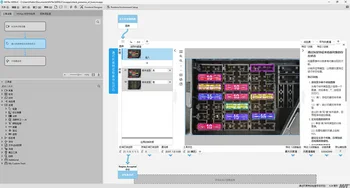
MVTec MERLIC supports an efficient and user-friendly workflow and is available in several languages, including Simplified Chinese, English, German, and Japanese.
All areas of the graphical user interface are translated. A large portion of the standard documentation is also available in these languages, including the complete MERLIC manual.
Furthermore, MERLIC allows the provision of frontends in additional languages. The desired language can be selected in the MERLIC Designer. Texts can be exported, translated, and then re-imported. The language of the displayed texts can then be switched directly in the frontend.
POWERFUL AI. SIMPLE WORKFLOW.
MVTec MERLIC includes advanced deep learning features as well as rule-based image processing methods. This combination allows for solving a wide range of tasks, including classification, defect detection, text and number reading, and other deep learning-based evaluations.
Depending on the method, trained models are used, which were previously created with the MVTec Deep Learning Tool. These models can be directly used in MERLIC.
With the Deep Learning Tool, you can easily label your data and train your models thanks to the intuitive user interface – all without programming skills. This data can be seamlessly integrated into MERLIC to run deep learning-based processes.
| Technology | Model training in DLT required? | MERLIC Deep-Learning-AddOn required? |
| Classification | ✔ | ✔ |
| Anomaly Detection | X (For this technology, training of the model can be done directly in MERLIC.) | ✔ |
| Global Context Anomaly Detection | ✔ | ✔ |
| Object Detection Instance Segmentation | ✔ | ✔ |
| Segmentation | ✔ | ✔ |
| Deep OCR* | X (For this technology, training of the model can be done directly in MERLIC.) | X |
| Deep Counting* | X (For this technology, training of the model can be done directly in MERLIC.) | X |
*This technology is included in the basic MERLIC package.