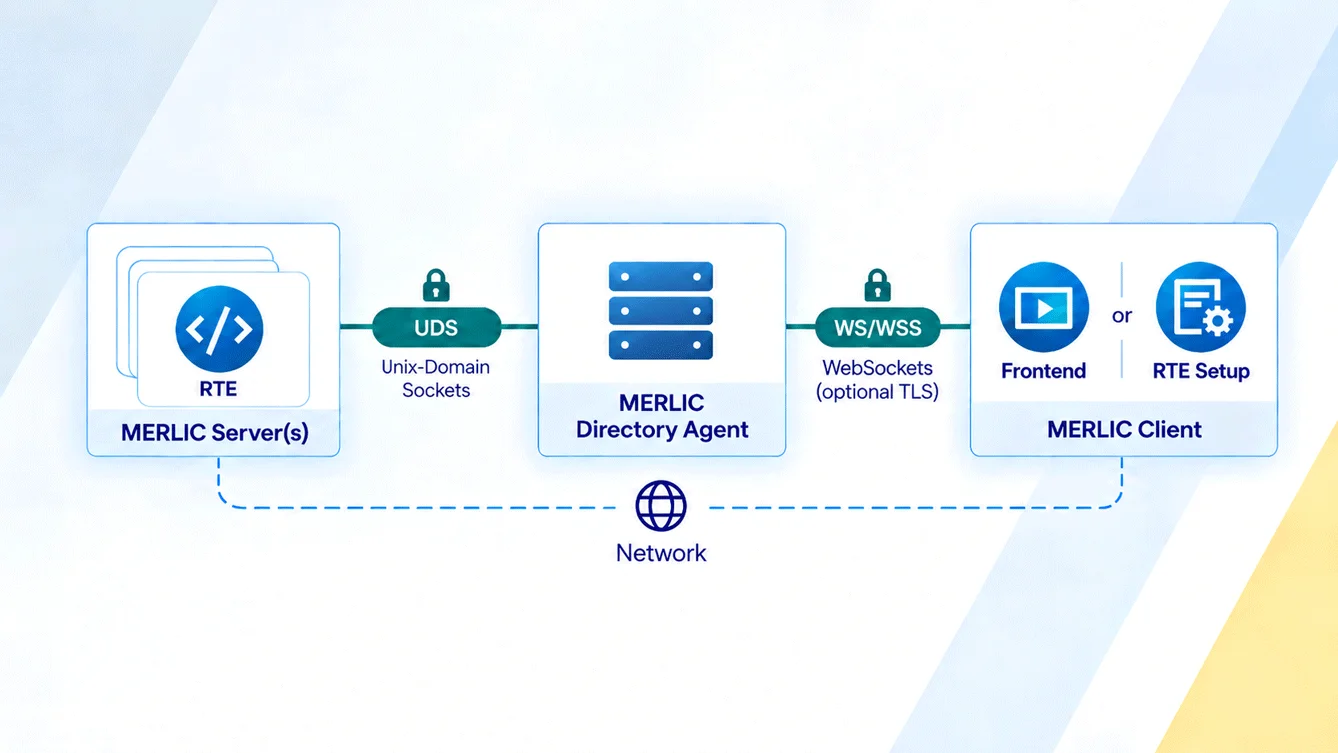
MERLIC often needs to communicate across system boundaries in production environments. MERLIC 26.10 therefore introduces a redesigned communication architecture that makes communication between MERLIC components more secure and easier to manage. Its secure-by-default model initially allows only local connections. Remote access must be explicitly enabled and can be protected using Transport Layer Security (TLS).
For remote connections, MERLIC now uses WebSockets. Multiple MERLIC services and instances can share the same port via separate WebSocket endpoints, reducing the number of required ports and simplifying firewall configuration. This also makes it easier to connect to a specific MERLIC instance on a system.
For local communication, MERLIC uses Unix-domain sockets (UDS). This removes network stack overhead and port management, while access is controlled through operating system file permissions.
The redesigned architecture also provides the technical foundation for future integration of MERLIC applications into web-based environments.
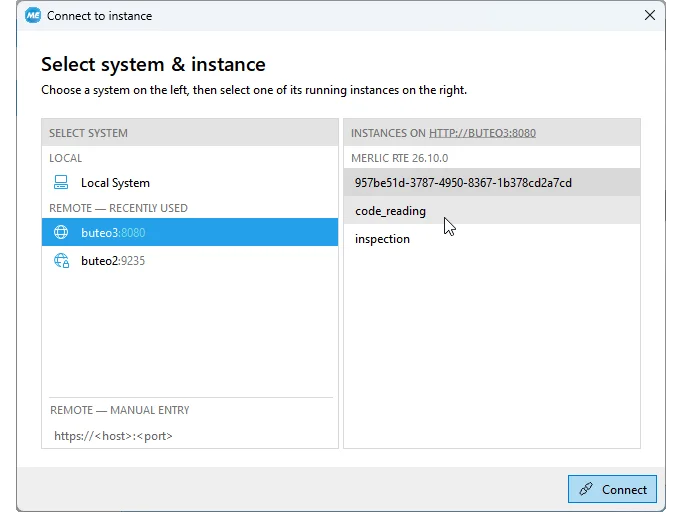
Production systems may run multiple MERLIC instances for different machine vision applications. MERLIC 26.10 introduces a redesigned connection dialog in MERLIC Frontend and MERLIC RTE Setup, making it easier to connect to these systems.
In addition to selecting a host, users can now select the specific MERLIC instance they want to connect to. Previously connected hosts are automatically available for selection, while graphical indicators show system availability and the security level required for the connection. This provides a clearer overview and helps prevent configuration errors, especially in systems with multiple MERLIC instances.
When creating a MERLIC application, tools can be grouped to structure more complex Tool Flows.
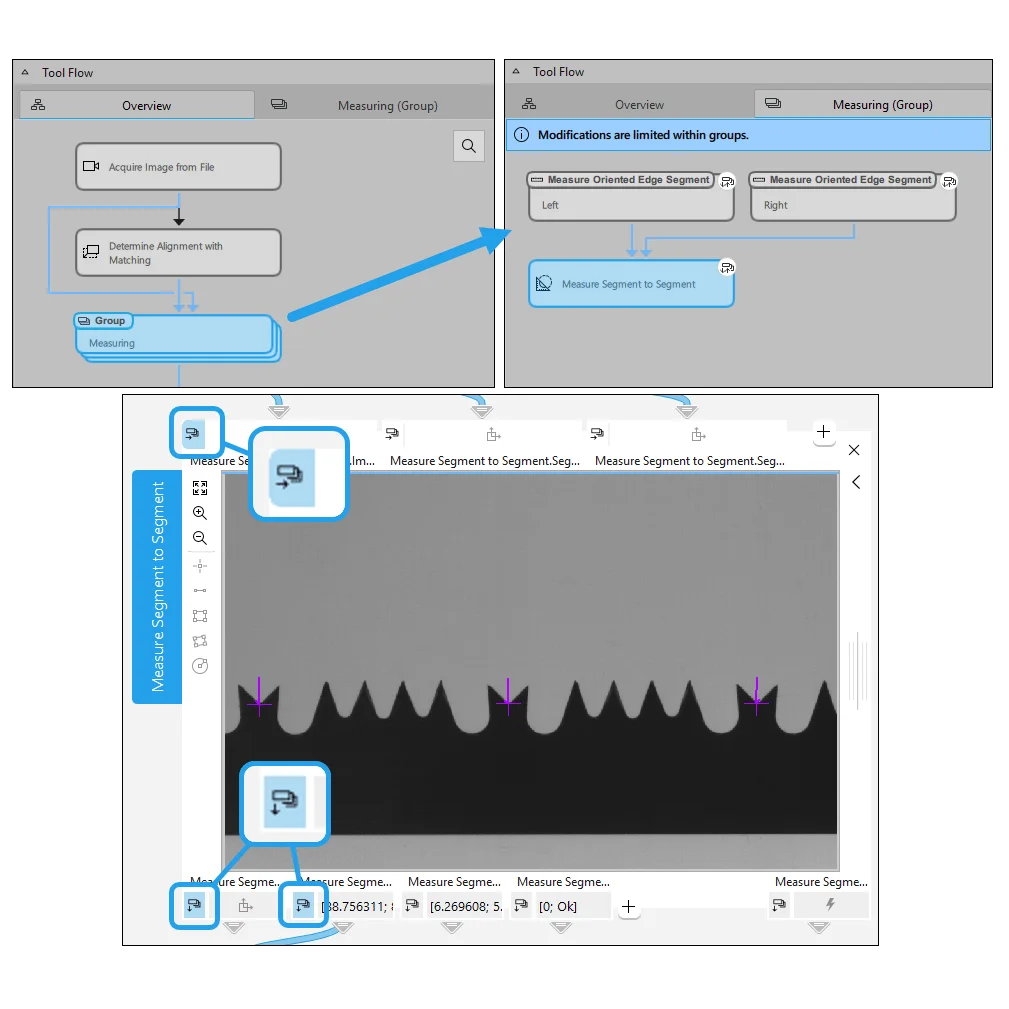
MERLIC 26.10 makes grouped tools easier to inspect, configure, and reuse within an MVApp. Groups can now be opened in their own Tool Flow tab, where users can view the contained tools, select individual tools, and check or adjust their parameter settings directly.
The group interface is also configurable. Parameters and results of grouped tools can now be added to the group interface. This makes them available for configuration and allows them to be connected to widgets in the Frontend Designer without ungrouping the tools.
As a result, users can modify grouped configurations and adapt Frontend designs, while keeping existing tool groups intact, reducing unnecessary restructuring during MVApp development.
Software Bills of Materials provide transparency about the components contained in a software product and support automated security and compliance processes. MERLIC 26.10 now provides SBOMs for most of its components in the standardized SPDX format.
The machine-readable SBOMs provide information such as provenance, dependencies, versions, and licenses. SBOMs can also be checked against databases of known vulnerabilities documented as Common Vulnerabilities and Exposures (CVEs). This helps integrate MERLIC into existing software security and vulnerability management workflows.
MERLIC 26.10 simplifies two common tasks during application setup and development: managing MVApps for process integration and inspecting regions of interest.
For most use cases, MVApps can now be imported directly into recipe management and used as virtual recipes in MERLIC RTE mode. This removes the need to create separate MERLIC recipes when no additional parameterizations or specific acquisition sequences are required, simplifying setup and maintenance. MERLIC recipes remain available for use cases that require multiple predefined MVApp parameterizations or a specific acquisition sequence.
ROI visualization has also been improved in MERLIC Creator and MERLIC Frontend. When an ROI is selected, relevant metrics such as width, height, position, angle, or radius are displayed directly, depending on the ROI type. This makes important ROI information immediately visible during application development and inspection.