
HDevelopEVO is aimed for developers who work with growing projects and increasingly complex machine vision logic. The preview supports efficient daily work by improving project organization, navigation, and debugging, so development and maintenance become more structured and less error-prone.
It addresses common workflow needs such as keeping an overview of larger code bases, navigating quickly through procedures and variables, understanding script structure and execution flow at a glance, and debugging image-based logic in a more visual and intuitive way.
HDevelopEVO complements HDevelop by introducing modern IDE concepts and workflows that are being evaluated for future generations of HALCON development tools.
HDevelopEVO introduces a more structured way of working with files and projects. The explorer in HDevelopEVO provides a clear structure to manage, create, and edit your files and folders. With just a few clicks, you can navigate your project and keep track of everything.
The enhanced editor in HDevelopEVO is designed to reduce manual effort and support focused development.
Streamline your development workflow with our enhanced editor. Enjoy features like code folding, word wrap, and the ability to open and edit multiple programs simultaneously. Plus, take advantage of our pre-built code snippets for control flow structures.
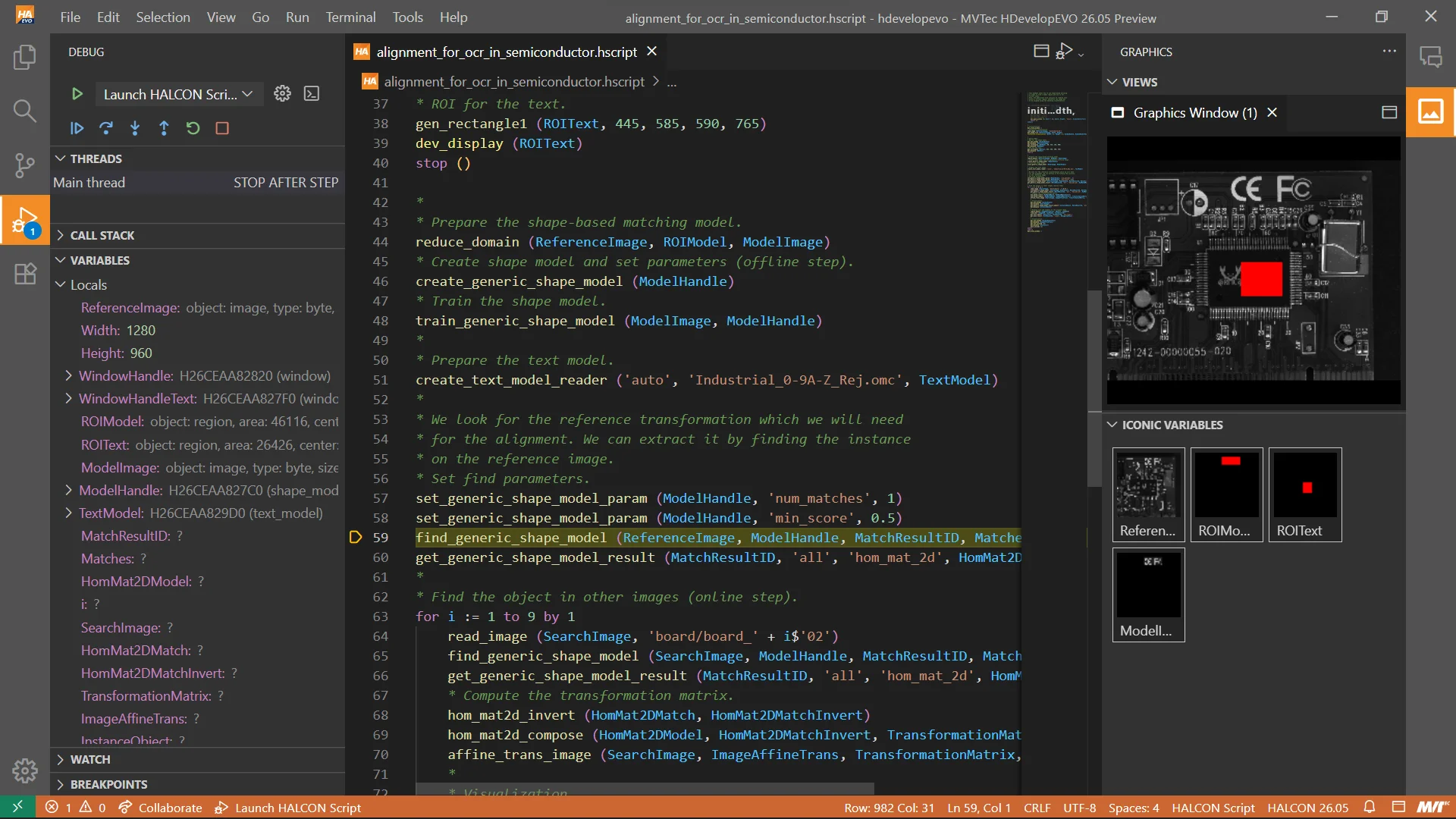
Debugging in machine vision is inherently visual. HDevelopEVO reflects this by integrating image visualization directly into the debugging process.
The Graphics Window now displays corresponding images during the debugging, providing a more intuitive and visual debugging experience. Enjoy familiar features like double-clicking iconic variables to view them, zooming, panning, and clearing the window. And with the ability to restart and step through your script, you can see how changes affect your images instantly.
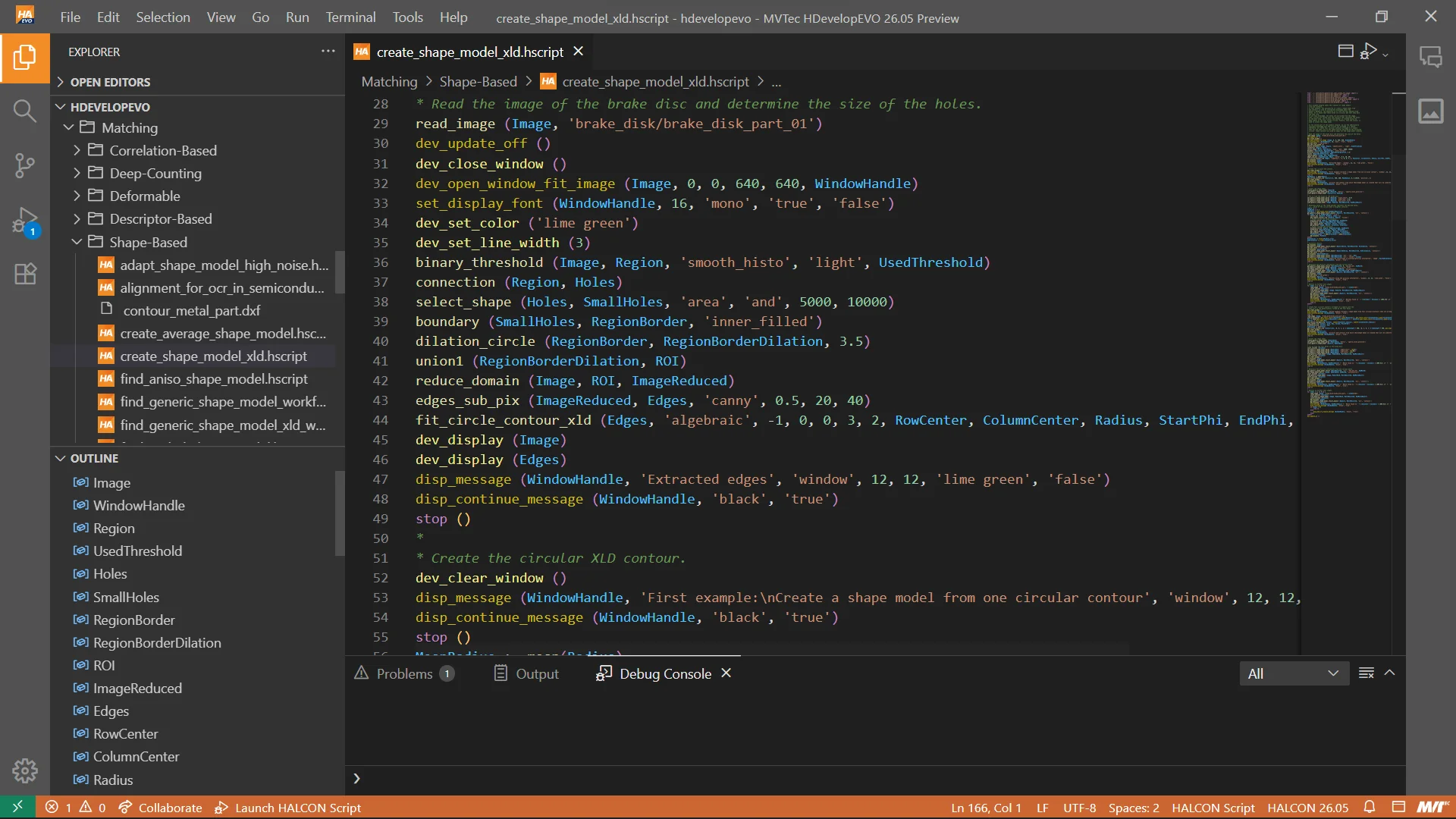
HDevelopEVO introduces improvements to the HALCON Script language to support more modular and readable code.
Experience greater flexibility in your HALCON scripting with the ability to declare procedures directly within your code. This streamlined approach simplifies your workflow and makes your scripts more modular.
UPCOMING FEATURES WITH HALCON 26.11
With HALCON 26.11, HDevelopEVO becomes available as an Early-Adopter version for customers who want to work with the latest development tools and explore new capabilities at an early stage. A new MCP server, integrated into HDevelopEVO by default, gives the integrated AI assistant access to broader HALCON-specific knowledge, while new multithreading capabilities in the HALCON Script Engine support the migration of parallel applications. Runtime Graphics Windows display application output directly in the IDE and clearly separate it from debug visualization. In addition, region parameters can now be adjusted visually directly in the code: Regions can be moved or resized in the graphics window, while HDevelopEVO automatically updates the corresponding operator parameters.
The Early-Adopter version does not yet provide the full functionality planned for HDevelopEVO. Development continues with high priority, with a particular focus on AI-agent-assisted software development and additional core functionality being added step by step. For all HALCON 26.11 customers, a free update with selected functional enhancements is planned for 2027. Further details on its scope and availability will be announced at a later date.
Give the AI assistant in HDevelopEVO access to broader HALCON-specific knowledge.
With HDevelopEVO 26.11, a new MCP server is integrated into HDevelopEVO by default and provides additional HALCON-specific information. This gives the AI assistant in HDevelopEVO access to broader HALCON-specific knowledge, including operator descriptions and HALCON Script examples. Using this additional context, the AI assistant can help users find suitable HALCON functionality and existing examples more quickly and apply them in their development workflow.
Reuse established parallel-processing concepts in HDevelopEVO.
With HDevelopEVO 26.11, developers can now use multithreading directly in the HALCON Script Engine. This makes it possible to implement parallel processing workflows in HDevelopEVO and to migrate existing HDevEngine applications that rely on multithreading without fundamentally redesigning their parallel-processing concepts.
To make multithreading easier to use, HDevelopEVO 26.11 introduces dedicated language constructs for creating, starting, and joining threads. These provide a clear way to control parallel execution directly in HALCON Script and support the reuse of established application structures when moving existing applications to the new HALCON Script Engine.
See your application’s runtime visualization directly in HDevelopEVO.
HDevelopEVO 26.11 introduces Runtime Graphics Windows for displaying the visual output explicitly generated by a HALCON Script or application. Unlike Debug Graphics, which are used to inspect variables and intermediate results during development, Runtime Graphics show the actual visualization created by the program. Developers can therefore see directly within HDevelopEVO how their application output will appear at runtime. The clear separation between application output and debug visualization improves clarity, particularly in larger applications with multiple processing and visualization steps. Development, execution, and visual validation can now take place within one integrated environment, making it easier to validate runtime visualization during development.
Adjust region parameters visually without leaving your coding workflow.
HDevelopEVO 26.11 lets developers adjust region parameters visually while working directly in their code. After adding a region operator such as gen_rectangle1, gen_rectangle2, or gen_circle, they can use a Code Action to display the corresponding region in the graphics window and edit it there.
Developers can move or resize the region directly on the image instead of calculating coordinates or changing parameter values by hand. HDevelopEVO updates the operator parameters automatically to reflect these changes. This keeps region definition within the normal coding workflow and makes it easier to adapt regions to actual image data. Typical uses include defining search areas, measurement regions, templates, masks, and other regions during the development and refinement of machine vision applications.
HDevelopEVO 26.05 introduces a .NET interface for the HALCON Script Engine, enabling HALCON scripts to be executed directly in .NET applications.
Scripts created and tested in HDevelopEVO can be embedded and executed in C# applications without having to reimplement algorithms. Developers can integrate vision logic directly into their .NET projects while retaining their existing toolchain.
This enables a seamless workflow from prototype to production: Vision applications are developed in HDevelopEVO and deployed directly in .NET systems, reducing integration effort and shortening the path from prototype to a production-ready machine vision solution.
HDevelopEVO 26.05 introduces the HALCONSearch Agent, an AI-powered search that helps users identify suitable HALCON operators, procedures, and example scripts for a specific machine vision task.
Users describe their problem in natural language. The agent identifies suitable operators, procedures, and example scripts from the HALCON library and evaluates them using an AI-based confidence score. Relevant example scripts can be displayed directly in the AI Views panel for immediate review.
This replaces manual library research with a task-oriented search. Developers can find relevant operators faster and build directly on existing examples, accelerating the start of new projects.
HDevelopEVO 26.05 introduces inline hover documentation that displays relevant metadata directly in the editor without switching to another tab.
Hovering over an import statement displays documentation for the referenced file. Hovering over a procedure call shows the procedure description, while parameter information appears automatically during parameterization.
This is particularly useful in larger projects with many modules and procedures: Developers can understand unfamiliar code faster and configure procedure calls with fewer errors.
HDevelopEVO 26.05 extends its multimodal LLM support with Visual Prompting. Developers can now include image data directly in prompts to the AI assistant.
Images from the Iconic Variable View, graphics windows, or selected variables can be passed directly to the model without having to describe visual content in text. The assistant analyzes the image and prompt together, enabling more relevant responses.
This speeds up debugging, analysis, and documentation because the assistant works with the same image data as the developer.
HDevelopEVO 25.11 introduces redesigned syntax highlighting for HALCON Script files, making code easier to read, navigate, and maintain. Instead of uniform coloring, operators, variables, and comments are now displayed in distinct colors, giving scripts a clear visual structure. This improves orientation in the code, reduces errors, and speeds up debugging and refactoring – resulting in a more efficient workflow and a smoother development experience.
With HDevelopEVO 25.11, MVTec introduces the first preview of the HALCON Script Engine, the successor to the HDevEngine. It provides a runtime environment for executing HALCON Script files created in HDevelopEVO. The HALCON Script Engine can initially be integrated into applications via a C++ API. Further interfaces such as .NET and Python are planned for future releases. This bridges the gap between prototyping in HDevelopEVO and productive use in custom solutions.
As a preview version, the HALCON Script Engine already enables embedding HALCON Scripts into applications. While not all language features are supported yet, these will follow in future releases. In the meantime, users can try it out and gain early experience with the new workflow.
Also included in this release are several improvements that make working with HDevelopEVO more efficient. A new script converter simplifies the migration of existing HDevelop procedures and example programs into HDevelopEVO, supporting stepwise conversion and reuse of established code. Usability has been enhanced with interactive tools: a real-time histogram integrated into the threshold operator for intuitive parameter adjustment, and a live display of grayscale values on mouse hover for instant pixel-level analysis. Together, these features simplify migration, speed up troubleshooting, and streamline everyday image processing workflows.

A new converter allows users to transform existing HDevelop procedures and example scripts into HScript files for use in HDevelopEVO. Programs and their associated procedures can be migrated for editing and execution in the new IDE, supporting stepwise conversion – from individual files to complete project folders.
Users receive direct feedback on which elements were converted and which may need further adaptation. While some language features and operators are not yet fully supported, the converter provides a straightforward way to reuse existing HDevelop scripts in HDevelopEVO. Continuous improvements and extended compatibility are planned for future updates.
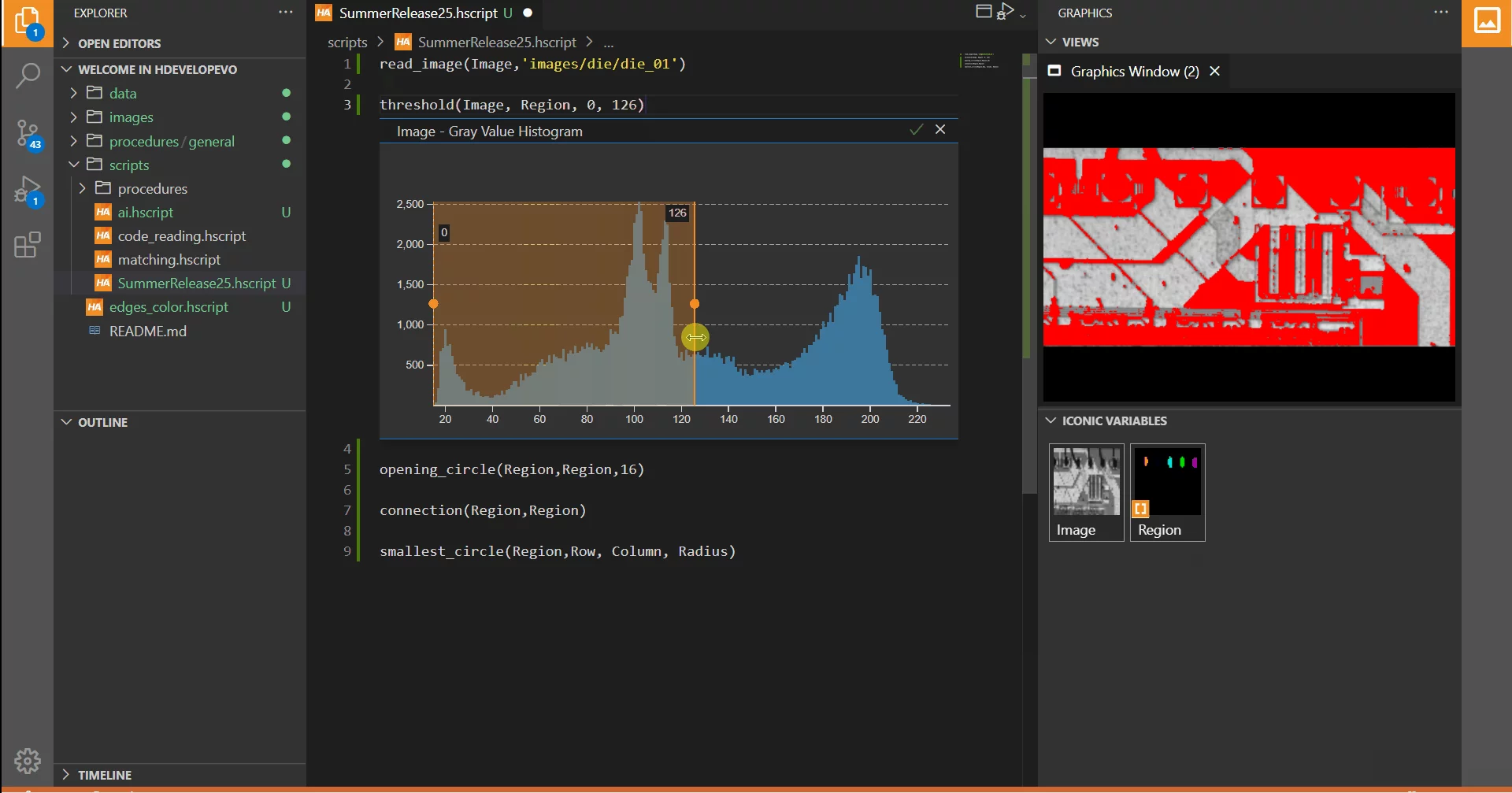
HDevelopEVO now provides a real-time gray value histogram directly below the threshold operator in the editor. This allows users to intuitively adjust minimum and maximum threshold values by interacting with the histogram, using the current image as reference. Changes are immediately reflected both in the segmented image and within the source code, enabling quick, visual fine-tuning without switching dialogs or editors. This streamlines segmentation workflows and supports efficient parameter optimization for various image processing tasks.
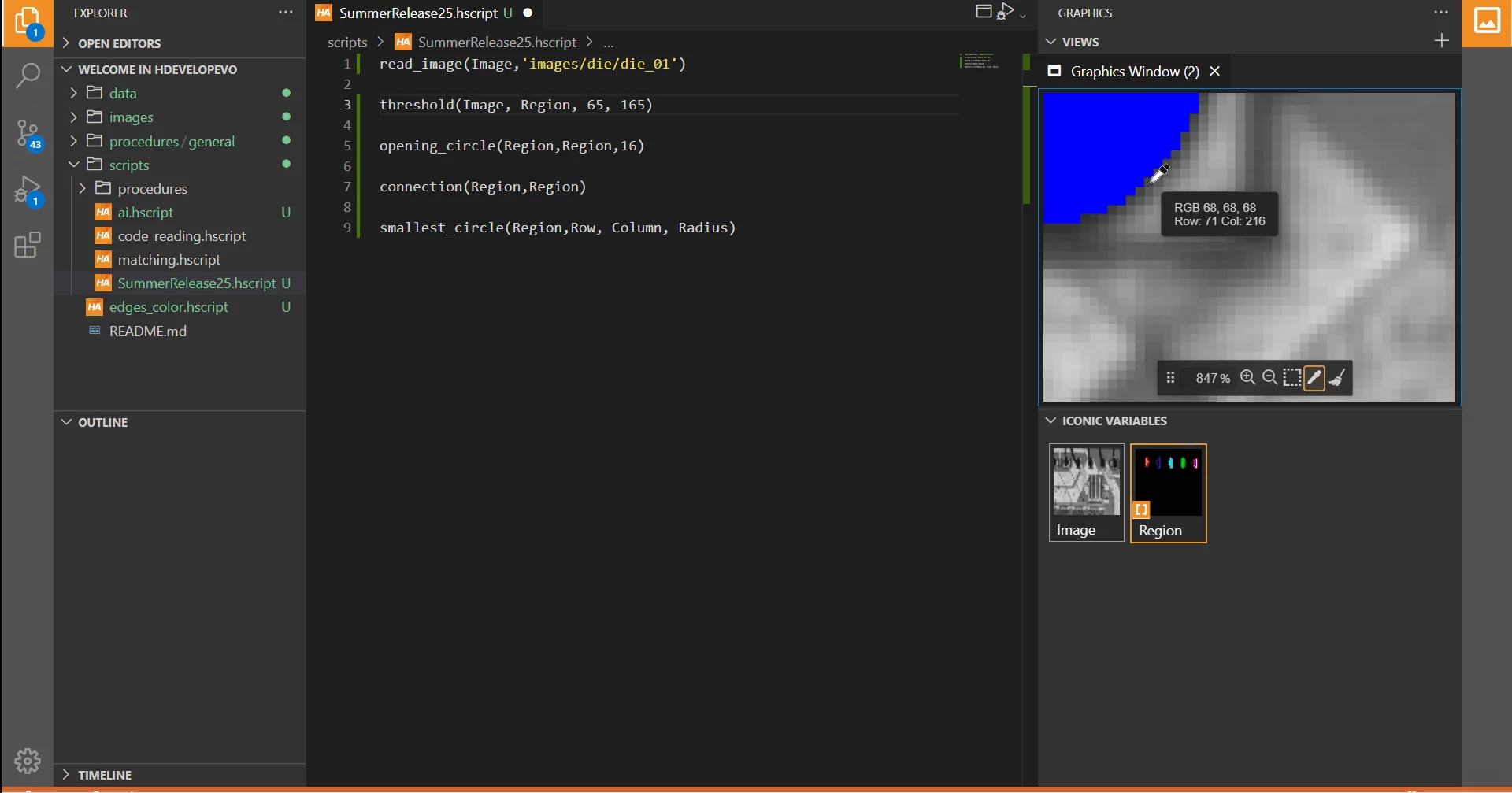
You can now instantly view the grayscale value of any pixel in HDevelopEVO by simply moving your mouse over the image.
The current cursor coordinates and the corresponding grayscale value are displayed in real time, eliminating the need to click or query individual pixels. This streamlines pixel-level analysis, speeds up troubleshooting, and supports quick checks in applications such as industrial inspection, research, or data visualization.
HDevelopEVO 25.05 introduces support for referencing procedures stored in external files. Users can now split their programs into multiple files and reference procedures across them. This enables cleaner program structure and is a first step toward future support for modular libraries.
To address a common need in machine vision workflows, HDevelopEVO 25.05 adds the gray value histogram – one of the most frequently used tools for image analysis. It enables the user to visualize the distribution of pixel intensities in an image and to interactively set thresholds to select relevant regions for further processing.
To support developers more effectively, HDevelopEVO 25.05 introduces AI assistants. These include an interactive chat, agents for, e.g., IDE commands and shell commands, and automatic code completion. Users can choose between cloud-based, self-hosted, or local AI models while maintaining full control over data and model usage. The AI assistants must be explicitly activated by the user.
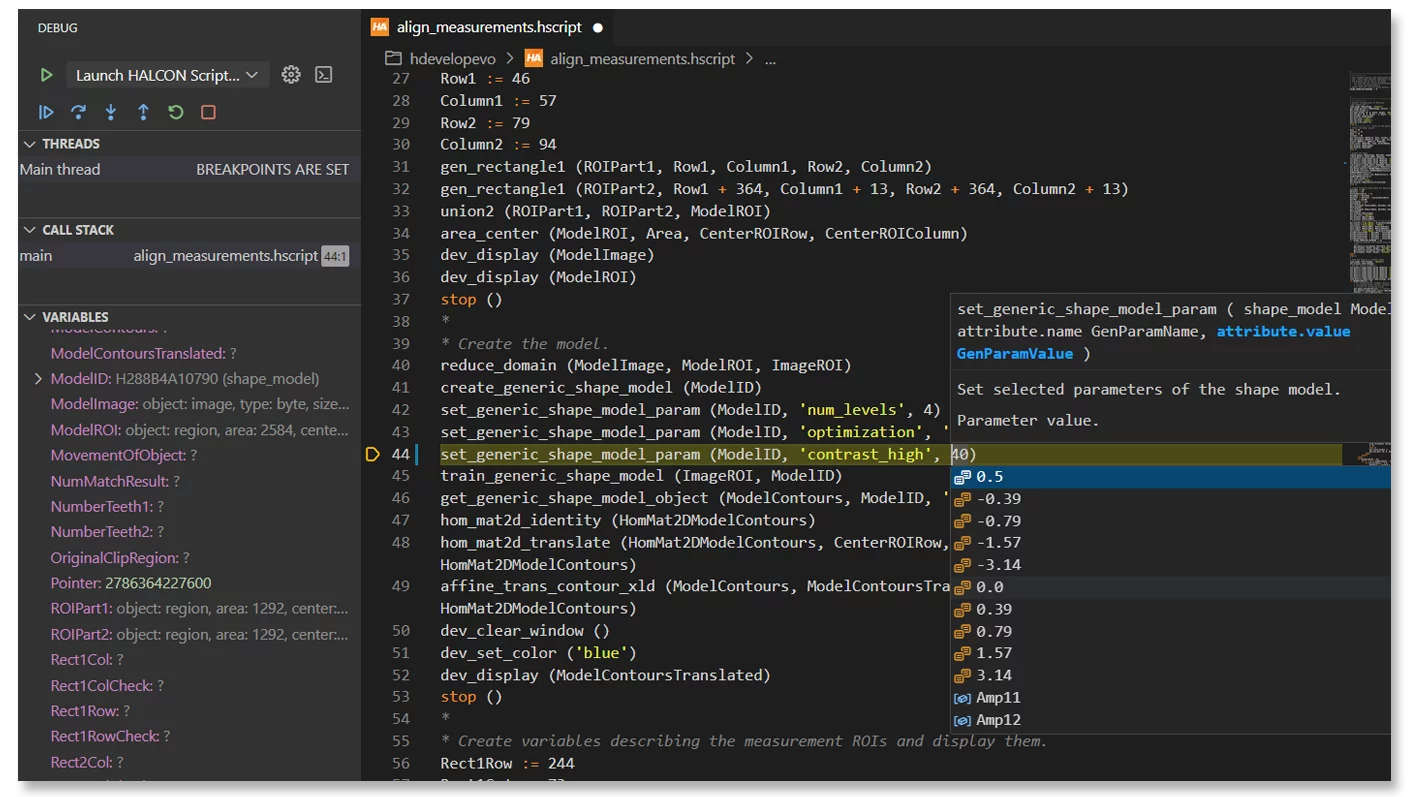
A key feature of HDevelop is also available in HDevelopEVO. Users can modify running scripts and adjust parameter values during execution without restarting the script. This enables interactive development and supports rapid prototyping, significantly accelerating the development process.
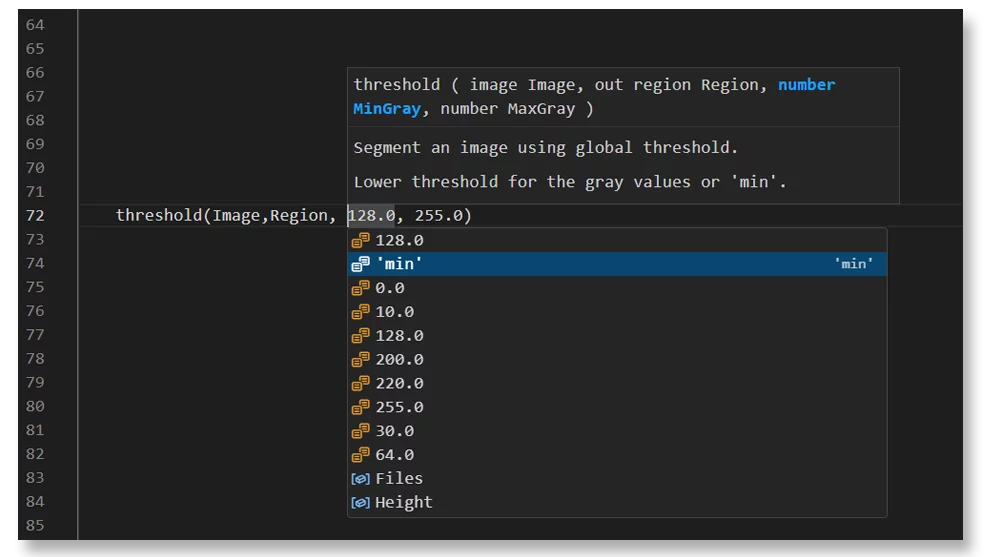
The auto-completion in HDevelopEVO provides support when writing HALCON scripts. While coding, users can now view a short documentation of each operator when needed, helping them better understand its function and parameters. This makes script development faster and more efficient.
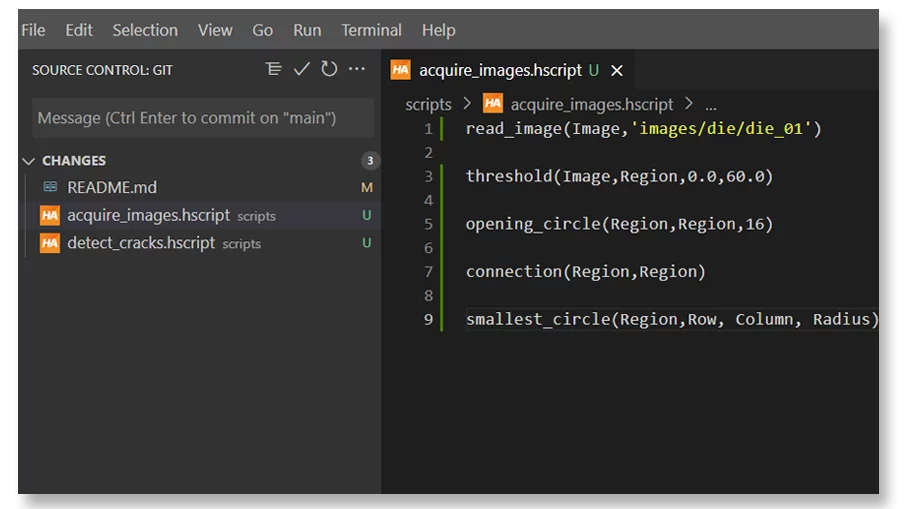
HDevelopEVO integrates version control via Git, allowing users to manage projects directly without having to leave the development environment. Git operations, such as committing changes, can be performed seamlessly within HDevelopEVO. Code changes are highlighted in the editor and can be compared to previous versions, making it easier to track modifications within a project. This functionality also enhances team collaboration, as multiple users can work on a project simultaneously and merge their changes efficiently.
