Developers Corner
In the digital age of smartphones and tablets, the control of devices via a touch screen became second nature to us. Little by little, this revolutionary new technology is adapted by industry as well. Often, we are asked whether it is possible to control a HALCON window via a touch device. In this article, we want to show you how easy it is to add touch functionality such as Pinch-to-Zoom to the HSmartWindowControlWPF.
The HSmartWindowControlWPF provides all the necessary touch events such as TouchDown, TouchMove and TouchUp to implement these touch gestures manually. However, handling the different touchpoints can quickly become complex to handle. Conveniently, the WPF framework already provides a built-in functionality for controls to handle multitouch events, which are called Manipulations.
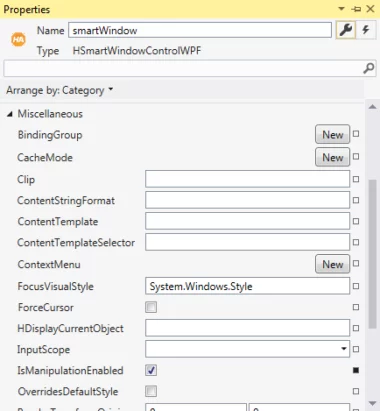
First, we have to activate the Manipulations for the HSmartWindowControlWPF by enabling the option IsManipulationEnabled. After that, we can use the Events ManipulationStarted and ManipulationDelta.
The event ManipulationStarted will be triggered as soon as the touch input has started. Here, we have to store the row and column coordinates of the original manipulation origin. These image coordinates should always be lying under the manipulation origin in order to get a natural movement of the image.
smartWindow.HalconWindow.GetPart(out row1, out col1, out row2, out col2);
double x = e.ManipulationOrigin.X;
double y = e.ManipulationOrigin.Y;
widthControl = smartWindow.ActualWidth; heightControl = smartWindow.ActualHeight;
row = (int)(row1 + (y / heightControl) * (row2 - row1));
col = (int)(col1 + (x / widthControl) * (col2 - col1));
In the ManipulationDelta event, the WPF framework already delivers the results of the multitouch input, such as the new manipulation origin and the scaling factor of the zooming. Using some maths magic as shown below, we can compute the new limits for that part of the HALCON window which is embedded in the HSmartWindowControlWPF.
double x = e.ManipulationOrigin.X;
double y = e.ManipulationOrigin.Y;
double scale = e.CumulativeManipulation.Scale.X;
double newHeight = (row2 - row1) / scale;
double newWidth = (col2 - col1) / scale;
double newRow1 = row - y/heightControl * newHeight;
double newCol1 = col - x / widthControl * newWidth; double newRow2 = row + (1 - y / heightControl) * newHeight;
double newCol2 = col + (1 - x / widthControl) * newWidth;
smartWindow.HalconWindow.SetPart(newRow1, newCol1, newRow2, newCol2);