December 14, 2018 | Developers Corner

Training a deep learning classifier with HALCON on the embedded board Jetson TX2

Learn how to train a deep learning classifier with HALCON on both a PC and an embedded Jetson TX2 board, from image acquisition to model training and inference, for efficient machine vision applications.

Deep learning technologies allow a wide range of applications for machine vision. Based on these technologies, MVTec offers various operators and tools within HALCON and MERLIC – often in combination with embedded boards and platforms (more information about this can be found in our section about Embedded Vision).

In this article, we describe how to train a deep learning classifier with HALCON on a standard PC together with the embedded board NVIDIA Jetson TX2 and a Basler GigEVision camera.

Prerequisites

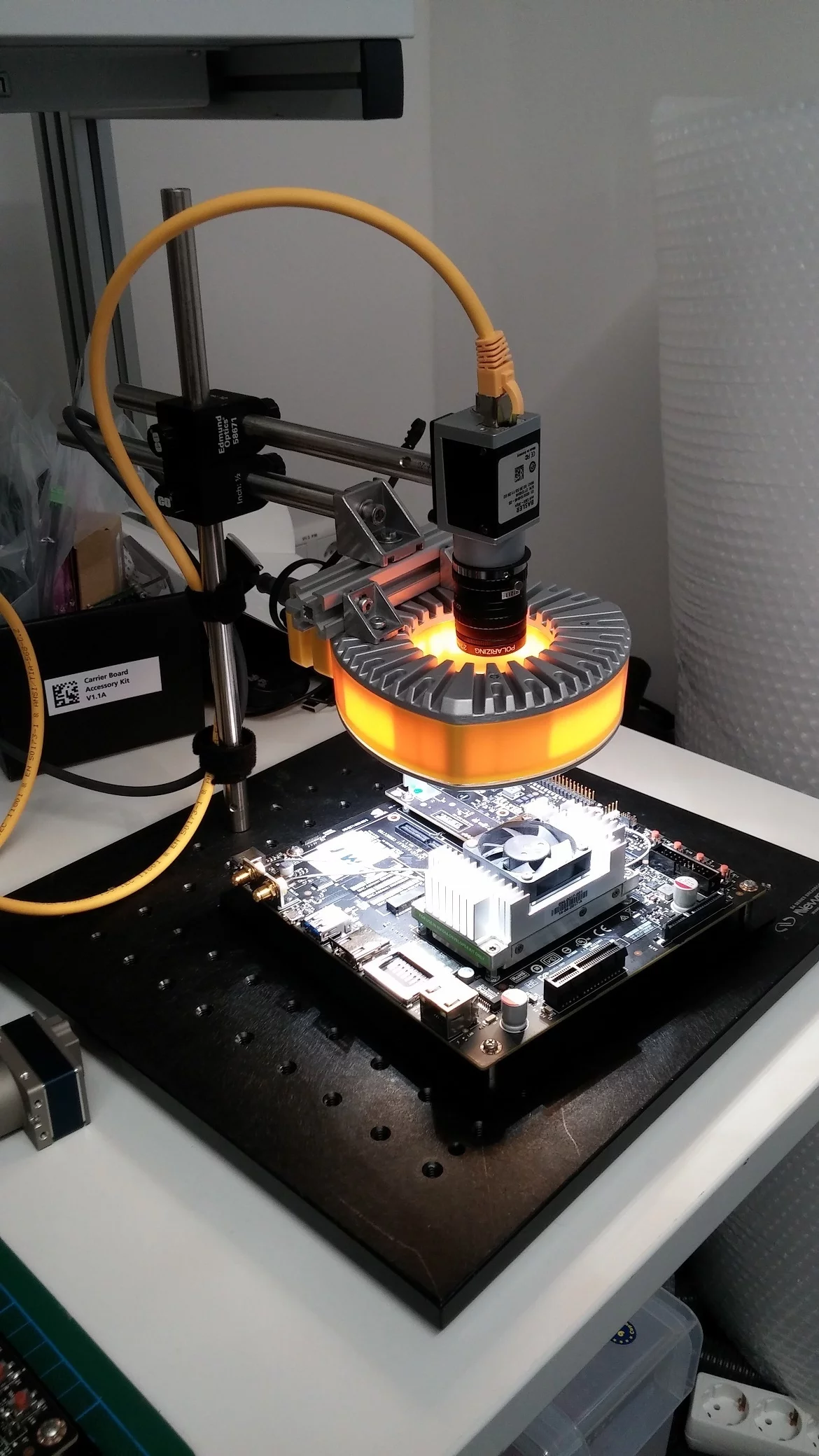
Therefore, we set up the following technical components:

  • Standard PC with a powerful NVIDIA GPU with HALCON 17.12 installation or above.
  • System with a NVIDIA GPU with HALCON 17.12 installation or above (we used NVIDIA Jetson TX2 + power supply and HALCON 17.12 for Arm-based x64 systems).
  • 2 HALCON dongles (dependent upon you want to switch the dongles between the systems)

To set up a live system – and not working only with offline images – you additionally need the items below. You can see, within the brackets, what we used.

  • GigEVision camera (Basler ace acA1300-30gc ICX445)
  • Lens (6mm, V.S. Technologies SV-0614 (B1211), 0.5mm distance ring, polarizing filter to avoid specular reflections)
  • Lighting setup (EFFI-Ring including polarizing filter to avoid specular reflections)
  • Stativ system (Newport opto-mechanical mounting sets)
  • Additional parts for identification (NVIDIA Jetson TX2, Raspberry Pi 3, background and our hands)

For a comfortable handling, we applied a switch for connecting the camera to the PC and the NVIDIA Jetson. Otherwise, you have to plug and unplug the camera in between the systems. If you don’t want to use an external power supply for the camera, you need a PoE-camera and an active switch.

Acquiring the images

Starting from scratch, using deep learning technologies, requires millions of images. With HALCON’s pretrained deep learning nets, only around 400 images per class are required. For speedy and easy acquisition of the data, we developed a simple recording script, which can be downloaded on this site. Please note that for the execution of this script, some external procedures are needed. You may find them in the complete download package at the end of this site.

If you press your mouse button down, the images grabbed from the camera are stored on the HDD in the correct folder structure ( ./images/XXXX/imgNNNN, where XXXX is the name of the class and NNNN the sequence number). You may configure the script to fit your objects you would like to distinguish.

Please make sure, you have Jumbo Frames activated for your network interface card where the camera is connected. On Linux-based systems, you may do so by typing: udo ifconfig eth0 mtu 1492

Rules for acquiring the images:

  • Make sure that the object covers most of the image. This is especially important if you have the background as a class.
  • The classifier uses – if you do not preprocess the images – the complete image content, including the background as well. Therefore, you should make sure, that the object itself covers a larger portion of the images. Otherwise, the classifier may train the background and not the appearance of the object.
  • Provide every perspective of the object that may occur in the target application.
  • Check if the objects are distinguishable on the target size of 224x224. If this is not the case, you may think about dissecting your image in smaller portions and performing the inference on them. Doing so, you need to combine the single decisions to a final one.

For our system, we performed the acquisition of the training images on the PC, since the training itself is also performed here. Basically, it does not matter if the acquisition takes place on the embedded board or the PC, as long as the same setup is used for training as for the live inference of the net. But of course, the data can be acquired on the embedded board and transferred to the PC afterward for the next step. Please note: For easier operation, the script crops the images shown in the live view to the space without the red overlay.

Please note: For easier operation, the script crops the images shown in the live view to the space without the red overlay.

Train the model

Basically, the training can be done on both platforms. However, we highly recommend doing it on the more performant system (PC in our case) since the training may take some time depending on the configuration, e.g. the used batch size, and the used hardware. The script reads the training images and prepares them for the training, which is mostly resizing the image to 225x225. It is also possible to automatically vary the given training set by a process called augmentation. The corresponding convenience procedure augment_images may automatically alter the image content by rotation, cropping, mirroring and local or global brightness variation.

The process of the training can be checked by the graphics provided by the script. The values for training and validation error should start at a high value and lower during the iterations. After the training converges, the classifier is written to disk in order to transfer it to the target platform if necessary.

Transfer the model

The *.hdl file created by the script in the previous step can be transferred from the PC to the Jetson TX2. This can be done comfortably using a network connection and a transfer software like WinSCP or by simply using a USB-Stick.

Perform the inference

After all previous steps are completed, the system is ready to use. The last script is pretty straightforward – it grabs images from the camera, applies the deep learning net and show the results. The output should look similar to the output of the acquisition script besides the inference result.

For easier handling, you may use a SSH client like PuTTY. This allows to show the output of the Jetson on the PC. Please make sure you enabled X11 forwarding and started an X-server on the PC to display the graphical output of the script on your remote platform. Furthermore, make sure you activate the high-performance mode of the Jetson. On the development system we used, the script jetson_clocks.sh can be executed to use all available cores. If this is activated, you should see the CPU fan rotating.
Download complete source code

Published on: December 14, 2018

Further Success Stories

MVTec HALCON product icon
Warehouse where cheese wheels age during the ripening process
Revolutionizing Cheese Production with AI and Machine Vision
The food industry is experiencing a transformative shift in quality control, due in part to advances in artificial intelligence (AI). When combined with rule-based machine vision, AI is enabling automation of processes that were previously impossible…
Show full Story
HALCON
Food & Beverage
Robotics
Anomaly Detection
Deep Learning
MVTec HALCON product icon
Dynamic OCR inspection with HALCON ensures maximum product quality
In the pharmaceutical industry, strict compliance regulations require medical product packaging to be correctly labeled before delivery. To meet these requirements, the Chinese company Shenzhen Jiangrun Xuneng Technology has developed a powerful mach…
Show full Story
HALCON
Medical Supplies & Pharmaceutical
Bar Code & 2D Code Reading
OCR
MVTec HALCON product icon
Automatisierte Transport- und Inspektionsstation für pharmazeutische Ampullen mit Machine-Vision-System von Aspen.
AI-powered machine vision automates quality inspection in the pharmaceutical industry
The pharmaceutical company Aspen is improving the quality inspection of filled ampoules with the MVTec HALCON machine vision software and the consulting and technical support services provided by MVTec. With deep learning methods, the company has sig…
Show full Story
HALCON
Medical Supplies & Pharmaceutical
Blob Analysis
Deep Learning
Matching
MVTec HALCON product icon
University of Paderborn, Heinz Nixdorf Institute
The Heinz Nixdorf Institute (HNI) joined the MVTec on Campus program in 2022. The University of Paderborn is a renowned research and educational institution specializing in the field of computer science and its applications in the context of digital…
Show full Story
HALCON
Robotics
Education, Research & Science
MVTec HALCON product icon
Intelligent Image Recognition for Automotive Logistics
An intelligent, database-based image recognition system supports order picking in automotive logistics. It shows staff the correct component, uses cameras to verify that packaging is ready for shipment, and enables seamless documentation. The solutio…
Show full Story
HALCON
Automotive
Packaging & Logistics
Object Detection
MVTec HALCON product icon
Line-scan vision system diagram used for inspecting printed materials with defect detection along a conveyor.
Industrial Inspection: Line-scan-based vision system tackles color print inspection - Daheng Image Vision
Daheng Image Vision uses a line-scan vision system with two Teledyne DALSA cameras and MVTec HALCON to inspect color prints on conveyor belts at 300 m/min. The system reliably detects ink spots, embossing errors, and misregistration, enabling compreh…
Show full Story
HALCON
Glass, Metal, Paper, Foil & Printing
Alignment
Classification
Matching
MVTec HALCON product icon
X-ray film dosimeter badges and opened cassettes with different metal filters inspected by a machine vision system.
Vision System Inspects X-ray Dosimeter Badges – Helmholtz-Zentrum
Helmholtz-Zentrum Munich uses HALCON to fully automate the evaluation of approximately 120,000 X-ray dosimeter films per month. Optical density, film type, and dosimeter numbers are precisely captured, and radiation sources are analyzed. The system s…
Show full Story
HALCON
Medical Supplies & Pharmaceutical
Calibration
Filtering
Matching
Measuring
OCR
MVTec HALCON product icon
Plastic rings on a conveyor used for automated machine vision inspection.
Closing the Ring – NP Plastics
NP Plastics in the Netherlands manufactures small plastic rings used in binder closing mechanisms. To increase throughput and improve quality, the company deployed a machine vision system with two AVT FireWire cameras, LED illumination, and HALCON so…
Show full Story
HALCON
Glass, Metal, Paper, Foil & Printing
Blob Analysis
Measuring
MVTec HALCON product icon
Workflow der Produktion zylindrischer Lithium-Ionen-Batterien mit verteilten Sensorsystemen und zentraler Deep-Learning-Auswertung mit MVTec HALCON.
MVTec HALCON’s deep learning helps Panasonic Energy to propel automotive battery production
Panasonic Energy manufactures automotive batteries, for which demand is increasing worldwide, at multiple sites in Japan and North America. The company recently implemented MVTec HALCON’s deep learning technologies on a large scale at its Kansas plan…
Show full Story
HALCON
Battery Production
Automotive
Deep Learning
Inspection
MVTec HALCON product icon
Advancing machine vision education at Reutlingen University
At Reutlingen University, Professor Arnd Buschhaus has been integrating MVTec HALCON into the teaching curriculum since 2018. HALCON is used extensively in courses related to robotics and machine vision, providing students with practical experience i…
Show full Story
Education, Research & Science
3D Vision
Blob Analysis
Classification
MVTec HALCON product icon
Robotic welding cell inspecting car body weld seams using machine vision.
Machine vision optimizes quality inspection in automotive production
Consistently high quality is an absolute must in automotive production. To ensure that welded connections in body shells meet these standards, DGH has developed an application that automatically inspects them and identifies anomalies. The MVTec HALCO…
Show full Story
HALCON
Automotive
Anomaly Detection
Deep Learning
Inspection
MVTec HALCON product icon
High-speed battery inspection using machine vision.
Machine Vision automates and optimizes battery inspection
A variety of defects can occur during battery production. Averna has developed a method for the automated inspection of batteries that reliably detects all conceivable defects. Here, the machine vision software MVTec HALCON plays a key role.
Show full Story
HALCON
Battery Production
Blob Analysis
Inspection
MVTec HALCON product icon
Automated robot cell handling vaccine vials with machine vision.
Machine Vision automates vaccine production
A global company needed to quickly ramp up vaccine production. Goldfuß engineering GmbH and SIMON IBV GmbH developed a robot-based solution for loading and unloading trolleys with the vaccine vials. The machine vision software HALCON ensures the seam…
Show full Story
HALCON
Robotics
Medical Supplies & Pharmaceutical
3D Vision
MVTec HALCON product icon
Micromechanical part measured with machine vision for high-precision inspection.
Machine vision improves the measuring process of precision and micro components
The precise inspection of very small precision components, for example in watchmaking, is a challenge. Petitpierre, the Swiss specialist for high-precision technology, has developed sophisticated applications with which micromechanical components can…
Show full Story
HALCON
Matching
Measuring
MVTec HALCON product icon
Industrial robots performing laser welding on battery cells guided by machine vision.
Machine vision accelerates battery production
High speed, precision, and reliability: These are the determining factors for battery production. To meet the rapidly growing demand for batteries, companies are developing increasingly efficient production processes. Laserax has developed a new syst…
Show full Story
HALCON
Battery Production
3D Calibration
Calibration
Matching
MVTec HALCON product icon
Robotic manufacturing cell assembling satellite panels with optical solar reflectors using machine vision.
Seeing robots process large work area with high precision
The automation specialist AKEOPLUS has developed an innovative robotic cell for the production of satellite panels at the global space manufacturer Thales Alenia Space. The special feature: robots place the components with high absolute accuracy to a…
Show full Story
HALCON
Robotics
3D Vision
Matching
MVTec HALCON product icon
Students and researchers using a robot with machine vision in a university lab to demonstrate the impact of MVTec HALCON on education and research.
Technical University of Applied Sciences Würzburg-Schweinfurt
At Technical University of Applied Sciences Würzburg-Schweinfurt (THWS), Professor Christian Zirkelbach is teaching robotics and machine vision at Faculty of Applied Natural Sciences and Humanities. He has integrated advanced machine vision tools int…
Show full Story
HALCON
Robotics
Education, Research & Science
3D Vision
Deep Learning
MVTec HALCON product icon
Aluminum bottles on a production line identified by OCR using machine vision for automated quality control.
Empty bottle? Not with Deep OCR
To identify products quickly and reliably, even in difficult circumstances, machine vision has proven its worth. The company Visione Artificiale also relies on machine vision for its system to trace aluminum bottles during production. Within this sys…
Show full Story
HALCON
Food & Beverage
OCR
MVTec HALCON product icon
Operating personnel using the PackCheck machine vision solution for quality control in food packaging production.
Machine vision for every taste
The Dutch company PackCheck BV ensures packaging quality in the food industry with a modular solution. Part of the solution is the machine vision software HALCON from MVTec Software GmbH. This enables the company to increase the efficiency of packagi…
Show full Story
HALCON
Food & Beverage
Bar Code & 2D Code Reading
Blob Analysis
Matching
OCR
MVTec HALCON product icon
Hand-eye calibration enabling precise alignment between camera and robot for accurate gripping of accessory bags.
Perfectly positioned plastic bags – with classic machine vision and deep learning
Consistently automated pick-and-place activities require the reliable gripping of differently shaped and translucent objects. TEKVISA has implemented a sophisticated application that enables reliable gripping even with complex surfaces with the help…
Show full Story
HALCON
Robotics
Deep Learning
MVTec Software